

Arduino and Python Examples
This page collects the official examples and wiring essentials from AmazingHand-main/ArduinoExample/ and AmazingHand-main/PythonExample/.
Arduino examples
Preparation
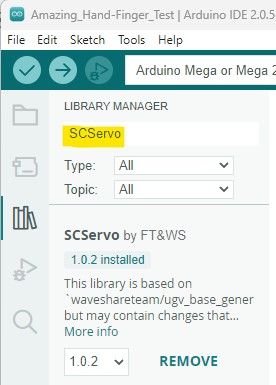
- Install the SCServo library in the Arduino IDE's Library Manager.
- Use the Feetech FD debug tool to set servo IDs (
feetech debug tool). - Cross-connect RX/TX between the Arduino and the TTL Linker.
Link mode: changing servo IDs
- First upload the
Blinkexample to the Arduino. - Wire according to Link mode and open the Feetech software to change IDs.
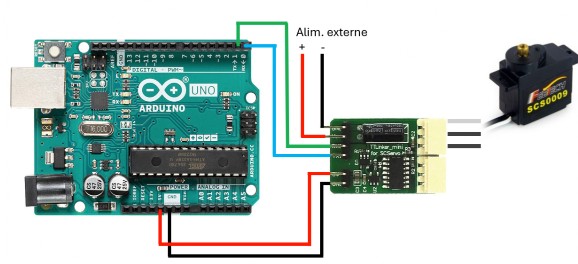
Control mode: the Arduino controls the servos
After uploading your custom program, wire according to Control mode:
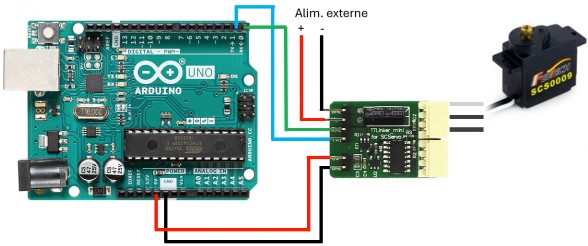
- Arduino Uno (only one serial port): use a software serial port / the specified pins as shown.
- Arduino Mega: use RX1 / TX1 (19 / 18).
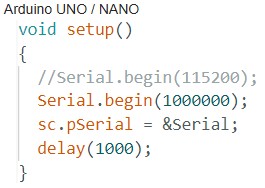
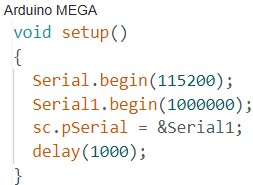
Pin numbers, library versions and TTL Linker orientation follow the actual board's silkscreen; confirm the bus power and common ground before changing IDs.
Python examples
AmazingHand-main/PythonExample/ provides 4 basic scripts:
| Script | Purpose |
|---|---|
AmazingHand_Demo.py | Basic single-hand demo: connect to the bus, perform motions |
AmazingHand_Demo_Both.py | Two-hand demo |
AmazingHand_FingerTest.py | Single-finger test |
AmazingHand_Hand_FingerMiddlePos.py | Finger middle-position calibration |
Before use:
- Use the Feetech software to set the servo IDs (right 1–8, left 11–18).
- Install
pyserial, change the serial port name/baud rate inside the script as needed, then run it. - Confirm the external servo power supply is connected and shares a common ground with the bus driver board.
These are the official basic examples; for the more complete GUI/CLI see SCS0009 desktop host software, and for TTL wiring and the middle position see SCS0009 servo debugging and calibration.