

Arduino
This routine uses an Arduino Nano development board, a Windows computer, several DuPont wires, an IMU attitude sensor, and a USB to TTL module.
1. Connect the device
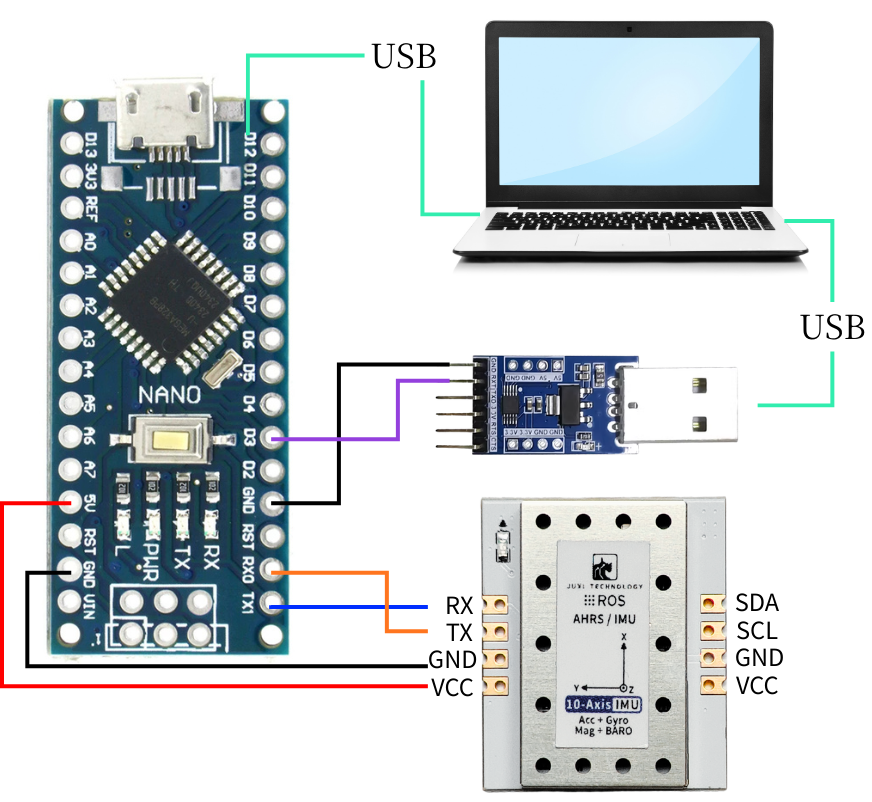
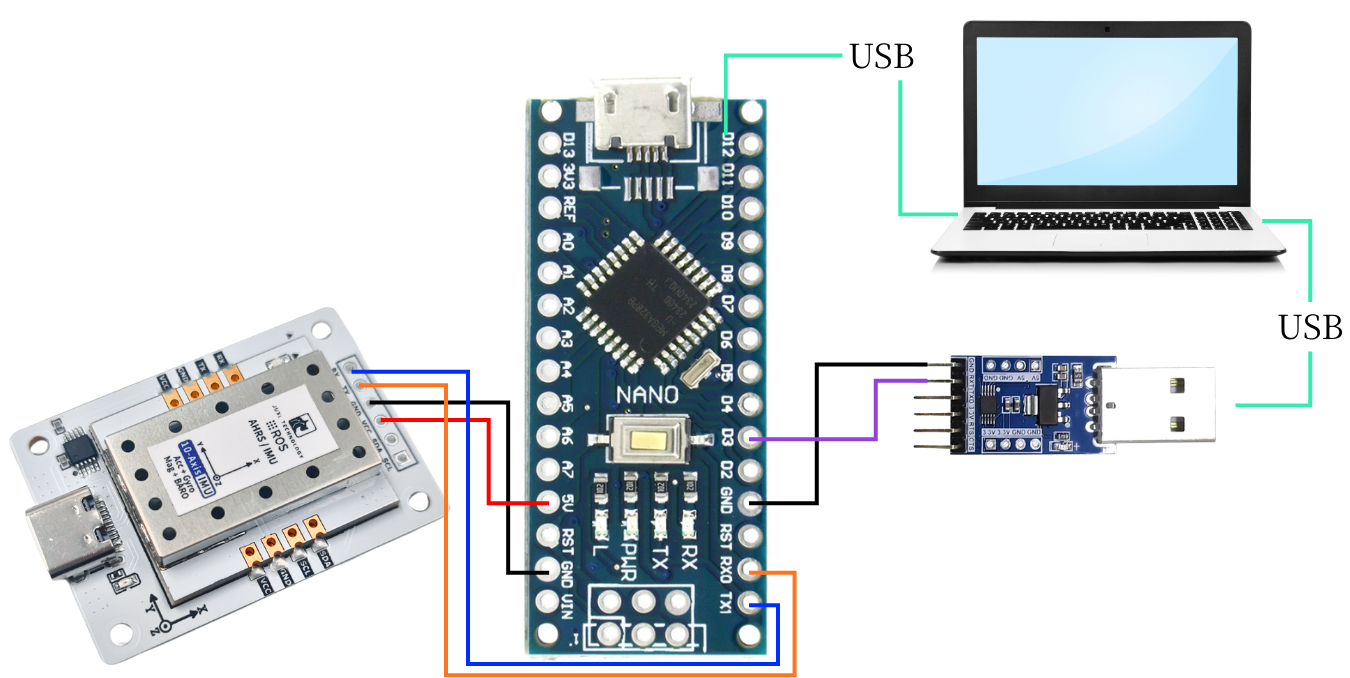
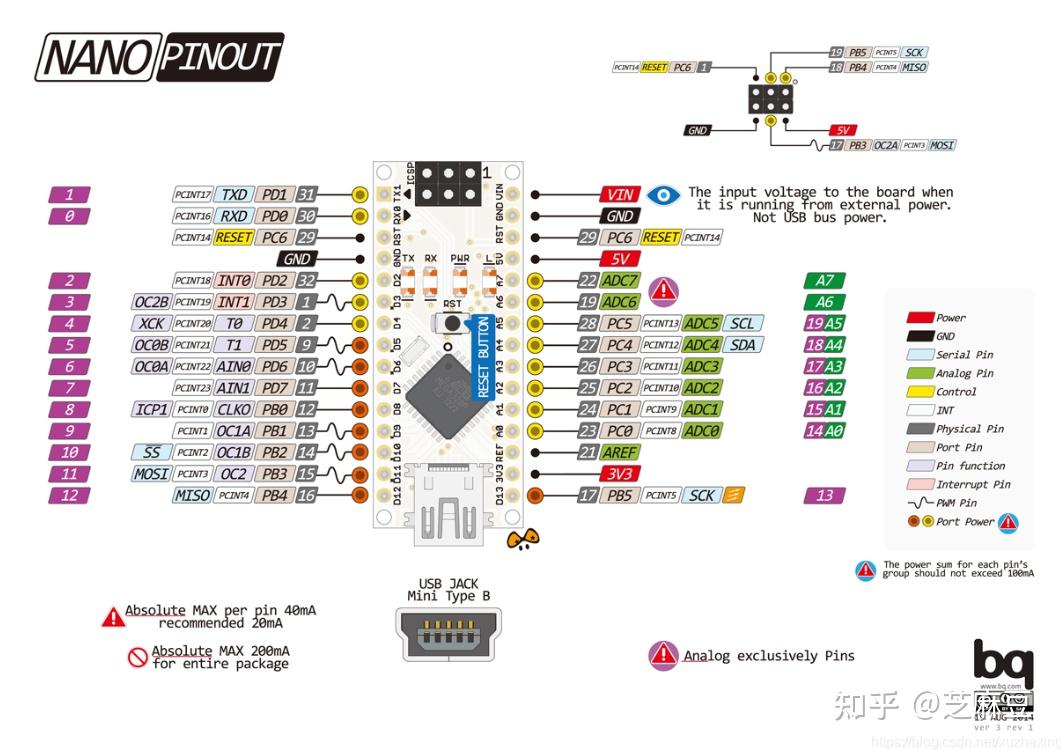
2. Key Code Analysis
Please refer to the source code in the materials for the specific code.
//Parse the data in the ring buffer, extract complete frames and update the cache
//Process RX ring buffer, parse frames and update internal cache
void IMU_UART_Process(void)
{
enum {
RX_STATE_EXPECT_HEAD1 = 0,
RX_STATE_EXPECT_HEAD2,
RX_STATE_EXPECT_LENGTH,
RX_STATE_EXPECT_FUNCTION,
RX_STATE_COLLECT_DATA
};
static uint8_t rx_state = RX_STATE_EXPECT_HEAD1;
static uint8_t frame_length = 0;
static uint8_t frame_function = 0;
static uint8_t frame_buffer[64]; /* 数据区 + 校验 / data section + checksum */
static uint16_t frame_index = 0;
uint8_t current_byte = 0;
// Process all data in the ring buffer
while (_rxbuf_pop(¤t_byte) == 0) {
switch (rx_state) {
case RX_STATE_EXPECT_HEAD1:
// Look for frame header 1
if (current_byte == FRAME_HEAD1) {
rx_state = RX_STATE_EXPECT_HEAD2;
}
// Otherwise stay in the current state
break;
case RX_STATE_EXPECT_HEAD2:
// Look for frame header 2
if (current_byte == FRAME_HEAD2) {
rx_state = RX_STATE_EXPECT_LENGTH;
} else {
// Frame header mismatch, restart the search
rx_state = RX_STATE_EXPECT_HEAD1;
}
break;
case RX_STATE_EXPECT_LENGTH:
// Save the frame length
frame_length = current_byte;
rx_state = RX_STATE_EXPECT_FUNCTION;
break;
case RX_STATE_EXPECT_FUNCTION:
// Save the function code
frame_function = current_byte;
frame_index = 0;
rx_state = RX_STATE_COLLECT_DATA;
break;
case RX_STATE_COLLECT_DATA: {
// Calculate the data length (frame length - 2 frame header bytes - 1 length byte - 1 function code byte)
uint16_t data_length = (frame_length >= 4) ? (uint16_t)(frame_length - 4) : 0;
// Check whether the data length is valid
if (data_length == 0 || data_length > sizeof(frame_buffer)) {
rx_state = RX_STATE_EXPECT_HEAD1;
break;
}
// Store the current byte
frame_buffer[frame_index++] = current_byte;
// Check whether all data has been collected
if (frame_index >= data_length) {
// Calculate the checksum
uint8_t calculated_checksum = (uint8_t)(FRAME_HEAD1 + FRAME_HEAD2 + frame_length + frame_function);
for (uint16_t i = 0; i < data_length - 1; ++i) {
calculated_checksum += frame_buffer[i];
}
// Verify the checksum
uint8_t received_checksum = frame_buffer[data_length - 1];
if (calculated_checksum == received_checksum) {
// Checksum passed, parse the data
_parse_frame_data(frame_function, frame_buffer);
}
// Reset state, ready to receive the next frame
rx_state = RX_STATE_EXPECT_HEAD1;
}
} break;
default:
// Unknown state, reset
rx_state = RX_STATE_EXPECT_HEAD1;
break;
}
}
}
/* ---------- 解析数据帧 / Parse one complete frame ---------- */
static void _parse_frame_data(uint8_t frame_function, const uint8_t *frame_data)
{
switch (frame_function) {
case IMU_FUNC_RAW_ACCEL: {
// Define constant scaling factors
const float ACCEL_RATIO = 16.0f / 32767.0f;
const float DEG2RAD = 3.14159265358979323846f / 180.0f;
const float GYRO_RATIO = (2000.0f / 32767.0f) * DEG2RAD;
const float MAG_RATIO = 800.0f / 32767.0f;
// Parse accelerometer data
s_ax = to_int16(&frame_data[0]) * ACCEL_RATIO;
s_ay = to_int16(&frame_data[2]) * ACCEL_RATIO;
s_az = to_int16(&frame_data[4]) * ACCEL_RATIO;
// Parse gyroscope data
s_gx = to_int16(&frame_data[6]) * GYRO_RATIO;
s_gy = to_int16(&frame_data[8]) * GYRO_RATIO;
s_gz = to_int16(&frame_data[10]) * GYRO_RATIO;
// Parse magnetometer data
s_mx = to_int16(&frame_data[12]) * MAG_RATIO;
s_my = to_int16(&frame_data[14]) * MAG_RATIO;
s_mz = to_int16(&frame_data[16]) * MAG_RATIO;
break;
}
case IMU_FUNC_EULER:
s_roll = to_float(&frame_data[0]);
s_pitch = to_float(&frame_data[4]);
s_yaw = to_float(&frame_data[8]);
break;
case IMU_FUNC_QUAT:
s_q0 = to_float(&frame_data[0]);
s_q1 = to_float(&frame_data[4]);
s_q2 = to_float(&frame_data[8]);
s_q3 = to_float(&frame_data[12]);
break;
case IMU_FUNC_BARO:
s_height = to_float(&frame_data[0]);
s_temperature = to_float(&frame_data[4]);
s_pressure = to_float(&frame_data[8]);
s_pressure_contrast = to_float(&frame_data[12]);
break;
case IMU_FUNC_VERSION:
s_version_high = frame_data[0];
s_version_mid = frame_data[1];
s_version_low = frame_data[2];
break;
case IMU_FUNC_RETURN_STATE:
s_last_rx_function = frame_data[0];
s_last_rx_state = (int16_t)frame_data[1];
break;
default:
// Unknown frame type; error handling can be added
break;
}
}IMU_UART_Process(): Reads the data from the buffer and calls _parse_frame_data to parse the data that conforms to the Communication Protocol.
_parse_frame_data(): Parse the data frame.
3. Read IMU data
After the program is downloaded into Arduino, open the serial assistant (configure the parameters as shown in the figure below), and you can see that the data of the IMU module is continuously printed. When we change the attitude of the IMU module, the data will change.
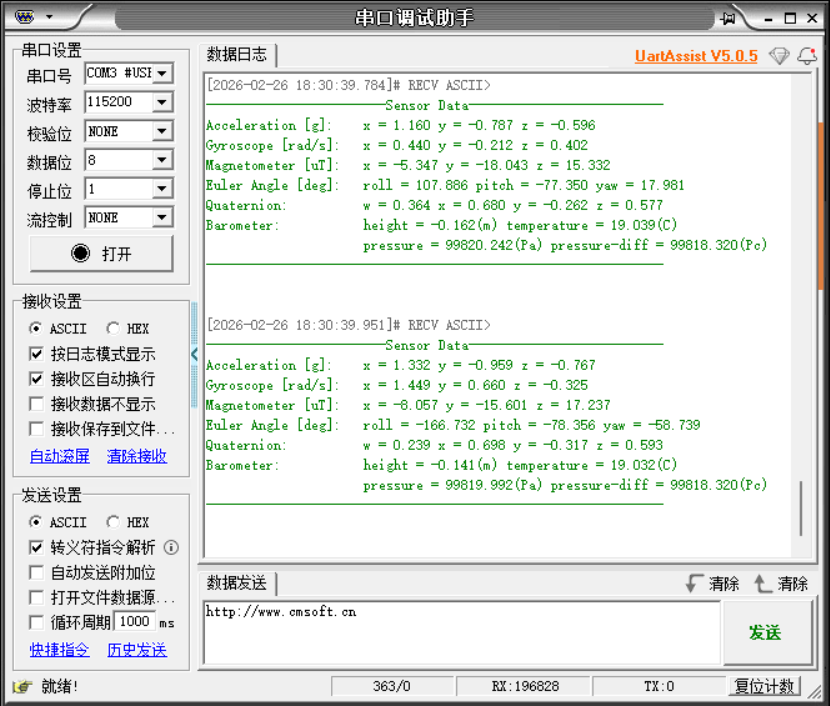
Note: The above is the data reading for a 10-axis IMU. The 6-axis has no Magnetometer and Barometer data, and the 9-axis has no Barometer data.