

ROS: Preparation
1. GPS Module Compilation Instructions
(1) After setting up the workspace, copy the contents of the gps_src folder into the src of the workspace, then compile with colcon build; if no errors appear, the compilation has passed;
Run in the ~/gps_ros2 directory
colcon buildRun in the ~/gps_ros2 directory
source install/setup.bash(2) Description of the package contents:
- nmea_navsat_driver: functions such as starting the GPS module, reading GPS module data, and drawing GPS data;
- nmea_msgs: stores some msg files for GPS messages
- imu_gps_localization: IMU and GPS data fusion function
- gps_goal: converts latitude and longitude data into Nav2 goal navigation data
2. Bind the GPS Port
The GPS module connects to the computer or the main controller through a serial port, so we need to bind the port for the GPS, to avoid the GPS module failing to be recognized by the computer or the main controller due to port number issues.
(1) Check the connected USB devices and find the GPS module. In the terminal, enter lsusb to look up the device ID for the connected GPS, as shown in the figure below, which is the GPS module's device identification ID,
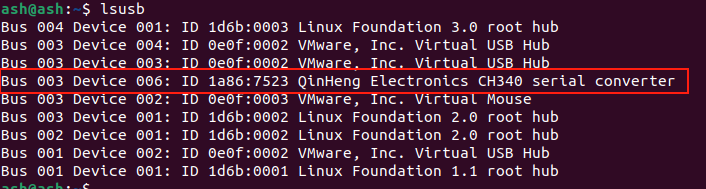
(2) Now that the device ID is known, the next step is to write the rules file and bind the port. In the terminal, enter,
sudo gedit /etc/udev/rules.d/my_serial.rulesCopy the following content into it,
KERNEL=="ttyUSB*", ATTRS{idVendor}=="1a86", ATTRS{idProduct}=="7523", MODE:="0777", SYMLINK+="myserial"Save and exit, then give it execute permission. In the terminal, enter,
sudo chmod 777 /etc/udev/rules.d/my_serial.rules(3) Unplug and replug the GPS module, and enter ll /dev/myserial in the terminal to check whether the binding succeeded. The following screen indicates a successful binding,
ll /dev/myserial