

Arduino Usage Tutorial
Sensor Introduction
JUXI_HeartRate_SPO2 is a heart rate & SpO2 sensor module based on the MAX30102 chip, with a built-in algorithm that can directly output heart rate and blood oxygen saturation values.
Main features:
- Blood oxygen saturation (SPO2) measurement
- Heart rate measurement (beats/minute)
- Onboard temperature measurement
- Supports I2C communication
Arduino Usage Tutorial
Hardware Preparation
| Required materials |
|---|
| Arduino board (Uno/ESP32, etc.) |
| JUXI_HeartRate_SPO2 sensor |
| Several jumper wires |
| USB cable (to connect the Arduino to the computer) |
Library Installation
- Download the library file JUXI_HeartRate_SPO2.zip
- Extract the archive and copy it to the Arduino libraries directory:
- Windows:
C:\Users\<username>\Documents\Arduino\libraries\ - Mac:
~/Documents/Arduino/libraries/ - Linux:
~/Arduino/libraries/
- Restart the Arduino IDE
Example Code Upload
Note: when uploading code, connect only the Arduino to the computer; do not connect the heart rate & SpO2 sensor to the Arduino!
Option 1: UART Mode Example
Comment out #define I2C_COMMUNICATION and upload the code to the Arduino
#include "JUXI_HeartRate_SPO2.h"

// I2C 地址
#define I2C_ADDRESS 0x57

// 创建传感器对象,I2C模式
JUXI_HeartRate_SPO2_I2C sensor(&Wire, I2C_ADDRESS);

void setup() {
  Serial.begin(9600);

  // 初始化传感器
  while (!sensor.begin()) {
    Serial.println("传感器初始化失败,请检查连接!");
    delay(1000);
  }
  Serial.println("传感器初始化成功!");

  // 启动数据采集
  sensor.sensorStartCollect();
}

void loop() {
  // 读取心率和血氧数据
  sensor.getHeartbeatSPO2();

  // 输出血氧饱和度
  Serial.print("血氧饱和度: ");
  Serial.print(sensor._sHeartbeatSPO2.SPO2);
  Serial.println(" %");

  // 输出心率
  Serial.print("心率: ");
  Serial.print(sensor._sHeartbeatSPO2.Heartbeat);
  Serial.println(" 次/分钟");

  // 读取并输出温度
  Serial.print("板载温度: ");
  Serial.print(sensor.getTemperature_C());
  Serial.println(" ℃");

  Serial.println("------------------------");

  // 传感器每4秒更新一次数据
  delay(4000);
}
Hardware Connection
I2C communication
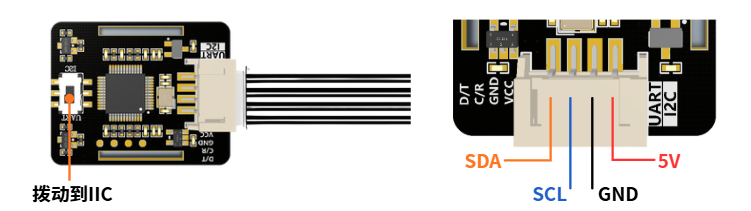
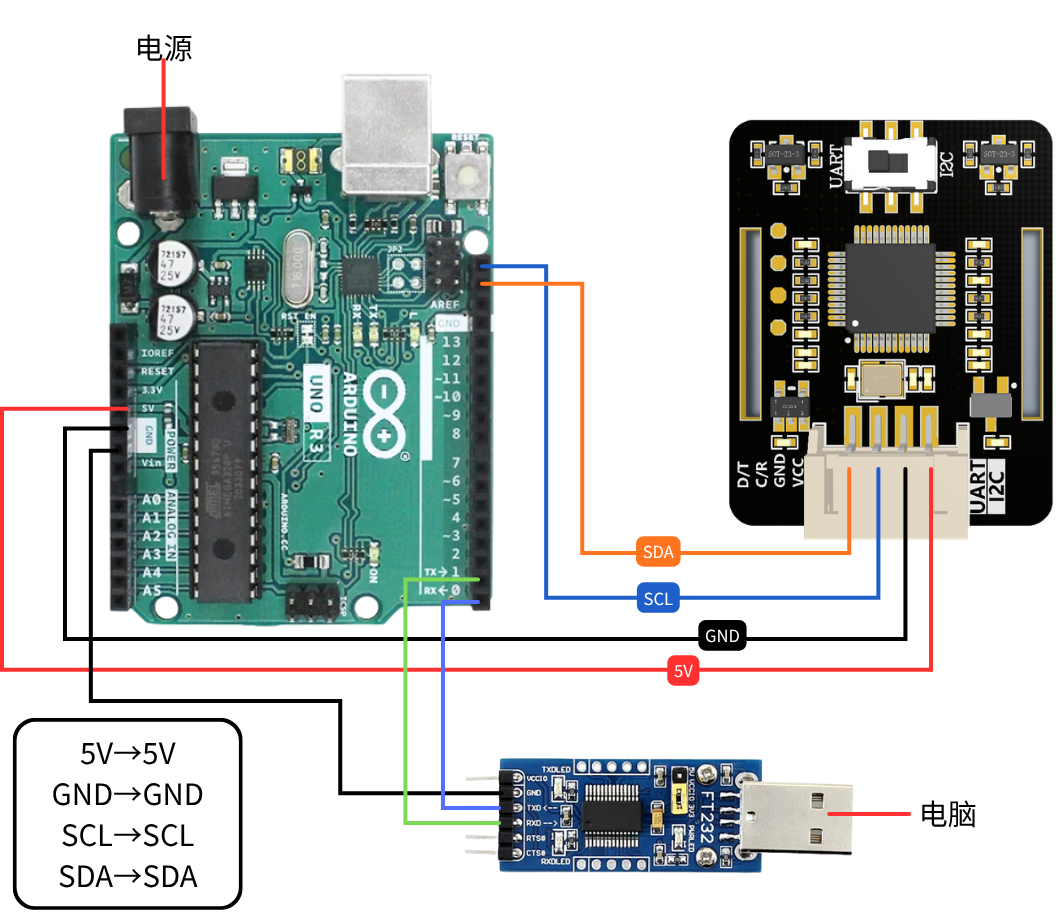
| Sensor pin | Arduino |
|---|---|
| VCC | 5V/3.3V |
| GND | GND |
| SDA | SDA/A4 |
| SCL | SCL/A5 |
- Slide the switch on the heart rate & SpO2 monitoring module to IIC!!!
- Use a data cable to connect the Arduino to the computer
Running Results:
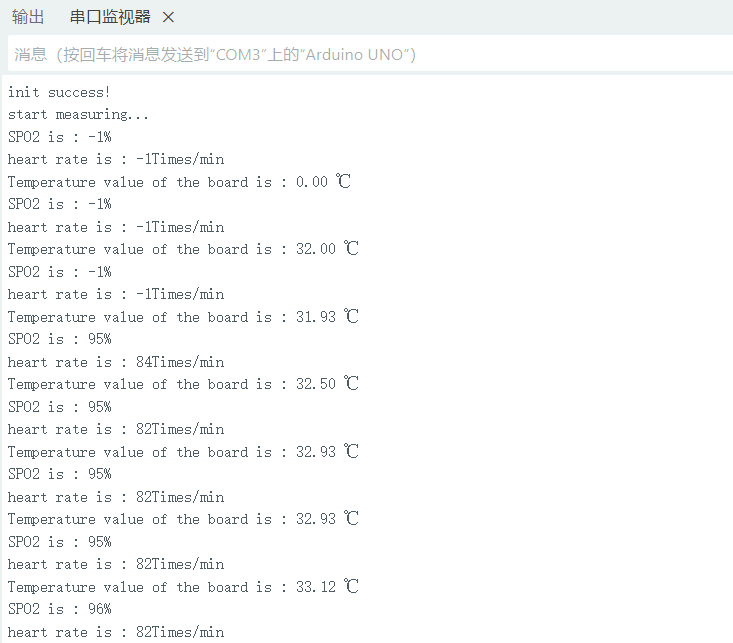
Step 1: Open Arduino - Tools - Serial Monitor
Set the baud rate to 9600
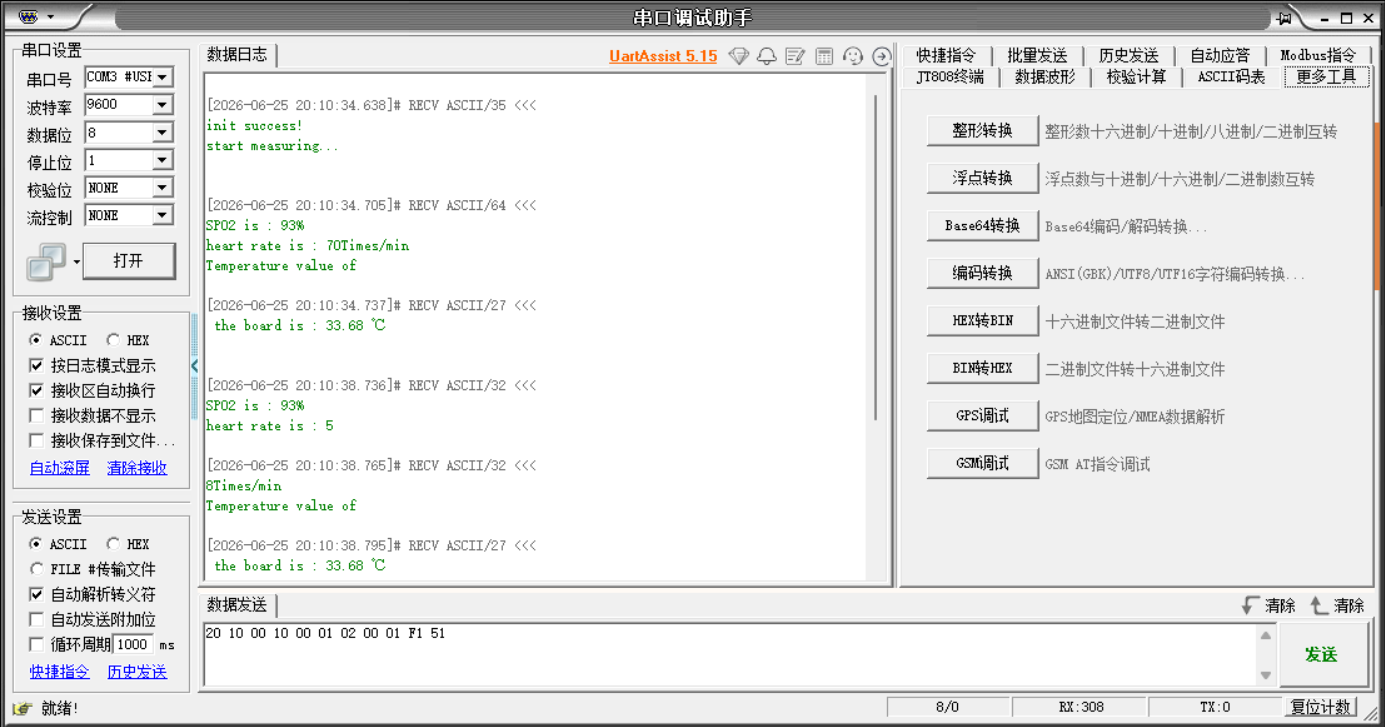
Step 2: Open the serial debugging assistant
Serial Debug Assistant uartassist5.15.zip
Select the serial port
Set the baud rate to 9600
Data bits 8, stop bit 1, parity NONE, flow control NONE
Select ASCII for both the receive settings and the send settings
API Description
| Function | Description |
|---|---|
| begin() | Initialize the sensor, returns true/false |
| getHeartbeatSPO2() | Read heart rate and SpO2 data, stored in the _sHeartbeatSPO2 struct |
| getTemperature_C() | Read the onboard temperature (degrees Celsius) |
| sensorStartCollect() | Start data collection (sensor LED on) |
| sensorEndCollect() | Stop data collection (sensor LED off) |
Data Notes
- SPO2 (blood oxygen saturation): normal range 95% - 100%; a value of -1 indicates invalid data
- Heartbeat: normal range 60 - 100 beats/minute; a value of -1 indicates invalid data
- Causes of invalid values: finger not placed properly or data not yet stable
Usage Precautions
Measurement Tips
- Place your finger correctly
- Place your finger gently on the sensor, covering both LEDs
- Do not press hard, so as not to affect blood circulation
- Keep your finger steady and do not move
- Wait for the data to stabilize
- At the beginning of a measurement, the values may be unstable
- It is recommended to wait 10-30 seconds until the data is stable before reading
- The sensor updates data every 4 seconds
- Environmental requirements
- Avoid direct strong light on the sensor
- Keep the ambient temperature comfortable
- Stay quiet during measurement
Data Interpretation
| SPO2 range | Description |
|---|---|
| 95% - 100% | Normal |
| 90% - 94% | Mild hypoxemia |
| < 90% | Hypoxemia; consult a doctor |
| Heart rate range | Description |
|---|---|
| 60 - 100 BPM | Normal adult range |
| < 60 BPM | Bradycardia |
| > 100 BPM | Tachycardia |
FAQ
Q1: What should I do if sensor initialization fails?
A:
- Check whether the wiring is correct (SDA to GPIO2/A4, SCL to GPIO3/A5)
- Confirm that the power supply is normal (3.3V or 5V)
- Use the
i2cdetect -y 1command to detect the device - Confirm that the sensor switch is in the IIC position
Q2: What should I do if the data keeps showing -1?
A:
- Confirm that your finger is placed correctly on the sensor
- Wait a few seconds for the data to stabilize
- Check whether
sensorStartCollect()has been called to start collection - Confirm whether the sensor indicator LED is on
Q3: What should I do if the data is inaccurate?
A:
- Make sure your finger completely covers the sensor's optical area
- Keep your finger still and do not move
- Wait at least 30 seconds for the data to stabilize
- Take multiple measurements and average the results
Q4: Which Arduino boards does the sensor support?
A: Supports:
- Arduino Uno/Mega
- ESP8266
- ESP32
- Other boards that support the Arduino environment
Example File Location
Arduino Example
JUXI_HeartRate_SPO2/
└── examples/
    └── gainHeartbeatSPO2/
        └── gainHeartbeatSPO2.ino