

Interfaces and Hardware Layout
The kit is two boards: the Jetson Orin Nano module (P3767) on the reference carrier board (P3768); the complete kit is P3766. This page covers the connectors and controls, using NVIDIA's official marks (1–12).
Numbered layout — labeled parts
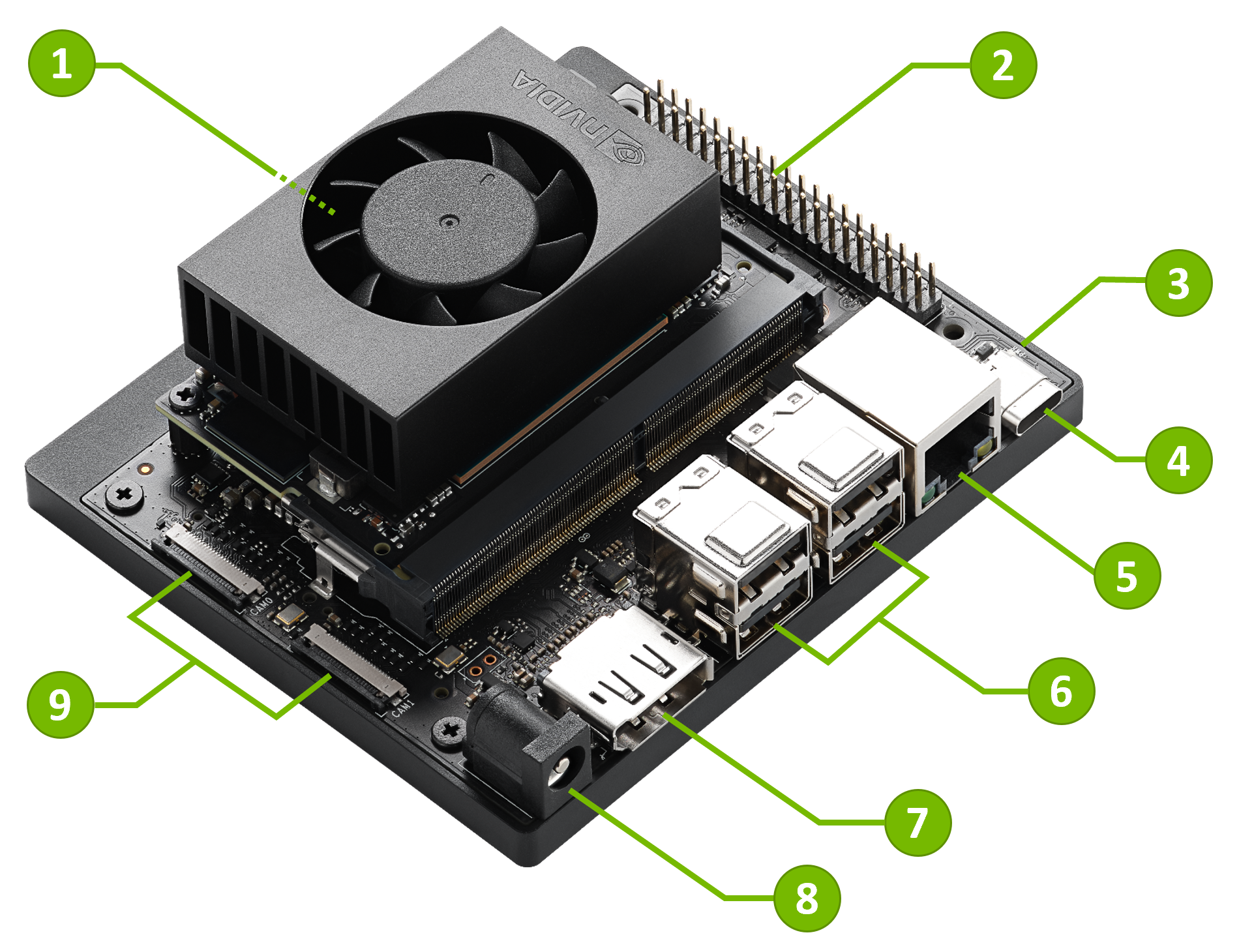 The official numbered layout — NVIDIA's marks 1–12.
| # | Part | Notes |
|---|---|---|
| 1 | microSD card slot | On the underside of the module — see below |
| 2 | 40-pin expansion header | UART, SPI, I2S, I2C, GPIO |
| 3 | Power indicator LED | Green; lights when the kit is powered |
| 4 | USB-C port | Host, device, and USB recovery modes; no video output |
| 5 | Gigabit Ethernet port | RJ45 |
| 6 | USB 3.2 Type-A ×4 | 10 Gbps; two dual-stacked connectors |
| 7 | DisplayPort output | The only display output on the kit |
| 8 | DC power jack | 5.5 mm × 2.5 mm barrel jack |
| 9 | MIPI CSI camera connectors ×2 | 22-pin, 0.5 mm pitch |
| 10 | M.2 Key-M slot (2280) | PCIe 3.0 ×4 — for an NVMe SSD |
| 11 | M.2 Key-M slot (2230) | PCIe 3.0 ×2 — for an NVMe SSD |
| 12 | M.2 Key-E slot (2230) | Populated with the included wireless module |
Three things to know first:
- Storage: no eMMC and no storage in the box. Add a microSD card or an NVMe SSD.
- microSD slot: on the underside of the module — see below.
- Display: DisplayPort is the only display output — no HDMI, no video over USB-C.
microSD slot — underside of the module
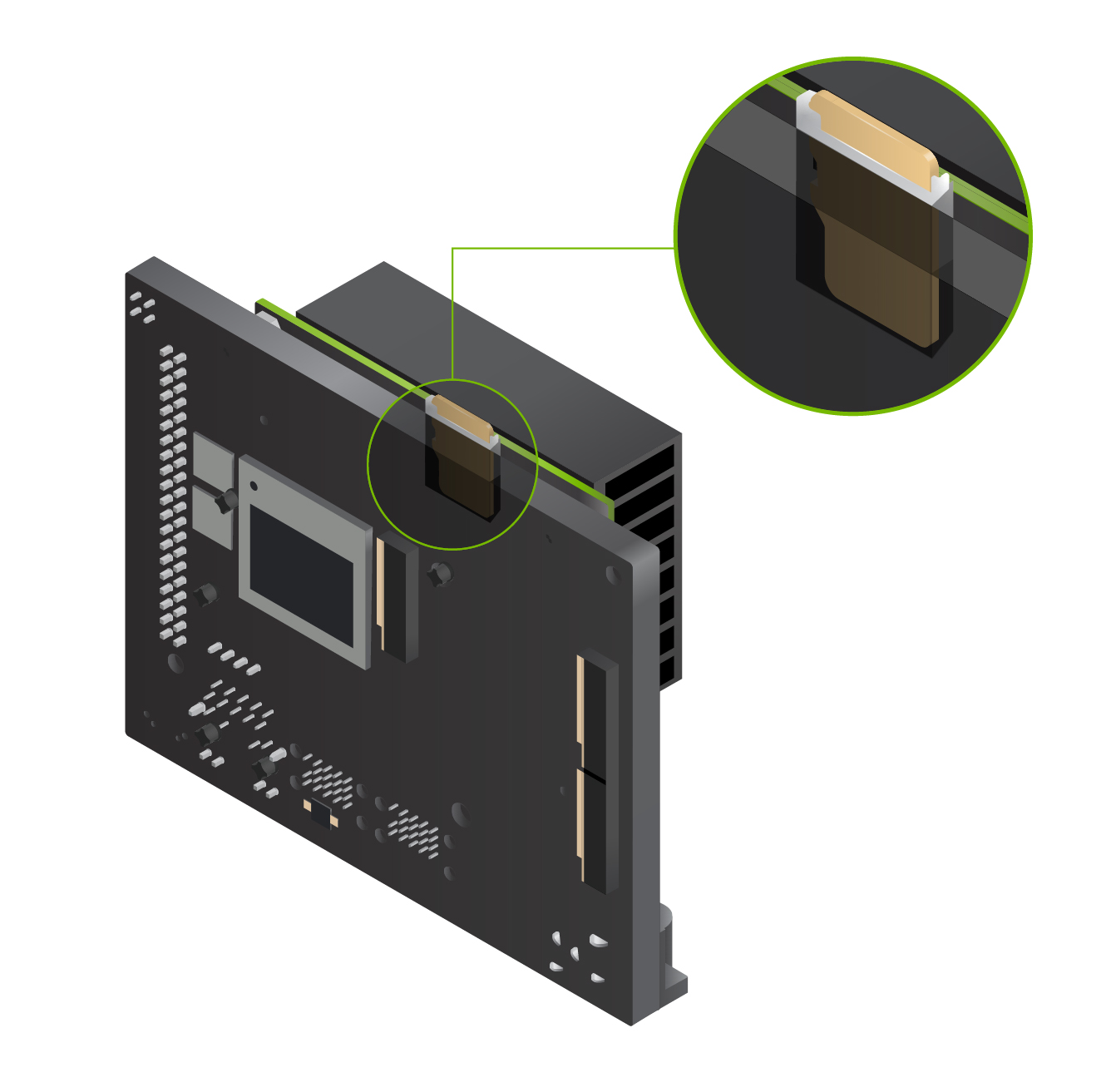 The card inserts into the underside of the module — NVIDIA image, with a magnified inset.
Attention: the microSD slot (mark 1) is on the underside of the module, not on the carrier board. It is the most-missed physical detail on this kit. Insert the card before you boot the installer.
- The kit boots from the microSD card when one is present; 64 GB UHS-1 or larger recommended.
- If the installer does not show the card, NVIDIA's troubleshooting guidance is to confirm the card is fully inserted in the module slot.
- JetPack 7.2 and later have no SD-card images. To change what is installed, use a supported install path — see Flashing and Updates.
Storage options
- microSD (module underside, mark 1) — the module's main storage.
- NVMe SSD — 2280 or 2230 size in the M.2 Key-M slots (marks 10 and 11, below).
- USB drive — on USB-C or Type-A; boot order is set in the UEFI Boot Manager.
See Quick Start for what to buy and the first-boot flow.
USB
| Port | Speed | Modes | Notes |
|---|---|---|---|
| USB 3.2 Type-A ×4 (mark 6) | USB 3.2 Gen 2, 10 Gbps | Host only | Two dual-stacked connectors; VBUS limited to 3 A per stack |
| USB-C (mark 4) | USB 3.2 Type-C | Host, Device, USB Recovery | Data only — this port does not output video |
In Device mode, the USB-C port presents the kit to a host PC as:
- a mass-storage device with the L4T-README file;
- a USB serial device;
- a USB Ethernet (RNDIS) link — the Jetson is at 192.168.55.1.
DisplayPort output
- One output only (mark 7): DisplayPort 1.2 with MST. There is no HDMI port, and the USB-C port does not carry video.
- For an HDMI monitor, use a DisplayPort-to-HDMI adapter.
- If there is no display output, connect the monitor directly — no KVM switch or adapter chain.
Ethernet
- 1× Gigabit Ethernet (RJ45), mark 5. The kit has no 10 GbE port.
M.2 slots
| Mark | Slot | Size | Electrical | Fits |
|---|---|---|---|---|
| 10 | M.2 Key-M | 2280 | PCIe 3.0 ×4 | NVMe SSD |
| 11 | M.2 Key-M | 2230 | PCIe 3.0 ×2 | NVMe SSD |
| 12 | M.2 Key-E | 2230 | — | The included wireless module (populated) |
Wireless module
- The Key-E slot ships populated. NVIDIA describes the card only as an "802.11ac/ab/gn wireless network interface controller" — no chip name.
- Community reports (unconfirmed) identify the stock card as a Realtek RTL8822CE (AzureWave module, PCI ID 10ec:c822). This is community information, not an NVIDIA statement.
- The officially supported NVMe models and Key-E modules are in the "Jetson supported components information" list in the Jetson Download Center, not on a public page. Check a part there before you buy.
- If the card cannot see your network — for example a 6 GHz router using MBSSID — see Troubleshooting → Wi-Fi cannot see the network.
CSI camera connectors
- Two connectors (mark 9): 22-position, 0.5 mm pitch, bottom-contact flex.
- CAM0: CSI 1×2 lane. CAM1: CSI 1×2 lane or 1×4 lane.
- A 15-pin camera (for example the Raspberry Pi Camera Module v2) needs a 15-to-22-pin cable.
40-pin expansion header (mark 2)
- GPIO and peripheral interfaces: UART, SPI, I2S, I2C, GPIO.
- For pin assignments, voltage levels, and electrical limits, NVIDIA refers to the Jetson Orin Nano Developer Kit Carrier Board Specification (Jetson Download Center). That document was not accessible for this page.
Button header (12-pin)
The button header carries the serial console, reset, and force-recovery functions.
| Pins | Function |
|---|---|
| 3 (RXD), 4 (TXD), 7 (GND) | Serial console (UART) |
| 9 + 10 | Force Recovery Mode — short the pins, then power on |
| 7 + 8 | Reset — short the pins while the system is powered |
| jumper | Sets the automatic power-on behavior |
Serial console
- Connect a USB-TTL serial adapter: adapter TX to pin 3 (RXD), RX to pin 4 (TXD), GND to pin 7.
- This is the headless fallback. See Troubleshooting for how to capture boot logs.
Force Recovery and reset
- Force Recovery Mode: connect pins 9 and 10, then power on the kit.
- Reset: while the kit is on, short pins 7 and 8.
- Force Recovery Mode is used for flash flows — see Flashing and Updates.
Power
- DC power jack (mark 8): 5.5 mm × 2.5 mm barrel jack; use the included 19 V supply.
- Auto power-on: by default, the kit powers on as soon as DC power is connected. A jumper on the Button Header changes this behavior.
- Power LED (mark 3): a green LED next to the USB-C connector lights when the kit is powered.
- NVIDIA's checked pages do not state the included supply's current rating or the jack polarity. For a third-party supply, confirm both with your supplier.
Fan connector
- The carrier board has a 4-pin fan header.
- The module ships with a heat sink; official images show the fan integrated into the heat-sink shroud. The header is for replacement thermal solutions.
- NVIDIA's checked pages do not state the module's operating-temperature range or Tj limits — those are in the Jetson Orin Nano Series Data Sheet and the Orin NX/Orin Nano Thermal Design Guide, both in the login-gated Download Center.
Dimensions
- Module: 69.6 mm × 45 mm, 260-pin SO-DIMM connector.
- Kit: two official figures disagree — the datasheet (Dec 2024) says 103 mm × 90.5 mm × 34.77 mm; NVIDIA's product family table says 100 mm × 79 mm × 21 mm. Both define height as including feet, carrier board, module, and thermal solution.
- NVIDIA has not published a reconciliation. A reseller explanation (kit on its base vs. bare carrier board) is unverified.
Juxi note: confirm the dimensions on NVIDIA's current datasheet before you design an enclosure.
Sources
- Hardware Layout — Jetson Orin Nano Developer Kit User Guide (checked 2026-09-26)
- Quick Start — Jetson Orin Nano Developer Kit User Guide (checked 2026-09-26)
- How-To — Jetson Orin Nano Developer Kit User Guide (checked 2026-09-26)
- Troubleshooting — Jetson Orin Nano Developer Kit User Guide (checked 2026-09-26)
- Jetson Orin Nano Super Developer Kit datasheet (PDF, Dec 2024) (checked 2026-09-26)
- Jetson Orin NX/Nano Series — Module Adaptation and Bring-Up, L4T r39.2 Developer Guide (checked 2026-09-26)
- Jetson Orin product family — developer.nvidia.com (checked 2026-09-26)
- NVIDIA Developer Forums — "Slow Wi-Fi on Orin Nano DevKit (RTL8822CE)", community thread (checked 2026-09-26)
Status: draft, pending review by cheny. Grounded in NVIDIA's official documentation as of the dates listed; not yet verified on physical hardware by Juxi Technology.
Image credits: the layout images are from NVIDIA's official Jetson Orin Nano Developer Kit User Guide (downloaded 2026-09-26), © NVIDIA Corporation.
NVIDIA® and Jetson™ are trademarks of NVIDIA Corporation. This page is published by Juxi Technology and is not an NVIDIA publication.