

PWM Hand Tracking (MediaPipe Built into the GUI)
Run the following commands in the repository's
AmazingHand-PWM/directory.
This page covers hand tracking for the PWM servo version: MediaPipe is built into the GUI, and the camera detects hand landmarks and maps them to the 8 PWM servos in real time. The full dora + MuJoCo IK pipeline belongs to the SCS0009 official demo; see SCS0009 hand tracking.
Pipeline: camera → MediaPipe hand skeleton → four-finger bend/extend angles → ESP32 → PWM servos
Applies to: ESP32-S3 + 8-channel PWM servos. For firmware flashing, see PWM quick start; for the protocol, see PWM protocol and calibration.
The official demo that requires full IK (MuJoCo + dora + Rust) is not distributed with this module; this tutorial only covers the tracking built into the module's GUI.
1. Prerequisites
- Hardware: ESP32-S3 + 8 PWM servos powered up, USB connected, and a working camera.
- Firmware: already flashed (see PWM quick start).
- Python: 64-bit Python 3.12 (mediapipe 0.10.14 only ships 64-bit wheels).
2. Installing tracking dependencies
Run in the module root directory (AmazingHand-PWM/):
tools/setup_tracking.batThe script automatically: locates 64-bit Python → creates the tools/tracking_env virtual environment → installs tools/requirements-tracking.txt (mediapipe 0.10.14, numpy<2, scipy, opencv, Pillow, pyserial) → verifies mediapipe.
You can also install manually (with 64-bit Python 3.12):
bashpython -m pip install -r tools/requirements-tracking.txt
3. Running
tools/tracking_env/Scripts/python tools/hand_gui.py- Select the ESP32's COM port at the top → click "Connect".
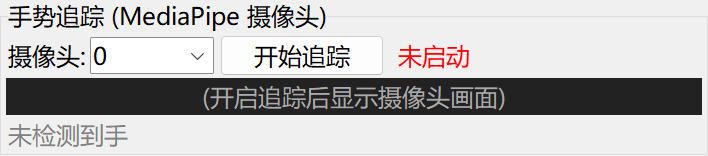
- Scroll to the "Hand Tracking (MediaPipe camera)" panel.
- Select the camera index (default 0) → click "Start Tracking".
- Put your hand in the frame; the dexterous hand follows the bend/extend motion; click "Stop Tracking" to finish.
4. How it works and its limitations
- MediaPipe 0.10.14 extracts 3D vectors for the four fingertips (in hand coordinates).
tips_to_angles()inhand_tracking.pymaps each finger to a differential angle:- flex (bend/extend): uses the z component for the three fingers and the y component for the thumb;
- base (left/right swing): fixed at 90 (left/right swing is not implemented yet).
- These are control axes; when sending, the program combines them into the angles of each finger's two servos (same direction = splay, opposite direction = flex/extend).
- The GUI applies built-in EMA smoothing (alpha=0.4) + 60 ms throttling to reduce jitter.
Limitations: there is no IK, so precision is lower than the full MuJoCo + dora pipeline; it is intended for demos and quick start-up.
Parameter calibration
FLEX_SCALE/THUMB_FLEX_GAINat the bottom ofhand_tracking.pycontrol the flex amplitude and direction (the current code values in the file are authoritative).- Left/right swing is not implemented yet and
baseis fixed at 90; for left/right swing, use the SCS0009 official dora demo. - Restart the GUI after changing them for the changes to take effect.
5. Switching left/right hand
Tick "Right hand" / "Left hand" at the top of the GUI. After switching, the thumb's mirror direction differs; if it looks reversed, tick the other side and test.
6. FAQ
| Symptom | Solution |
|---|---|
| Servos do not move at all | Check the power supply (5V 3A), the COM port, and the wiring; confirm the firmware is flashed |
| No camera image | Grant camera permission (Settings → Privacy → Camera) |
| Hand does not follow / lags | Ensure good lighting, keep the whole hand in frame, and move more slowly with larger motions |
| Hand pose mirrored / thumb direction reversed | Tick the opposite left/right hand |
| Cannot find the serial port after changing USB ports | Re-select the COM port in the GUI |
| mediapipe missing error on startup | Launch with tools\tracking_env\Scripts\python, or re-run tools/setup_tracking.bat |
7. Full IK / SCS0009 bus servos
- The full IK pipeline (camera → MediaPipe → MuJoCo + mink IK → AHControl → ESP32) comes from a separate dora demo project and is not part of this module; if you need it, use the original delivery package or the MediaPipe project.
- SCS0009 bus servos are supported by the repository's
Amazinghand-web/andAmazingHandControl/.
Directory overview
| Path | Contents |
|---|---|
tools/hand_gui.py | Tkinter host application (gestures, direct drive, differential control, built-in tracking) |
tools/hand_tracking.py | MediaPipe hand tracking and angle mapping |
tools/setup_tracking.bat | Creates tools/tracking_env and installs the tracking dependencies |
tools/requirements-tracking.txt | Tracking dependency list |
tools/serial_test.py | Command-line serial testing |