

Arduino: IIC Communication
📁 File Structure
IIC_Voice/
├── IIC_Voice.ino    # Main program
├── bsp_iic.hpp         # Header file (addresses and function declarations)
├── bsp_iic.cpp         # Implementation file
└── README.md            # This tutorial
🔌 Hardware Connection
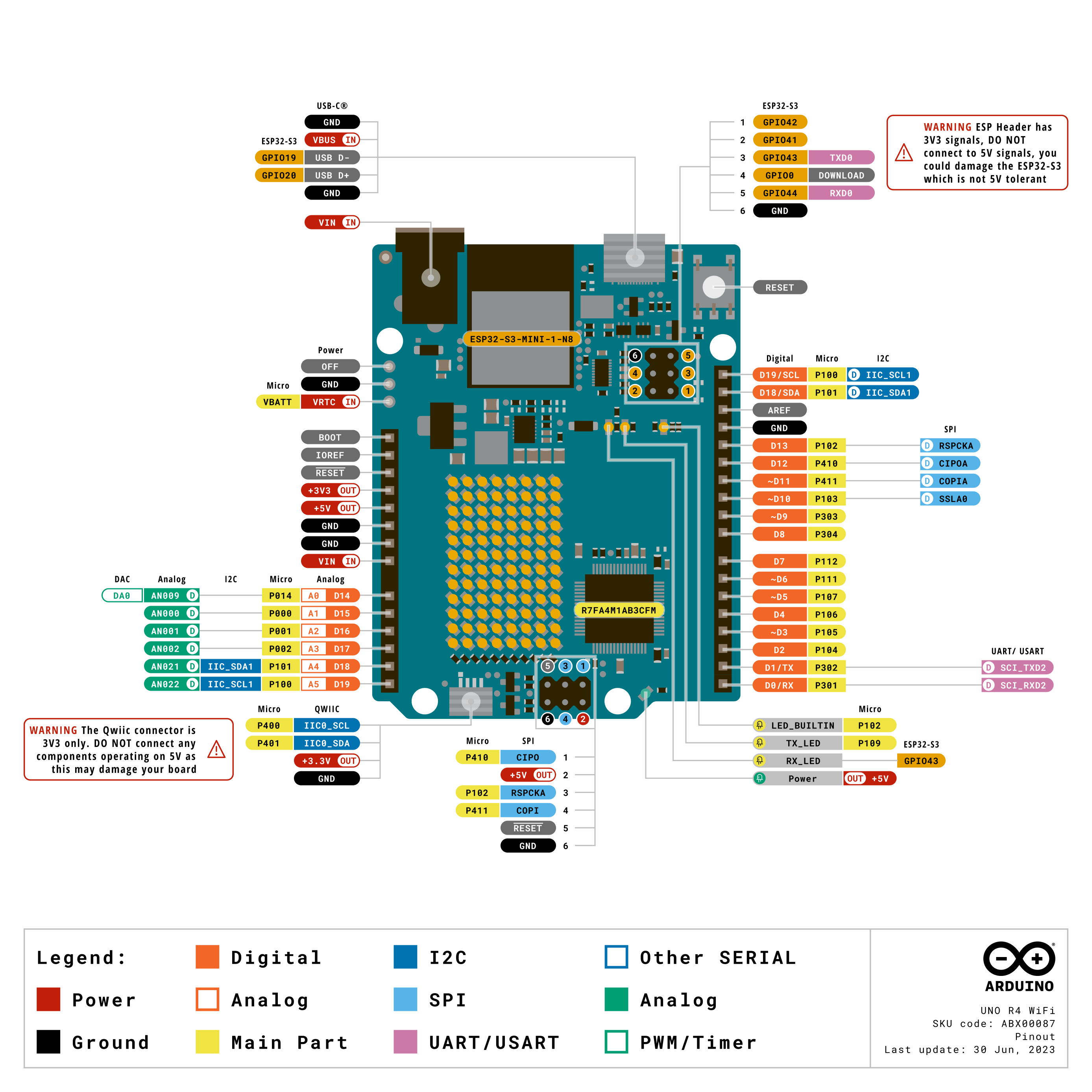
🔧 Build and Upload
Step 1: Open the Arduino IDE
Open the
IIC_Voice.inofileSelect your development board model (e.g. Arduino Uno)
Select the corresponding serial port
Step 2: Build and Upload
Click the ✔️ button to build
Click the ➡️ button to upload to the development board
📡 Serial Port Test
Open the serial monitor in the Arduino IDE
Baud rate: 115200
Line ending: None
Expected Output
After power-on you should see:
IIC Voice Module Initialized
Say the wake word and command words to the module, and the corresponding IDs will be output:
ID: 1
ID: 2
ID: 10
📚 Register Map
📚 BSP Interface Description
IIC_Init()
void IIC_Init(void);Function: Initialize the I2C bus
Example:
void setup() {
  IIC_Init();
}
IIC_ReadCommand()
int IIC_ReadCommand(void);Function: Read the command ID recognized by the voice module
Return value:
0- no command recognized1~254- command ID-1- communication error
Example:
int id = IIC_ReadCommand();
if (id > 0) {
  Serial.print("识别到命令: ");
  Serial.println(id);
}
IIC_SetPassiveVoice()
void IIC_SetPassiveVoice(uint8_t voiceID);Function: Set the passive playback voice
Parameter:
0x00- passive response phrase type
Example:
IIC_SetPassiveVoice(0x00);
delay(200);
IIC_SetFunctionVoice()
void IIC_SetFunctionVoice(uint8_t voiceID);Function: Set the function word playback voice
Parameter:
0x00- function word playback phrase type
Example:
IIC_SetFunctionVoice(0x00);
delay(200);
IIC_SetCommandVoice()
void IIC_SetCommandVoice(uint8_t voiceID);Function: Set the command word playback voice
Parameter:
0x00- command word playback phrase type
Example:
IIC_SetCommandVoice(0x00);
delay(200);
🎯 Main Program Logic Description
void setup() {
  Serial.begin(115200);
  IIC_Init();

  Serial.println("IIC Voice Module Initialized");

  IIC_SetCommandVoice(0x00);  // Play the command word voice on power-up
  delay(200);
}

void loop() {
  int commandId = IIC_ReadCommand();

  if (commandId >= 0) {
    // Filter out invalid values to prevent duplicate output
    if (commandId != 0 && commandId != 255 && commandId != lastCommandId) {
      Serial.print("ID: ");
      Serial.println(commandId);
      lastCommandId = commandId;

      // Example: control the playback based on the recognized command
      if (commandId == 1) {
        IIC_SetCommandVoice(0x00);  // Command 1 recognized, play command word voice
      } else if (commandId == 2) {
        IIC_SetCommandVoice(0x00);  // Command 2 recognized, play command word voice
      }
    } else if (commandId == 0 || commandId == 255) {
      if (lastCommandId != 0) {
        lastCommandId = 0;  // Reset state
      }
    }
  } else {
    Serial.println("IIC Read Error");
    delay(1000);
  }

  delay(50);
}
🔍 Troubleshooting
Q1: The serial port only shows "IIC Read Error"
Possible causes:
Incorrect wiring, not connected
The module is not powered
Wrong I2C address
Solutions:
Check whether SDA/SCL are reversed
Check whether the grounds are common
Check whether the 5V supply is normal
Use an I2C scanner program to confirm the device address
Q2: No output at all
Possible causes:
Wrong serial port baud rate
The module is not woken up
Solutions:
Confirm that the serial port baud rate is 115200
Say the wake word first, then the command words
Q3: It outputs "ID: 255" or "ID: 0"
Note: this is normal
0= no command recognized255= no new data
These values are already filtered out in the code and normally will not be output. If you see them output, the code is not taking effect.
💡 Advantages of the BSP Architecture
Clear Code Layering
bsp_iic.hpp - view the declarations only, not the implementation
bsp_iic.cpp - the concrete implementation details
IIC_Voice.ino - concerned only with business logic
Easy to Port
If you switch to another platform (such as STM32 or ESP32), you only need to modify the implementation of bsp_iic.cpp; the main program does not need to change.
Easy to Maintain
Changes to I2C-related code are made only in bsp_iic.cpp; change once, effective everywhere.
🚀 Extended Function Examples
Example 1: Trigger Different Playback Based on Different Commands
if (commandId == 1) {
  IIC_SetCommandVoice(0x00);      // Play command word
} else if (commandId == 2) {
  IIC_SetFunctionVoice(0x00);     // Play function word
} else if (commandId == 3) {
  IIC_SetPassiveVoice(0x00);      // Play passive phrase
}
Example 2: Control an LED
if (commandId == 10) {
  digitalWrite(LED_PIN, LOW);    // Turn off the light
  IIC_SetCommandVoice(0x00);     // Play confirmation voice
}
Example 3: Control a Motor
if (commandId == 11) {
  motor_stop();
  IIC_SetCommandVoice(0x00);     // Play confirmation voice
}