

Raspberry Pi Usage Tutorial
Project Introduction
JUXI_HeartRate_SPO2 is a heart rate & SpO2 sensor module based on the MAX30102 chip, with a built-in algorithm that can directly output heart rate and blood oxygen saturation values.
Main features:
- Blood oxygen saturation (SPO2) measurement
- Heart rate measurement (beats/minute)
- Onboard temperature measurement
- Supports both UART and I2C communication
Hardware Preparation
| Required materials | Description |
|---|---|
| Raspberry Pi (2/3/4/Zero all work) | Raspberry Pi 3B+ or 4B recommended |
| JUXI_HeartRate_SPO2 sensor | Heart rate & SpO2 sensor module |
| Several jumper wires | 4 female-to-female jumper wires |
| Power adapter | Dedicated Raspberry Pi power supply |
Hardware Connection
Option 1: I2C Communication (Recommended)
I2C wiring is simple and recommended.
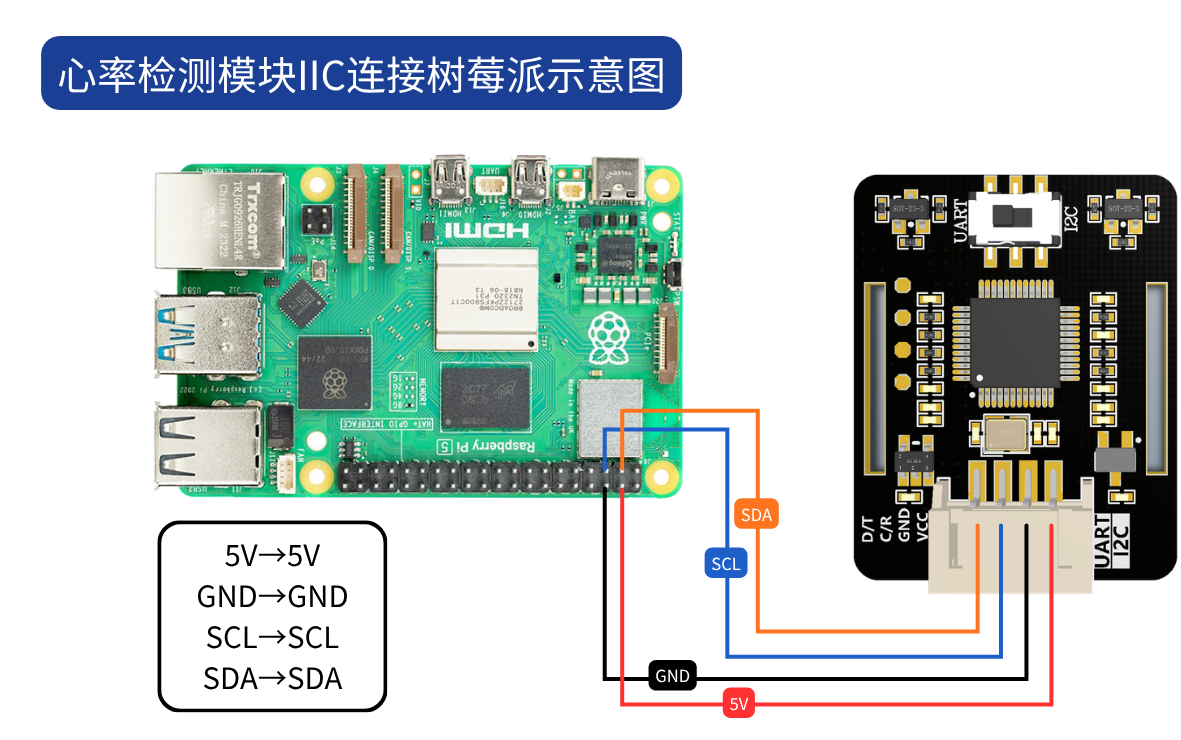
| Sensor pin | Raspberry Pi physical pin | BCM number | Description |
|---|---|---|---|
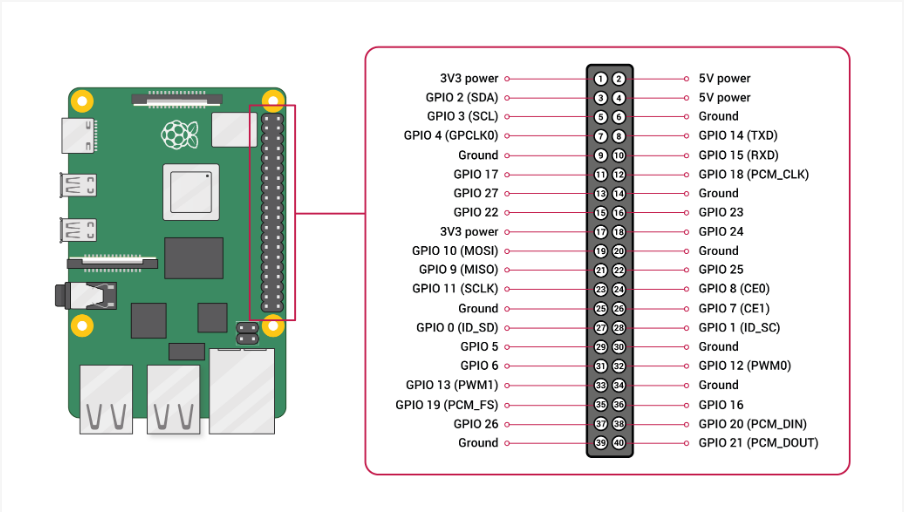
| VCC | 1 or 17 | - | 3.3V power (5V also works) |
| GND | 6 or 9 or 14 | - | Ground |
| SDA | 3 | GPIO2 | I2C data line |
| SCL | 5 | GPIO3 | I2C clock line |
Important: Slide the switch on the sensor to the IIC position!
Option 2: UART Serial Communication
UART communication requires cross-connection.
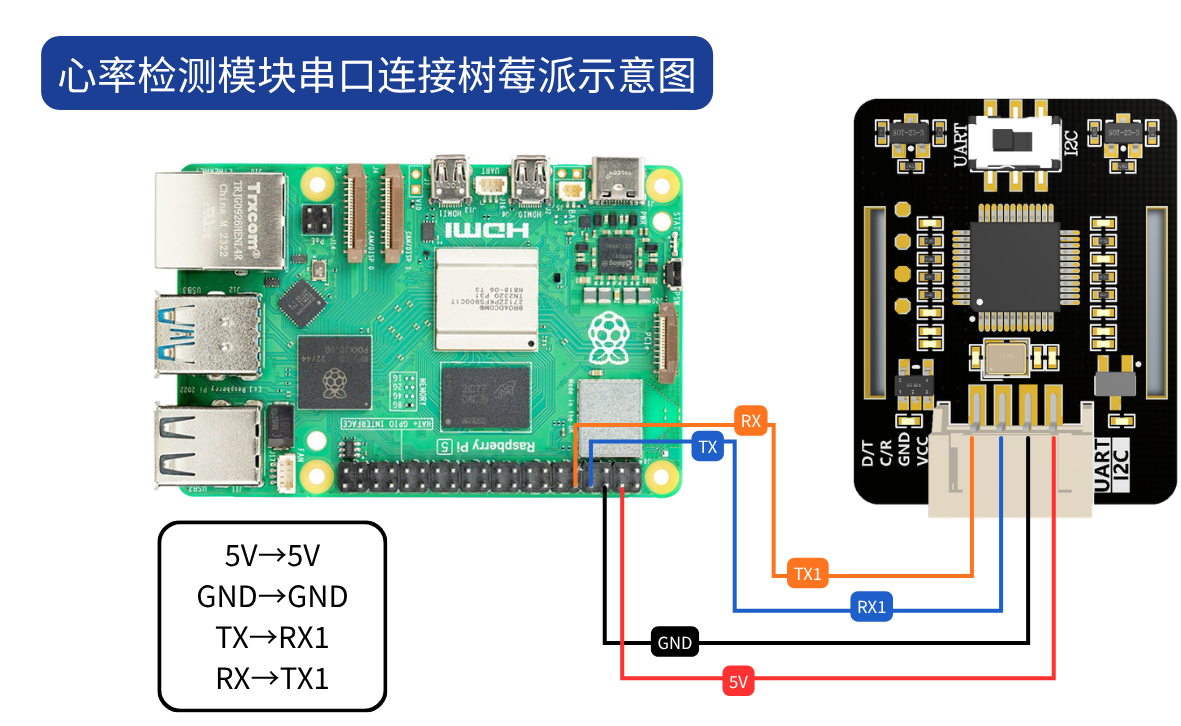
| Sensor pin | Raspberry Pi physical pin | BCM number | Description |
|---|---|---|---|
| VCC | 2 or 4 | - | 5V power (3.3V also works) |
| GND | 6 or 9 or 14 | - | Ground |
| RX | 8 | GPIO14 | Sensor RX to Raspberry Pi TX |
| TX | 10 | GPIO15 | Sensor TX to Raspberry Pi RX |
Important: Slide the switch on the sensor to the UART position!
Environment Setup
1. Enable I2C (Required for I2C Mode)
sudo raspi-configChoose Interface Options → I2C → choose Yes to enable it
Reboot the Raspberry Pi:
sudo reboot2. Enable the Serial Port (Required for UART Mode)
sudo raspi-configChoose Interface Options → Serial
- First question: "Would you like a login shell to be accessible over serial?" → choose
No - Second question: "Would you like the serial port hardware to be enabled?" → choose
Yes
Reboot the Raspberry Pi:
sudo reboot3. Install Dependencies
# 更新软件源
sudo apt-get update

# 安装 I2C 工具和 smbus2 库(I2C 模式必须使用 smbus2)
sudo apt-get install -y i2c-tools python3-smbus2

# 安装 pyserial(串口支持)
sudo pip3 install pyserial
Note: I2C mode requires
smbus2; the oldpython-smbuscannot be used. The library internally usessmbus2.i2c_msgto implement an independent two-step I2C transaction (first write the register address and send STOP, then start a new read transaction to continuously read multiple bytes) to match the sensor chip's I2C timing requirements.
4. Verify the I2C Connection (I2C Mode)
After wiring is complete, run the following command to detect I2C devices:
i2cdetect -y 1If you see the address 0x57, the sensor is connected successfully.
Using the Example Code
File Structure
python/raspberry/
├── JUXI_HeartRate_SPO2.py      # 主库文件
└── examples/
    ├── i2c_example.py          # I2C 模式示例
    └── uart_example.py         # UART 模式示例
Running the I2C Mode Example
cd python/raspberry/examplessudo python3 i2c_example.pyRunning the UART Mode Example
cd python/raspberry/examplessudo python3 uart_example.pyNote: Using the hardware serial port requires sudo privileges.
Running Results
If everything is normal, you will see output similar to the following:
==================================================
JUXI 心率血氧传感器 - I2C 模式
==================================================

正在初始化 I2C 总线 1,地址 0x57...
传感器初始化成功!

开始数据采集...
传感器 LED 已亮起!

请将手指放在传感器上...

血氧饱和度: 98 %
心率: 72 次/分钟
板载温度: 25.5 ℃
...
Press Ctrl+C to stop the program.
API Reference
Class: JUXI_HeartRate_SPO2_i2c
Sensor class for I2C communication.
Constructor
JUXI_HeartRate_SPO2_i2c(bus_number=1, i2c_address=0x57)
Parameters:
bus_number: I2C bus number, usually 1 on a Raspberry Pii2c_address: sensor I2C address, default 0x57
Methods
| Method | Description | Return value |
|---|---|---|
| begin() | Initialize the sensor and detect the connection | bool (True on success) |
| sensor_start_collect() | Start data collection (sensor LED on) | None |
| sensor_end_collect() | Stop data collection (sensor LED off) | None |
| get_heartbeat_SPO2() | Read heart rate and SpO2 data | None (results stored in object attributes) |
| get_temperature_c() | Read the onboard temperature | float (degrees Celsius) |
| close() | Close the I2C connection | None |
Attributes
| Attribute | Description |
|---|---|
| SPO2 | Blood oxygen saturation (%), invalid value is -1 |
| heartbeat | Heart rate (beats/minute), invalid value is -1 |
Class: JUXI_HeartRate_SPO2_uart
Sensor class for UART serial communication.
Constructor
JUXI_HeartRate_SPO2_uart(port='/dev/serial0', baudrate=9600)
Parameters:
port: serial device path,/dev/serial0by default on a Raspberry Pibaudrate: baud rate, default 9600
Methods
Same as JUXI_HeartRate_SPO2_i2c.
FAQ
Q1: What should I do if sensor initialization fails?
A: Check the following steps:
- Check the wiring
- I2C mode: confirm SDA is connected to GPIO2 and SCL to GPIO3
- UART mode: confirm RX-TX are cross-connected
- Check the sensor switch
- I2C mode: the switch should be in the IIC position
- UART mode: the switch should be in the UART position
- Check the power supply
- Confirm VCC is connected to 3.3V or 5V
- Confirm GND is connected
- Check the system settings
- I2C mode: confirm I2C is enabled
- UART mode: confirm the serial port is enabled
- Use detection commands
# I2C 模式
i2cdetect -y 1

# UART 模式
ls /dev/serial*
Q2: What should I do if the data keeps showing -1?
A:
- Confirm your finger is placed correctly on the sensor, completely covering both LEDs
- Wait a few seconds for the data to stabilize (usually 10-30 seconds)
- Check whether
sensor_start_collect()has been called to start collection - Confirm whether the sensor indicator LED is on
Q3: What should I do if the data is inaccurate?
A:
- Make sure your finger completely covers the sensor's optical area
- Keep your finger still and do not move
- Wait more than 30 seconds for the data to stabilize
- Take multiple measurements and average the results
- Avoid direct strong light on the sensor
Q4: Can I2C and UART be used at the same time?
A: No; only one communication mode can be selected at a time.
Q5: Do I need to run with sudo?
A:
- I2C mode: sudo is recommended to avoid permission issues
- UART mode: sudo is required, otherwise the serial port cannot be accessed
Precautions
Measurement Tips
- Place your finger correctly
- Place your finger gently on the sensor, covering both LEDs
- Do not press hard, so as not to affect blood circulation
- Keep your finger steady and do not move
- Wait for the data to stabilize
- At the beginning of a measurement, the values may be unstable
- It is recommended to wait 10-30 seconds until the data is stable before reading
- The sensor updates data every 4 seconds
- Environmental requirements
- Avoid direct strong light on the sensor
- Keep the ambient temperature comfortable
- Stay quiet during measurement
Data Interpretation
| SPO2 range | Description |
|---|---|
| 95% - 100% | Normal |
| 90% - 94% | Mild hypoxemia |
| < 90% | Hypoxemia; consult a doctor |
| Heart rate range | Description |
|---|---|
| 60 - 100 BPM | Normal adult range |
| < 60 BPM | Bradycardia |
| > 100 BPM | Tachycardia |
Safety Notes
- This sensor is for reference only and cannot replace professional medical equipment
- If you have health problems, please seek medical attention promptly
- Measurement results are for reference only and are not a basis for diagnosis