

AmazingHand Web Control
Drive the AmazingHand dexterous hand from a browser — left or right hand, with two ways to steer it:
- Manual — 8 servo sliders + 19 preset poses + one-click return to middle
- Camera teleop — MediaPipe runs locally in the browser and maps your hand onto the fingers in real time (video never leaves the machine)
- Bilingual UI — switch between Chinese and English in the top-right corner; the choice is remembered by the browser
The servo map, pose library and conversion formulas all line up with AmazingHandControl (the official GUI).
Quick start
Open a terminal and cd into the Amazinghand-web folder:
pip install -r requirements.txt

python server.py --no-connect   # recommended: start the server, pick the port in the page (nothing moves)

# python server.py                # auto-detect the serial port and connect
# python server.py --port COM9    # use a specific port
# python server.py --hand left    # enable the left hand only
# python server.py --dry-run      # no serial port at all, UI only
Then open http://localhost:8000 in a browser.
Picking the serial port in the page
The top of the page has a port bar:
Port [COM3 ★ USB-Enhanced-SERIAL CH343 ▾] [Refresh] [Connect] [Disconnect] Connected to COM3- The dropdown lists every serial port on the machine. Common USB-serial chips (CH34x / CP210x / FTDI …) are marked ★ and sorted first
- Refresh re-scans (use it after plugging the board in)
- Connect opens the selected port; the hand returns to middle right after
- Disconnect releases torque first, so the servos don't stay locked where they are
- To switch ports, just pick the new one and click Connect — the old port is closed for you
--no-connectis designed for this flow: the server starts up without touching any serial port, so it can't grab the wrong one and jerk the hand. Drop the flag if you want it to connect on startup.
Serial logs go to server.log (if you launch through a .bat, the window flashes past — read the file instead).
Wiring check
Lists the servo IDs it finds and checks them hand by hand against config.json.
python tools/scan_servos.py --port COM9Replace COM9 with your actual port.
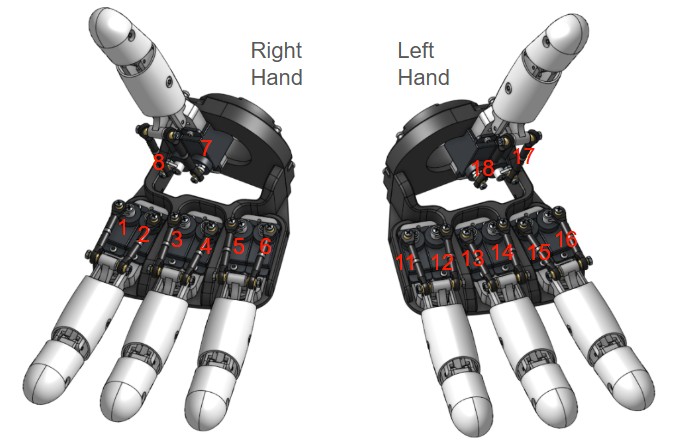
Servo map
Source: DEFAULT_HAND_SERVOS in AmazingHandControl/hand_logic.py and docs/zh-hans/CONFIG_FORMAT.md.
| Finger | Right hand ID | Left hand ID |
|---|---|---|
| Ring | 5, 6 | 11, 12 |
| Middle | 3, 4 | 13, 14 |
| Index | 1, 2 | 15, 16 |
| Thumb | 7, 8 | 17, 18 |
A finger's two servos do different jobs ⚠️
servo1 (odd ID)  = flexion axis   open ↔ closed
servo2 (even ID) = splay axis     fingers together ↔ apart
The UI shows exactly these two axes. "The finger won't spread / won't close up" means the splay axis isn't moving — a scissors-style V comes from index splay +17 and middle splay −30 (one positive, one negative).
They are combined on the wire:
servo1 = flexion + splay
servo2 = flexion − splay
Range (derived from the 19 official poses plus middle):
| Axis | Range | Meaning |
|---|---|---|
| Flexion | −50 ~ +90 | open (negative) ↔ closed (positive) |
| Splay | −45 ~ +45 | together (negative) ↔ apart (positive) |
Two ID rules (getting them wrong burns servos or reverses motion):
- Odd IDs are a finger's first servo, even IDs its second. True on both hands (left 11/12, 13/14 … alternate as well). The second servo is mounted backwards, so negate it in the conversion.
- The left hand is not 9–16, it's 11–18, numbered ring-first. Wiring it as 1–8 in sequence is always wrong.
Conversion
Identical to apply_pose() in AmazingHandControl (verified pose by pose):
1) when mirror_pose is true, first swap the two servo values of each finger
2) servo_deg = (ID odd ? +1 : -1) × (pose value − angle_offset_deg)| Hand | angle_offset_deg | mirror_pose |
|---|---|---|
| Right | 0 | yes ⚠️ |
| Left | -35.16 | yes |
-35.16° is the physical half-slot offset of the left hand's servo horns relative to the right, taken from the official config.
About
mirror_pose— this build differs from the official oneIn the official reference only the left hand is
true. This build's right-hand module also has its servo pairs mounted reversed, so the right hand istrueas well.The swap only flips splay, never flexion:
base = (a+b)/2is unchanged by a swap, whileside = (a−b)/2changes sign. So if one hand's splay comes out mirrored, this is the first switch to check.
The pose array is always 8 values in the order [ring, middle, index, thumb], two per finger — byte-identical to the official data/hand_config.yaml, so you can compare them directly.
Worked examples
| Pose | Right | Left |
|---|---|---|
open [-35]*8 | ID5 −35 / ID6 +35 | ID11 +0.16 / ID12 −0.16 |
close [75]*8 | ID5 +75 / ID6 −75 | ID11 +110.16 / ID12 −110.16 |
middle [-17.578]*8 | ID5 −17.58 / ID6 +17.58 | ID11 +17.58 / ID12 −17.58 |
Note that the left hand's
closeneeds ±110.16°, well beyond the right's. That's whyconfig.jsonsets the limit to ±120° (the SCS0009's full range is about ±150°). A ±90 limit would clip the left hand's fist.
Preset poses (19)
| Pose | Pose | ||
|---|---|---|---|
open | Open | wave1 | Wave |
close / stone | Fist | wave_r / wave_l | Swipe right / left |
ok | OK | ring_close | Ring only |
greeting | Greeting | middle_close | Middle only |
victory / two / scissors | Victory / Two | pointer_close | Index only |
paper | Paper | thumb_close | Thumb only |
one / three | One / Three | hifive | High five |
To change a pose, edit the poses section of config.json; the keys match the names in the official YAML.
Left and right can use different values
Inside a pose, positions is shared by both hands. If one hand needs a different set because of mechanical assembly differences, add a right or left key to that entry and it overrides positions:
"close": {
  "label": "Fist",
  "positions": [75, 75, 75, 75, 75, 75, 18, 18],   // shared by both hands
  "right":     [ ... 8 values ... ]                 // optional: right hand only
}
Two modes
| Mode | Behaviour |
|---|---|
| Right hand | Sends only to the right hand's 8 servos |
| Left hand | Sends only to the left hand's 8 servos (mirror + −35.16° offset applied automatically) |
One hand at a time. Both hands sit on the same bus; switch with Target at the top. Switching doesn't disturb the other hand — it holds its pose where it is.
Camera teleop
MediaPipe hand landmarks run locally in the browser (assets under web/mediapipe/, offline-capable). The 21 landmarks are turned into pose values for 4 fingers and streamed to the selected hand.
1. Capture three poses first
Start the camera, then pose your hand and click that pose's capture button (about 1 second of averaging). Order doesn't matter; click the same button again to re-capture. The status only turns green once all three are in — nothing is sent before that, so the hand stays at middle.
| Button | Pose | Provides |
|---|---|---|
| ① Spread | Fingers straight and spread, thumb pointing outward | The "straight" end of flexion + the "spread" end of splay |
| ② Together | Fingers straight and together, thumb against the index finger | The "together" end of splay |
| ③ Fist | Make a fist, thumb tucked toward the palm | The "closed" end of flexion |
2. Each axis is a line through two measured points
Both flexion and splay use two measured endpoints to define a straight line:
t      = (measured − endpointA) / (endpointB − endpointA)      // clamped to 0..1
target = A.target + (B.target − A.target) × t
The payoff: the sign of each finger's measurement is absorbed automatically — so there is no "reverse this finger" checkbox to tick. (Index and ring sit on opposite sides of the centre line, and the thumb's joint chain differs, so their directions really are opposite — two measured endpoints absorb it.)
The endpoint targets live in the camera section of config.json:
| Axis | Endpoints | Ring | Middle | Index |
|---|---|---|---|---|
| Flexion | straight → fist | −50 → 90 | −50 → 90 | −50 → 90 |
| Splay | together → spread | −45 → +45 | 0 → 0 | +45 → −45 |
Both splay ends are 0 for the middle finger (it doesn't swing sideways).
3. The thumb only flexes ⚠️
The thumb's CMC is a saddle (opposable) joint, and its flexion couples tightly with abduction — with the thumb tucked against the index finger it is already at a splay position, so the "flexion zero" measured there is contaminated. Force it into two axes and both come out wrong.
So the thumb only flexes; its splay is always 0 (both of its servos get the same value). The two reference poses it needs are ① (pointing outward) and ③ (pointing toward the palm) — nothing extra to capture.
4. Splay fades out as the finger curls
The final splay is scaled by:
side = side_measured × (1 − curl)splayDeg is the projection of the MCP→PIP direction onto the palm's lateral axis, and finger flexion rotates about exactly that axis — past a certain curl the projection flips sign and the measured "spread" suddenly snaps to the other end.
Without the fade, that snap travels through servo2 = flexion − splay and drags the even-ID servo into reverse. (The odd ID gets flexion + splay, so it moves the same way, just faster — you can't see it.) The symptom is "half-way into a fist, servos 12 and 16 suddenly reverse" — 12 is the left ring finger's splay servo and 16 the left index finger's, precisely the two whose splay targets are non-zero.
With the fade, splay is exactly 0 at full curl no matter how wild the measurement gets. And a fist should be fingers-together anyway.
5. Skeleton colours
| Finger | Colour |
|---|---|
| Thumb | orange |
| Index | red |
| Middle | blue |
| Ring | yellow |
| Pinky | dim grey |
| Palm bones | neutral grey |
The pinky isn't used for gesture mapping, but its base MCP (landmark 17) defines the right hand's palm coordinate frame, so it can't just be dropped.
Tuning cheat sheet
| What you want to change | Where |
|---|---|
| Axis target values | camera section of config.json |
| Left and right splay go opposite ways | set that hand to -1 in camera.side_sign (1 = unchanged) |
| Smoothness | SMOOTH in tracking.js (default 0.35; lower is steadier but laggier) |
| How fast a curl registers | re-capture the three poses |
side_sign applies to whichever hand is selected under Target. Change it and reload the page — no server restart needed:
"side_sign": { "right": 1, "left": -1 } // invert the whole splay axis on the left handFlexion is not affected by side_sign.
Project layout
Amazinghand-web/
├── config.json          servo map / pose library / sequences / limits (generated from the official YAML)
├── server.py            backend: serial + static files + WebSocket
├── requirements.txt
├── README.md            English (the root document)
├── tutorials/           de · en · es · fr · it · ja · ko · pt-br · pt-pt · zh-hans · zh-hant
├── tools/
│   └── scan_servos.py   scan the bus for servos and check their IDs
└── web/
    ├── index.html · app.js · tracking.js · style.css
    ├── i18n.js          UI strings (Chinese/English dictionary + the top-right switch)
    └── mediapipe/       MediaPipe assets (bundled locally, offline, ~42 MB)
Frontend/backend protocol:
// frontend → backend   target: "left" | "right"
{ "cmd": "ports" }                                  // re-scan serial ports
{ "cmd": "connect",    "port": "COM3" }
{ "cmd": "disconnect" }
{ "cmd": "target", "target": "left" }
{ "cmd": "set",    "target": "left", "angles": { "pointer": [0, 0], ... } }
{ "cmd": "pose",   "target": "left", "name": "close" }
{ "cmd": "middle", "target": "left" }
{ "cmd": "torque", "target": "left", "on": true }
{ "cmd": "stop" }

// backend → frontend
{ "type": "state", "hands": {...}, "poses": {...}, "positions": {...},
  "axes": {...}, "camera": {...}, "target": "left",
  "limits": {...}, "port": { "available": [...], "current": "COM3", "connected": true } }
{ "type": "ports" | "connected" | "disconnected", "ports": [...], ... }
{ "type": "error", "msg": "connect COM_FAKE failed: the system cannot find the file specified." }
Safety
| Item | |
|---|---|
| Pose limits | ±120° (limits in config.json); all 19 poses checked to stay inside |
| Change dedup | changes under 0.5° are not sent, so the bus isn't flooded with noise |
| Write throttle | minimum 20 ms between writes |
| E-stop | the red button in the UI releases every servo at once |
| Exit protection | torque is released automatically on Ctrl+C |
| Single-hand debug | --hand left/right |
Troubleshooting
Motion is reversed → check the wiring follows "odd ID first"; on the left hand also confirm angle_offset_deg = -35.16.
Left hand's fist is too small / servos whine → the limit is probably still ±90; check that config.json has ±120.
A finger doesn't move / "expected N motors, found M" → run tools/scan_servos.py; the left hand's IDs are the easiest to miswire.
Middle position is off → the middle value -17.578125 is converted from the official raw 451/571. To calibrate against your own assembly, edit middle.positions in config.json.
Camera tracking is jittery → even lighting, palm facing the camera. SMOOTH in tracking.js (default 0.35) — higher is smoother but laggier.
Camera gestures wrong / a finger doesn't follow → see the Camera teleop section above. Check three things first:
- Are all three poses captured? — the status must be green; nothing is sent before that and the hand stays at middle
- A reversed direction means that pose was captured backwards — just re-capture that one button, no code change
- The thumb shouldn't splay — it only flexes, see section 3 above
A servo snaps into reverse half-way into a fist → that servo should have an even ID (the splay axis, e.g. left hand 12 / 16). Normally splay fades to 0 with curl and never jumps; if you see this, the side *= (1 - curl) line in tracking.js isn't taking effect, or curl isn't being computed.