

Raspberry Pi Serial Communication
Note: The voice interaction module needs to be flashed with the factory firmware. If the voice chip has not been flashed with firmware after being received, it does not need to be flashed.
1. Check the port
Plug it into the Raspberry Pi via the USB interface.
When inputting at the terminal, the appearance of the ttyUSB0 device indicates normal recognition (usually it is ttyUSB0, but it could also be other device numbers)
ls /dev/ttyUSB*
2. Code Implementation
Download speech_serial.py to the corresponding directory
#!/usr/bin/env python3
# -*- coding: utf-8 -*-

import time
import serial
from typing import Optional, Tuple


class SpeechModule:
    """
    Serial communication controller for the speech module
    Encapsulates the interaction logic with the speech module
    """

    # Serial port configuration constants
    DEFAULT_PORT = "/dev/ttyUSB0"
    DEFAULT_BAUDRATE = 115200

    # Command word definitions (playback words/function IDs)
    CMD_THIS_RED = 0x60
    CMD_THIS_GREEN = 0x61
    CMD_THIS_YELLOW = 0x62
    CMD_RECOGNIZE_YELLOW = 0x63
    CMD_RECOGNIZE_GREEN = 0x64
    CMD_RECOGNIZE_BLUE = 0x65
    CMD_RECOGNIZE_RED = 0x66
    CMD_INIT = 0x67

    def __init__(self, port: str = DEFAULT_PORT, baudrate: int = DEFAULT_BAUDRATE):
        self._port = port
        self._baudrate = baudrate
        self._serial_conn: Optional[serial.Serial] = None

    def connect(self) -> bool:
        """Establish serial connection"""
        try:
            self._serial_conn = serial.Serial(self._port, self._baudrate, timeout=0.1)
            if self._serial_conn.is_open:
                print(f"[Connected] Speech Serial Opened! Baudrate={self._baudrate}")
                return True
            return False
        except serial.SerialException as e:
            print(f"[Error] Speech Serial Open Failed: {e}")
            return False

    def send_command(self, cmd_id: int) -> None:
        """
        Send command frame
        Protocol format: 0xAA 0x55 0xFF [Data] 0xFB
        """
        if not self._serial_conn or not self._serial_conn.is_open:
            return

        # Build the complete data frame
        frame = bytes([0xAA, 0x55, 0xFF, int(cmd_id), 0xFB])

        self._serial_conn.write(frame)
        time.sleep(0.005)
        self._serial_conn.reset_input_buffer()  # Equivalent to flushInput

    def read_response(self) -> Optional[int]:
        """
        Read and parse the returned data
        Returns: Read_ID (data from the 6th byte)
        """
        if not self._serial_conn or not self._serial_conn.is_open:
            return None

        # Check the amount of data in the buffer
        bytes_available = self._serial_conn.in_waiting
        if bytes_available <= 0:
            return None

        raw_data = self._serial_conn.read(bytes_available)
        hex_str = raw_data.hex()

        # Verify the frame header 'aa55'
        if hex_str.startswith('aa55'):
            try:
                # Simple index extraction logic (kept consistent with the original code logic)
                # Note: this assumes the data length is sufficient; production code should add a length check
                # byte1 = hex_str[4:6] # keep the 5th byte from the original logic but do not use it
                byte2 = hex_str[6:8] # Extract the 6th byte

                read_id = int(byte2, 16)

                self._serial_conn.reset_input_buffer()
                time.sleep(0.005)
                print(f"Read_ID: {read_id}")
                return read_id
            except (IndexError, ValueError):
                pass

        return None

    def run(self):
        """Main run loop"""
        if not self.connect():
            return

        # Initialize the module
        self.send_command(self.CMD_INIT)
        time.sleep(0.005)

        print("[Listening] Waiting for data...")
        try:
            while True:
                self.read_response()
        except KeyboardInterrupt:
            print("\n[Stopped] Program interrupted by user.")
        finally:
            if self._serial_conn and self._serial_conn.is_open:
                self._serial_conn.close()
                print("[Disconnected] Serial port closed.")


if __name__ == "__main__":
    module = SpeechModule()
    module.run()
3. Implementation Effect
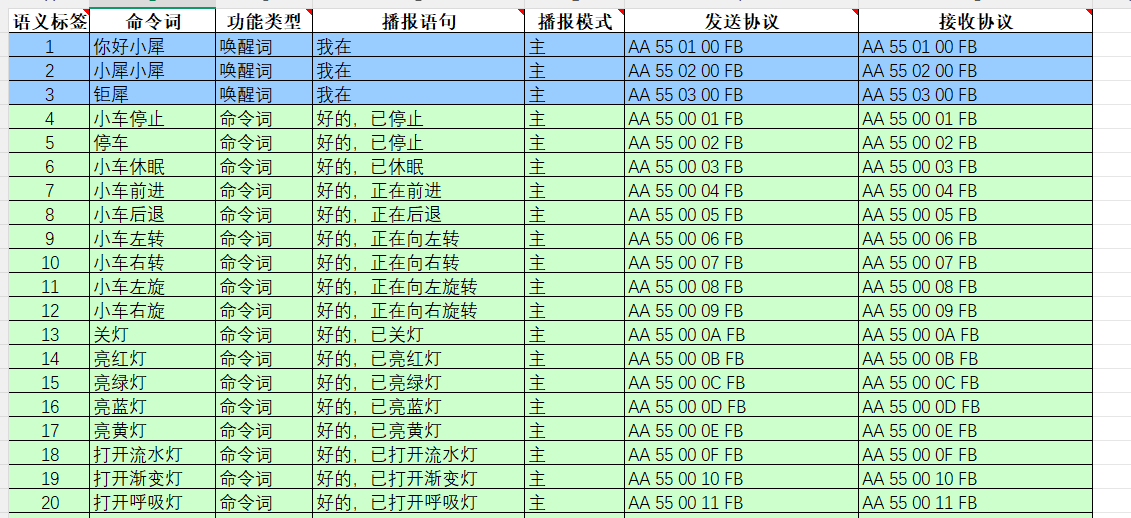
The content of the broadcast can be viewed according to the protocol in the <Command Word and Broadcast Word Protocol List V1_Chinese File> provided in the attachment.
Among them, the first and second bytes AA 55 represent the frame header of the protocol, the third byte 00 represents the broadcast function, the fourth is the ID of the broadcast content, where we can see that "the car moves forward" is 0x07 in hexadecimal, so sending 0x07 to register 0x03 in the program will broadcast the corresponding content. The fifth byte is the end frame.
Enter the following command in the terminal to run the program
python3 -m speech_serialAfter saying the wake word Wake , the Console will reply with the received Read_ID: 0
says "Turn off the light", and the Console will reply with Receiving Read_ID: 13

At this time, you can open the attached "Command Word and Announcement Word Protocol List V1_Chinese File" to view the protocol for "Turn off the light"

Among them, the first and second bytes AA 55 represent the frame header of the protocol, the third byte represents the ID of the ten functional words of the chip, the fourth is the ID of the command word, where we can see that "turn off the light" is 0D in hexadecimal and 13 in decimal. The fifth byte is the end frame.
If you say other command words, the Console will also print the corresponding command word ID. You can try it yourself.