

PWM Web Control
This page is the PWM (ESP32-S3) version-specific guide for web control. For the general interface, startup, preset poses and camera teleoperation, see the web control overview.
Hardware and flashing
- For wiring, GPIO, power and the servo model, see PWM wiring, GPIO and power.
- For firmware flashing (ESP-IDF or the prebuilt bin), see PWM quick start.
- Host ↔ ESP32 is fixed at 115200 8N1; the servos themselves have no baud rate.
Connecting from the web page
- In the "driver" dropdown at the top, select PWM (ESP32-S3)
- Click Add port… and select the ESP32-S3's USB serial port
- Click Connect: the page automatically performs a handshake (NOP), sends the left/right hand selection and returns to middle
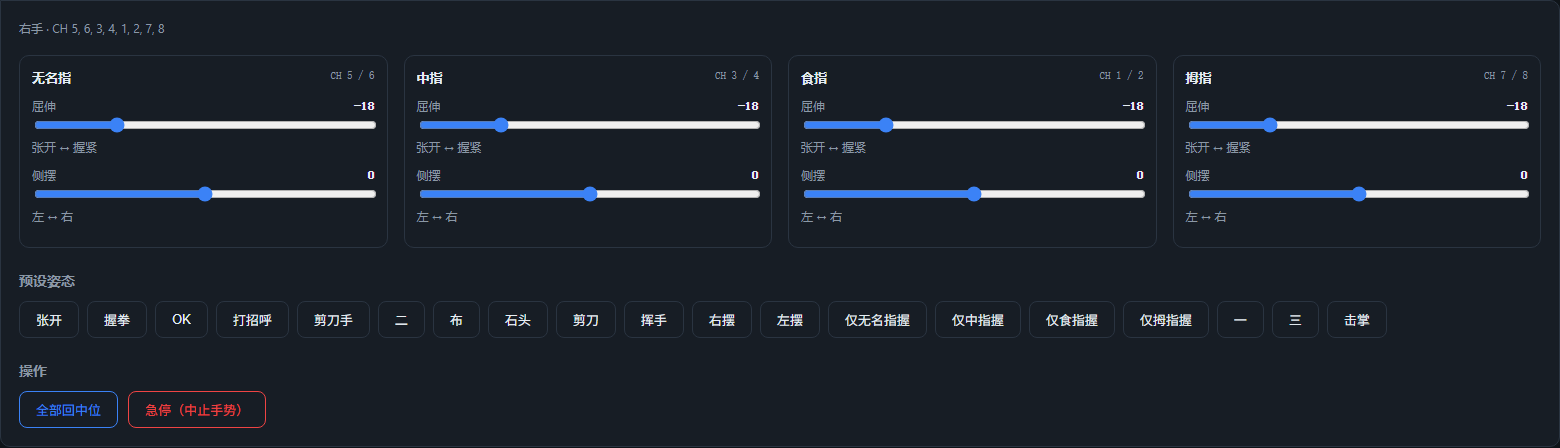
- After that, use the sliders, preset poses and camera teleoperation to control it; the finger headings show CH 1/2 … (PWM channel numbers)

Differences from the SCS0009 version
| Item | SCS0009 bus version | PWM version |
|---|---|---|
| Serial baud rate | 1,000,000 | 115,200 |
| Driver board | USB bus driver board | ESP32-S3 + PWM adapter board |
| Torque | can be enabled/released | none (the firmware has no torque command; the button is hidden) |
| E-stop | releases all torque | sends 0xFF to abort the gesture; the servos stay powered and hold position |
| Speed | supports a speed parameter | direct-drive frames have no speed parameter |
| Feedback | position/temperature/voltage/speed readback | no readback; stall or step loss cannot be detected |
| Left/right hand | different servo IDs | same set of channels, send 0xF1 to switch (mainly affects firmware gestures; the web poses use each hand's own mapping) |
Angle calibration
The web page converts pose values into 8 angles in the range 0–180°; the default formula is:
angle = 90 + dir × scale × pose value + offset- The first channel of each finger has
dir = -1, the second hasdir = +1 - By default
scale = 1andoffset = 0, i.e. the servo shaft angle is mirrored directly - When
mirror_poseis true, the two pose values of each finger are swapped first (enabled for both hands in this repository)
If the direction is reversed on the real hardware or the middle position is off, edit pwm.calibration in config.json:
jsonc
"pwm": {
  "calibration": {
    "right": {
      "pointer": { "scale": 1.0, "offset_deg": [0, 0] }
    }
  }
}- Direction reversed: set the corresponding finger's
scaleto-1 - Middle position offset: adjust
offset_deg(the two channels separately) - Per-finger procedure: return to middle → drag one finger alone → observe the direction/middle position → change
scale/offset_deg→ refresh the page and retry
FAQ
- Connection failed / no response from the ESP32: confirm the baud rate is 115200, that the ESP32's COM port is selected, and that the 5 V/3 A supply and common ground are correct; opening the serial port may reset the ESP32, and the page automatically retries the NOP
- Servos do not move or jitter: first confirm the servos are 333 Hz digital servos (PTK 7452 MG-D or equivalent) and that the power supply is adequate; the SG90 requires firmware changes
- Direction reversed: set the corresponding finger's
scaleto-1 - Middle position incorrect: adjust the corresponding channel's
offset_deg - "Busy (gesture executing)" prompt: the firmware is executing a built-in gesture; wait for it to finish or click E-stop (
0xFF) - Scanning servos:
tools/scan_servos.pyonly applies to SCS0009; for PWM useAmazingHand-PWM/tools/serial_test.pyor the web page