

AmazingHand Web Control
Control the AmazingHand dexterous hand from a browser, with left hand / right hand modes and two ways to operate it:
- Manual control — 8 servo sliders + 19 preset poses + one-click return to middle
- Camera teleoperation — MediaPipe runs locally in the browser to recognise hand motion and map it to the fingers in real time (video never leaves the machine)
- Chinese/English switching — switch in the top-right corner; the choice is stored in the browser, so the next visit opens in the same language
This page is the general web control guide. For the SCS0009-specific mapping/conversion, see SCS0009 web control; for PWM-specific wiring/flashing/calibration, see PWM web control.
Quick start
Open a terminal and cd into the Amazinghand-web directory:
pip install -r requirements.txt

python server.py --no-connect   # recommended: start the server, pick the port in the page (nothing moves)

# python server.py                # auto-detect the serial port and connect
# python server.py --port COM9    # use a specific port
# python server.py --hand left    # enable the left hand only
# python server.py --driver pwm   # use the ESP32-S3 PWM servo version
# python server.py --dry-run      # no serial port at all, UI only
Open http://localhost:8000 in a browser.
You can also use the static frontend directly (Web Serial, no Python server needed):
- Online: https://juxi-technology.github.io/AmazingHand/Amazinghand-web-io/ (Chrome / Edge)
- Local: run
python -m http.server 8099in the repository root and open http://localhost:8099/Amazinghand-web-io/
Picking the serial port in the page
The top of the page has a toolbar — pick the driver first, then the port:
Driver [SCS0009 bus ▾] Port [COM3 ★ USB-Enhanced-SERIAL CH343 ▾] [Refresh] [Connect] [Disconnect] Connected to COM3- The driver dropdown: SCS0009 bus (the official bus servos, default) or PWM (ESP32-S3) (see PWM web control)
- The dropdown lists every serial port on the machine; common USB-serial chips (CH34x / CP210x / FTDI …) are marked ★ and sorted first
- Click Refresh to re-scan (use it after plugging the board in)
- Click Connect to open the selected port; the hand returns to middle right after
- Click Disconnect to release torque before disconnecting, so the servos don't stay locked where they are (the PWM version has no torque command; see below)
- To switch ports, just pick the new one and click "Connect"; the old port is closed for you
A static deployment (GitHub Pages) has no Python server: for privacy reasons the browser cannot silently enumerate serial ports and only sees devices you have authorised. In that case click Add port… and choose the control board in the browser popup; the "list every serial port on the machine" behaviour above applies only to
server.pyserver mode.

--no-connectis designed for this flow: the server starts up without touching any serial port, so it can't grab the wrong one and jerk the hand. Drop the flag if you want it to connect on startup.
Serial logs go to server.log (if you launch through a .bat, the window flashes past — read the file instead).
Wiring check
Lists the servo IDs it finds and checks them hand by hand against config.json.
python tools/scan_servos.py --port COM9Replace COM9 with your actual port number
This tool only applies to SCS0009 bus servos. For the wiring check on the PWM version, see PWM web control, or use
AmazingHand-PWM/tools/serial_test.py.
Preset poses (19)
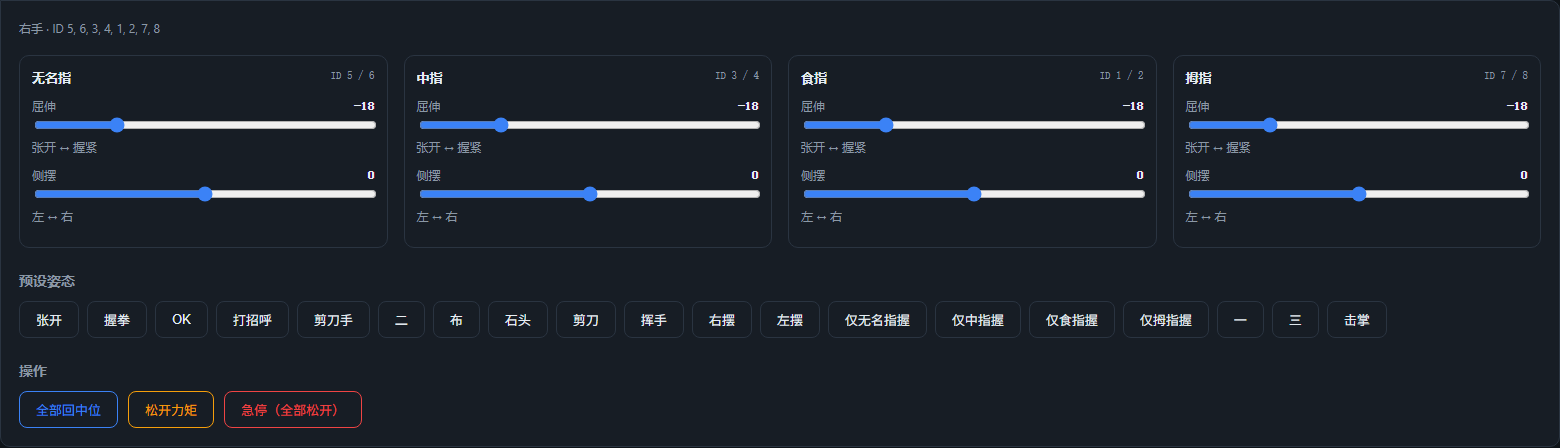
| Pose | Description | Pose | Description |
|---|---|---|---|
open | Open | wave1 | Wave |
close / stone | Fist | wave_r / wave_l | Swipe right / left |
ok | OK | ring_close | Ring only |
greeting | Greeting | middle_close | Middle only |
victory / two / scissors | Victory / Two | pointer_close | Index only |
paper | Paper | thumb_close | Thumb only |
one / three | One / Three | hifive | High five |
To modify the poses yourself, edit the poses section of config.json; the keys correspond to the names in the official YAML.
Left and right can use different pose values
Inside each pose, positions is shared by both hands. If one hand needs a different set because of mechanical assembly differences, add a right or left key to the same entry and it overrides positions:
"close": {
  "label": "Fist",
  "positions": [75, 75, 75, 75, 75, 75, 18, 18],   // shared by both hands
  "right":     [ ... 8 values ... ]                   // optional: right hand only
}
Two modes
| Mode | Behaviour |
|---|---|
| Right hand | Sends only to the right hand's 8 servos |
| Left hand | Sends only to the left hand's 8 servos (SCS0009 applies the mirror and the −35.16° offset automatically; PWM uses the left-hand channel mapping) |
Only one hand is controlled at a time; switch with Target at the top. Switching does not affect the other hand, which holds its current pose where it is. With SCS0009, both hands can share the same bus; with PWM, each hand is controlled by its own ESP32-S3.
Camera teleoperation
MediaPipe hand landmarks run locally in the browser (resources are in Amazinghand-web/web/mediapipe/, usable offline; the page also probes Amazinghand-web-io/mediapipe/ first), and the 21 landmarks are converted into pose values for the 4 fingers and sent to the currently selected hand in real time.
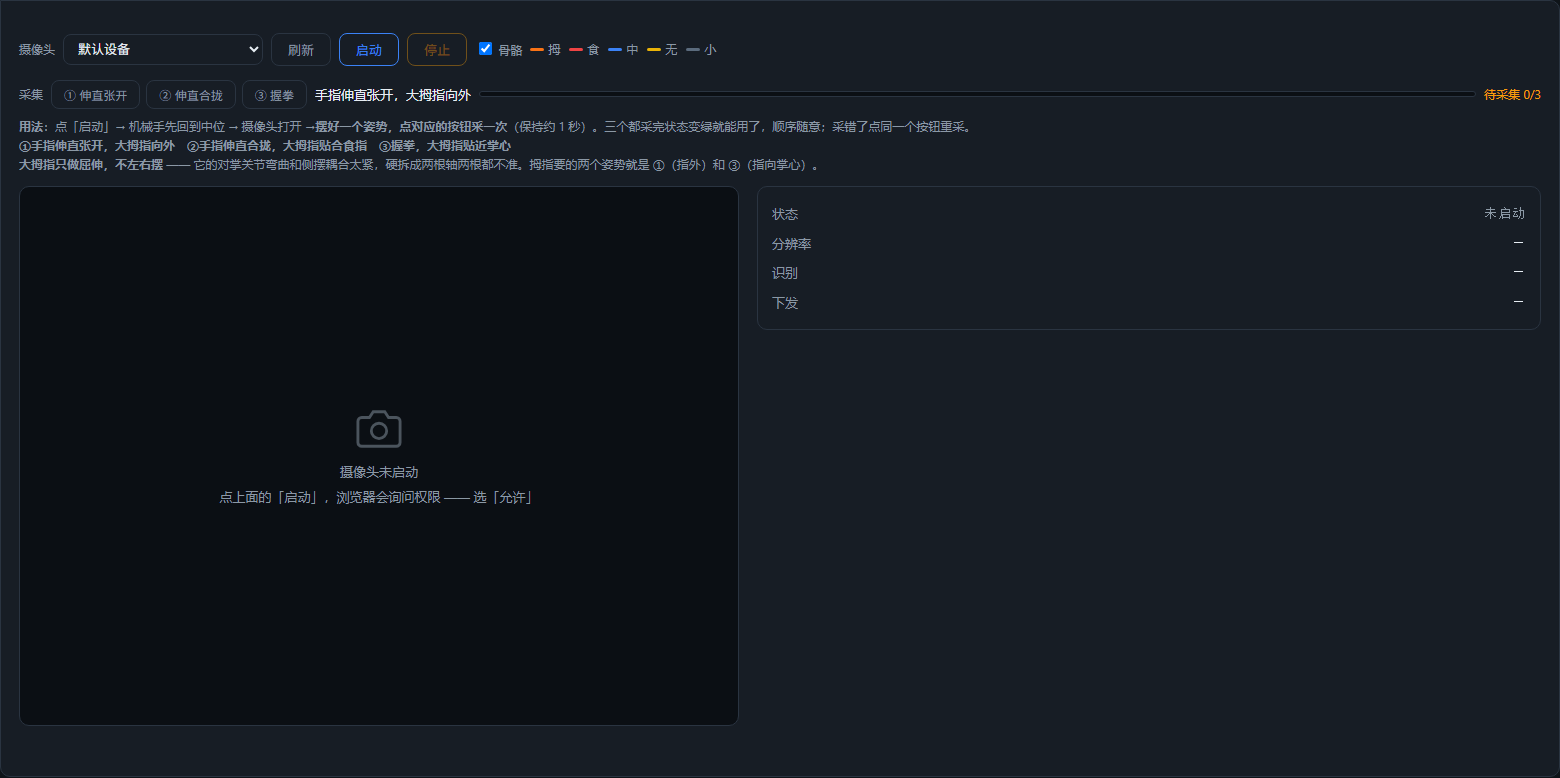
1. Capture three poses first
After starting the camera, hold a pose and click the corresponding button to capture it once (about 1 second of averaging). The order doesn't matter; if you capture the wrong one, click the same button to re-capture. The status only turns green once all three are captured; nothing is sent before then, and the dexterous hand stays in its middle pose.
| Button | Pose | Provides |
|---|---|---|
| ① Spread | Fingers straight and spread, thumb pointing outward | The "straight" end of flexion + the "spread" end of splay |
| ② Together | Fingers straight and together, thumb against the index finger | The "together" end of splay |
| ③ Fist | Make a fist, thumb tucked toward the palm | The "closed" end of flexion |
2. Each axis is a line through two measured points
Both flexion and splay use two measured endpoints to define a straight line:
t    = (measured − endpoint A) / (endpoint B − endpoint A)        // clamped to 0~1
target = A's target + (B's target − A's target) × t
The benefit is that the sign/direction of each finger's measurement is absorbed automatically — so there is no need for switches like "this finger needs inversion" (the index and ring fingers sit on opposite sides of the central axis, and the thumb's joint chain is different again, so their directions are inherently reversed, but clamping between the two measured endpoints lines them up automatically).
The endpoint target values are in the camera section of config.json:
| Axis | Endpoints | Ring | Middle | Index |
|---|---|---|---|---|
| Flexion | straight → fist | −50 → 90 | −50 → 90 | −50 → 90 |
| Splay | together → spread | −45 → +45 | 0 → 0 | +45 → −45 |
Both ends of the middle finger's splay are 0 (it does not splay left/right).
3. The thumb only flexes ⚠️
The thumb's CMC is the opposition joint, and bending and left/right splay are tightly coupled — when the thumb is against the index finger it is already in a splayed position, so the "flexion zero" measured at that moment is contaminated. Forcing it into two axes makes both inaccurate.
So the thumb only flexes, with splay fixed at 0 (the differential splay of its two servos is 0). The two reference poses it needs are ① (pointing outward) and ③ (pointing toward the palm); no extra capture is required.
4. Splay fades out as the finger curls
The final splay is scaled as follows:
side = side_measured × (1 − curl)splayDeg takes the projection of the MCP→PIP direction onto the palm's transverse axis, and finger flexion is exactly rotation about that axis — once the finger curls past a certain point the projection flips, and the "spread amount" suddenly jumps to the other side.
Without the fade, this jump would travel through servo2 = flexion − splay and make the even-ID servos reverse (the odd IDs get flexion + splay, which changes in the opposite direction, so it is less noticeable). The symptom is "halfway into a fist, servos 12 and 16 suddenly reverse" — 12 is the left hand's second ring-finger servo, and 16 is the left hand's second index-finger servo, exactly the two that are carried along differentially when the splay component is nonzero.
With the fade, splay is always 0 at full fist, no matter how far off the measurement is. And a fist should be fingers together anyway.
5. Skeleton colours
| Finger | Colour |
|---|---|
| Thumb | orange |
| Index | red |
| Middle | blue |
| Ring | yellow |
| Pinky | dim grey |
| Palm bones | neutral grey |
The pinky does not participate in the gesture mapping, but its base MCP (landmark 17) is used to define the right hand's palm coordinate system, so it cannot be removed.
Tuning cheat sheet
| What you want to change | Where |
|---|---|
| Axis target values | camera section of config.json |
| Left and right splay go opposite ways | set that hand to -1 in camera.side_sign (1 = unchanged) |
| Smoothness | SMOOTH in tracking.js (default 0.35; lower is steadier but laggier) |
| How fast a curl registers | re-capture the three poses |
side_sign applies to the hand selected by Target; after changing it, refresh the page — no need to restart the server:
"side_sign": { "right": 1, "left": -1 } // the left hand inverts the whole splay axisFlexion is not affected by side_sign.
Project structure
Amazinghand-web-io/          Frontend (static, can be deployed separately)
├── index.html
├── app.js                   UI, driver switching, poses and camera UI
├── io.js                    SCS0009 Web Serial backend
├── pwm.js                   PWM Web Serial backend
├── common.js                Shared configuration, pose conversion and limits
├── ws.js                    WebSocket backend (Python server mode)
├── tracking.js              MediaPipe camera tracking
├── i18n.js                  Chinese/English text
├── config.json              Driver, servo mapping, pose library, camera parameters
└── tools/pwm_protocol_test.mjs

Amazinghand-web/
├── server.py                HTTP + WebSocket + serial server
├── requirements.txt
├── tools/scan_servos.py     Scan the SCS0009 bus and verify IDs
└── web/mediapipe/           MediaPipe resources (offline, about 42MB)
Frontend/backend protocol:
// Frontend → backend   target: "left" | "right"
{ "cmd": "ports" }                                  // re-scan serial ports
{ "cmd": "driver", "driver": "pwm" }                // scs0009 | pwm
{ "cmd": "connect",    "port": "COM3" }
{ "cmd": "disconnect" }
{ "cmd": "target", "target": "left" }
{ "cmd": "set",    "target": "left", "angles": { "pointer": [0, 0], ... } }
{ "cmd": "pose",   "target": "left", "name": "close" }
{ "cmd": "middle", "target": "left" }
{ "cmd": "torque", "target": "left", "on": true }   // SCS0009 only
{ "cmd": "stop" }

// Backend → frontend
{ "type": "state", "hands": {...}, "poses": {...}, "positions": {...},
  "axes": {...}, "camera": {...}, "target": "left", "driver": "scs0009",
  "capabilities": { "torque": true, "speed": true }, "pwm": {...},
  "limits": {...}, "port": { "available": [...], "current": "COM3", "connected": true } }
{ "type": "ports" | "connected" | "disconnected", "ports": [...], ... }
{ "type": "error", "msg": "connect COM_FAKE failed: the system cannot find the file specified." }
Safety design
| Item | Description |
|---|---|
| Pose limits | pose values ±120° (limits in config.json); all 19 poses have been checked to stay within limits |
| Change dedup | changes under 0.5° are not sent, avoiding flooding the bus with noise |
| Write throttle | SCS0009 minimum interval 20ms; PWM direct drive about 30ms |
| E-stop | SCS0009: release all torque; PWM: send 0xFF to abort the gesture, and the servos stay powered and hold position |
| Exit protection | SCS0009: Ctrl+C releases torque; PWM: the servos hold position after the serial port is closed |
| Single-hand debug | --hand left/right |
FAQ
Camera recognition is inaccurate → use even lighting and face the palm toward the camera. In tracking.js, a larger SMOOTH (default 0.35) is smoother but laggier.
Camera gesture is wrong / a finger does not follow → first confirm all three poses have been captured (status turns green); if a direction is reversed, re-capture the corresponding pose; the thumb only flexes and does not take part in splay.
A servo suddenly reverses halfway into a fist → check whether splay fades to 0 as the finger curls (side *= (1 - curl)), and whether the sign/magnitude of the splay control value is abnormal.
SCS0009 direction/ID/middle position problems → see SCS0009 web control and SCS0009 debugging and calibration.
PWM connection/baud rate/calibration problems → see PWM web control.
More questions → FAQ.