

Pantalla OLED de 0,91 pulgadas
Serie Jetson
1. Diagrama de pines GPIO
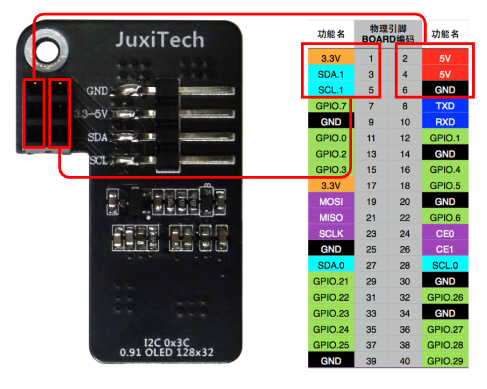
Pruebe la comunicación I2C con el OLED de 0,91 pulgadas. Conéctelo de la siguiente manera:
Atención: no haga conexiones incorrectas ni provoque cortocircuitos en los pines: un error puede dañar el hardware de la placa base.
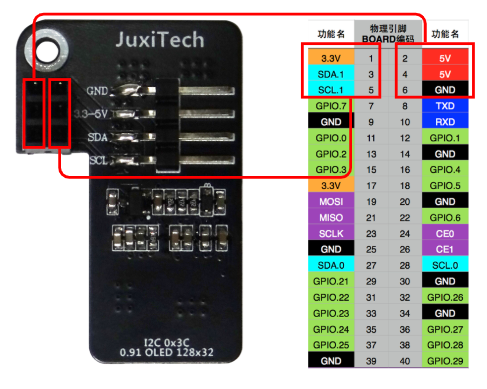
2. Prueba I2C
2.1. Instalar dependencias
sudo apt install -y python3-pip
sudo pip3 install smbus
sudo pip3 install Adafruit_SSD1306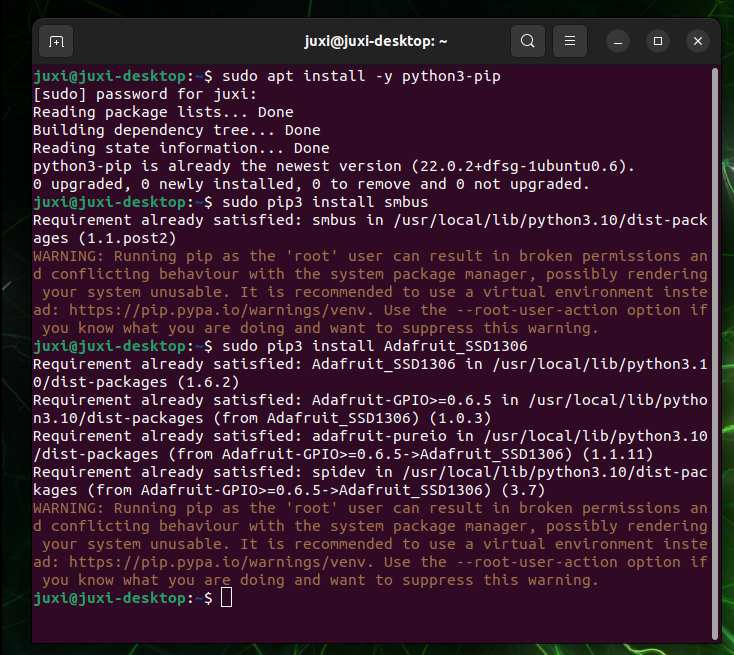
2.2. Dispositivos I2C
Durante el desarrollo normal, debemos averiguar el bus y la dirección del dispositivo I2C.
(1) Consultar buses I2C
El siguiente comando enumera todos los buses del dispositivo:
i2cdetect -l(2) Consultar dispositivos I2C
El siguiente comando enumera los dispositivos I2C del bus especificado: la dirección I2C del OLED es 0x3c
i2cdetect -y -r *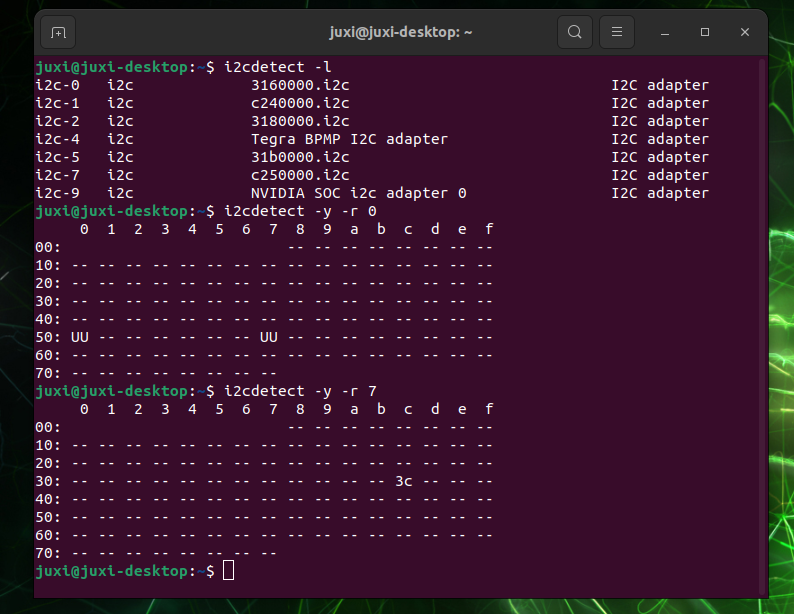
3. Ver la dirección IP y el puerto
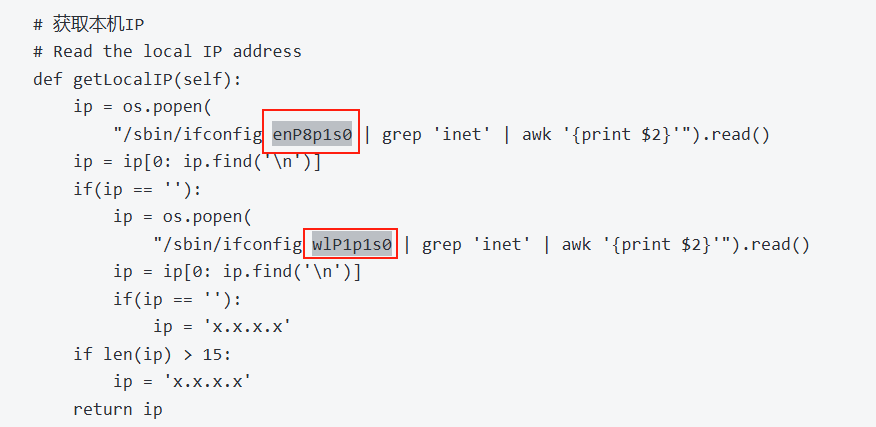
Usar ifconfig para ver la dirección IP y el puerto
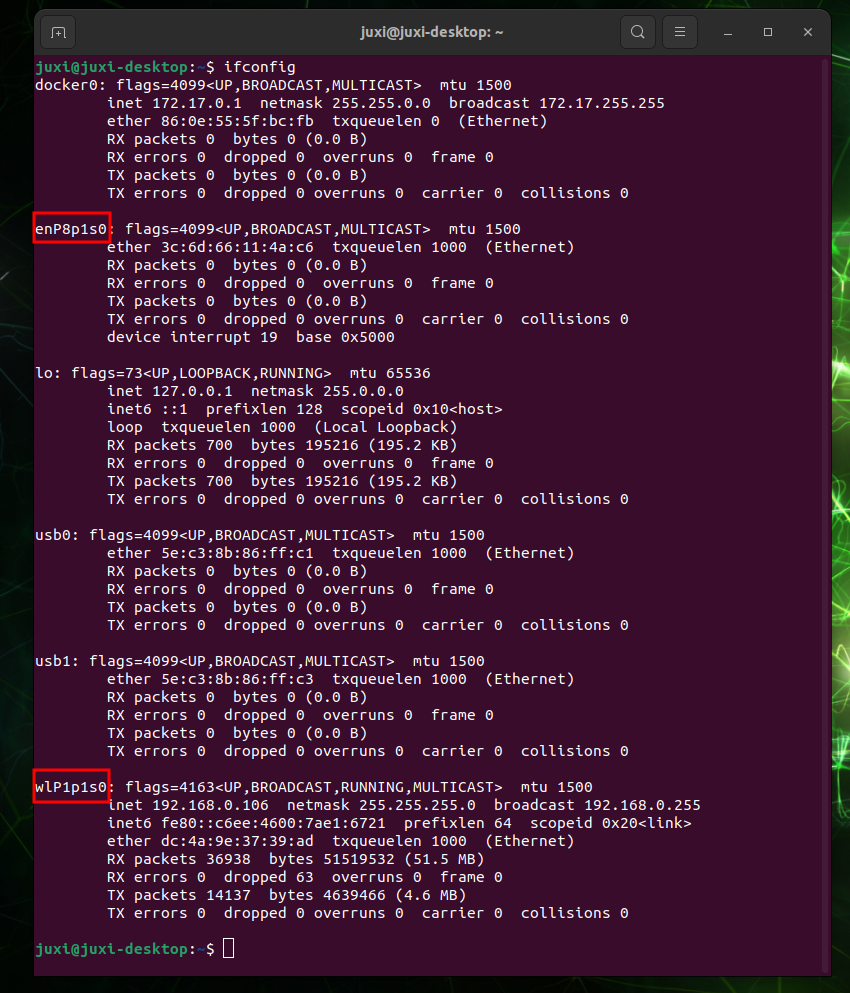
Modificar el código según el puerto real
4. Resultado del experimento
Crear el archivo Oled_i2c.py
# (If gedit is not installed) sudo apt install gedit
sudo gedit Oled_i2c.py
Copiar el siguiente código, pegarlo en el archivo, guardar y cerrar
#!/usr/bin/env python3
# coding=utf-8
import time
import os
import sys

i2c_num = 7
if len(sys.argv) > 1:
    if str(sys.argv[1]).isdigit():
        i2c_num = int(sys.argv[1])

print("i2c_num=", i2c_num)

passwd = "juxi"
cmd_i2c = "sudo i2cdetect -y -r " + str(i2c_num)
os.system('echo %s | sudo -S %s' % (passwd, cmd_i2c))


import Adafruit_SSD1306 as SSD

from PIL import Image
from PIL import ImageDraw
from PIL import ImageFont

import subprocess


class Juxi_OLED:
    def __init__(self, i2c_bus=1, debug=False):
        self.__debug = debug
        self.__i2c_bus = i2c_bus
        self.__top = -2
        self.__x = 0

        self.__total_last = 0
        self.__idle_last = 0
        self.__str_CPU = "CPU:0%"


    def __del__(self):
        if self.__debug:
            print("---OLED-DEL---")

    # Inicializar el OLED; devuelve True si tiene éxito y False si falla
    # Initialize OLED, return True on success, False on failure
    def begin(self):
        try:
            self.__oled = SSD.SSD1306_128_32(
                rst=None, i2c_bus=self.__i2c_bus, gpio=1)
            self.__oled.begin()
            self.__oled.clear()
            self.__oled.display()
            self.__width = self.__oled.width
            self.__height = self.__oled.height
            self.__image = Image.new('1', (self.__width, self.__height))
            self.__draw = ImageDraw.Draw(self.__image)
            self.__font = ImageFont.truetype("DejaVuSansMono.ttf",8)    # ImageFont.load_default()
            if self.__debug:
                print("---OLED begin ok!---")
            return True
        except:
            if self.__debug:
                print("---OLED no found!---")
            return False

    # Limpiar la pantalla. refresh=True actualiza de inmediato; refresh=False no actualiza.
    # Clear the display.  Refresh =True Refresh immediately, refresh=False refresh not
    def clear(self, refresh=False):
        self.__draw.rectangle(
            (0, 0, self.__width, self.__height), outline=0, fill=0)
        if refresh:
            self.refresh()

    # Añadir caracteres. start_x y start_y indican el punto de inicio. text son los caracteres que se añaden.
    # refresh=True actualiza de inmediato; refresh=False no actualiza.
    # Add characters.  Start_x Start_y indicates the starting point.  Text is the character to be added
    # Refresh =True Refresh immediately, refresh=False refresh not
    def add_text(self, start_x, start_y, text, refresh=False):
        if start_x > 128 or start_x < 0 or start_y < 0 or start_y > 32:
            if self.__debug:
                print("oled text: x, y input error!")
            return
        x = int(start_x + self.__x)
        y = int(start_y + self.__top)
        self.__draw.text((x, y), str(text), font=self.__font, fill=255)
        if refresh:
            self.refresh()

    # Escribir una línea de caracteres text. refresh=True actualiza de inmediato; refresh=False no actualiza.
    # line=[1, 4]
    # Write a line of character text.  Refresh =True Refresh immediately, refresh=False refresh not.
    def add_line(self, text, line=1, refresh=False):
        if line < 1 or line > 4:
            if self.__debug:
                print("oled line input error!")
            return
        y = int(8 * (line - 1))
        self.add_text(0, y, text, refresh)

    # Actualizar el OLED para mostrar el contenido
    # Refresh the OLED to display the content
    def refresh(self):
        self.__oled.image(self.__image)
        self.__oled.display()

    # Leer el uso de CPU
    # Read the CPU usage rate
    def getCPULoadRate(self, index):
        count = 10
        if index == 0:
            f1 = os.popen("cat /proc/stat", 'r')
            stat1 = f1.readline()
            data_1 = []
            for i in range(count):
                data_1.append(int(stat1.split(' ')[i+2]))
            self.__total_last = data_1[0]+data_1[1]+data_1[2]+data_1[3] + \
                data_1[4]+data_1[5]+data_1[6]+data_1[7]+data_1[8]+data_1[9]
            self.__idle_last = data_1[3]
        elif index == 4:
            f2 = os.popen("cat /proc/stat", 'r')
            stat2 = f2.readline()
            data_2 = []
            for i in range(count):
                data_2.append(int(stat2.split(' ')[i+2]))
            total_now = data_2[0]+data_2[1]+data_2[2]+data_2[3] + \
                data_2[4]+data_2[5]+data_2[6]+data_2[7]+data_2[8]+data_2[9]
            idle_now = data_2[3]
            total = int(total_now - self.__total_last)
            idle = int(idle_now - self.__idle_last)
            usage = int(total - idle)
            usageRate = int(float(usage / total) * 100)
            self.__str_CPU = "CPU:" + str(usageRate) + "%"
            self.__total_last = 0
            self.__idle_last = 0
        return self.__str_CPU

    # Leer la hora del sistema
    # Read system time
    def getSystemTime(self):
        cmd = "date +%H:%M:%S"
        date_time = subprocess.check_output(cmd, shell=True)
        str_Time = str(date_time).lstrip("b'")
        str_Time = str_Time.rstrip("\\n'")
        return str_Time

    # Leer el uso de memoria y la memoria total
    # Read the memory usage and total memory
    def getUsagedRAM(self):
        cmd = "free | awk 'NR==2{printf \"RAM:%2d%% -> %.1fGB \", 100*($2-$7)/$2, ($2/1048576.0)}'"
        FreeRam = subprocess.check_output(cmd, shell=True)
        str_FreeRam = str(FreeRam).lstrip("b'")
        str_FreeRam = str_FreeRam.rstrip("'")
        return str_FreeRam

    # Leer la memoria libre / la memoria total
    # Read free memory/total memory
    def getFreeRAM(self):
        cmd = "free -h | awk 'NR==2{printf \"RAM: %.1f/%.1fGB \", $7,$2}'"
        FreeRam = subprocess.check_output(cmd, shell=True)
        str_FreeRam = str(FreeRam).lstrip("b'")
        str_FreeRam = str_FreeRam.rstrip("'")
        return str_FreeRam

    # Leer el uso de espacio de la tarjeta TF / el espacio total de la tarjeta TF
    # Read the TF card space usage/TOTAL TF card space
    def getUsagedDisk(self):
        cmd = "df -h | awk '$NF==\"/\"{printf \"SDC:%s -> %.1fGB\", $5, $2}'"
        Disk = subprocess.check_output(cmd, shell=True)
        str_Disk = str(Disk).lstrip("b'")
        str_Disk = str_Disk.rstrip("'")
        return str_Disk

    # Leer el espacio libre de la tarjeta TF / el espacio total de la tarjeta TF
    # Read the free TF card space/total TF card space
    def getFreeDisk(self):
        cmd = "df -h | awk '$NF==\"/\"{printf \"Disk:%.1f/%.1fGB\", $4,$2}'"
        Disk = subprocess.check_output(cmd, shell=True)
        str_Disk = str(Disk).lstrip("b'")
        str_Disk = str_Disk.rstrip("'")
        return str_Disk

    # Obtener la IP local
    # Read the local IP address
    def getLocalIP(self):
        ip = os.popen(
            "/sbin/ifconfig enP8p1s0 | grep 'inet' | awk '{print $2}'").read()
        ip = ip[0: ip.find('\n')]
        if(ip == ''):
            ip = os.popen(
                "/sbin/ifconfig wlP1p1s0 | grep 'inet' | awk '{print $2}'").read()
            ip = ip[0: ip.find('\n')]
            if(ip == ''):
                ip = 'x.x.x.x'
        if len(ip) > 15:
            ip = 'x.x.x.x'
        return ip

    # Función principal del OLED; se llama en el bucle while y permite la conexión en caliente.
    # Oled mainly runs functions that are called in a while loop and can be hot-pluggable
    def main_program(self):
        state = False
        try:
            cpu_index = 0
            state = self.begin()
            while state:
                self.clear()
                str_CPU = self.getCPULoadRate(cpu_index)
                str_Time = self.getSystemTime()
                if cpu_index == 0:
                    str_FreeRAM = self.getUsagedRAM()
                    str_Disk = self.getUsagedDisk()
                    str_IP = "IPA:" + self.getLocalIP()
                self.add_text(0, 0, str_CPU)
                self.add_text(50, 0, str_Time)
                self.add_line(str_FreeRAM, 2)
                self.add_line(str_Disk, 3)
                self.add_line(str_IP, 4)
                self.refresh()
                cpu_index = cpu_index + 1
                if cpu_index >= 5:
                    cpu_index = 0
                time.sleep(.1)
        except:
            if self.__debug:
                print("!!!---OLED refresh error---!!!")
            pass


if __name__ == "__main__":
    try:

        oled = Juxi_OLED(i2c_num, debug=True)
        while True:
            oled.main_program()
            time.sleep(2)
    except KeyboardInterrupt:
        oled.clear(True)
        del oled
        print(" Program closed! ")
        pass
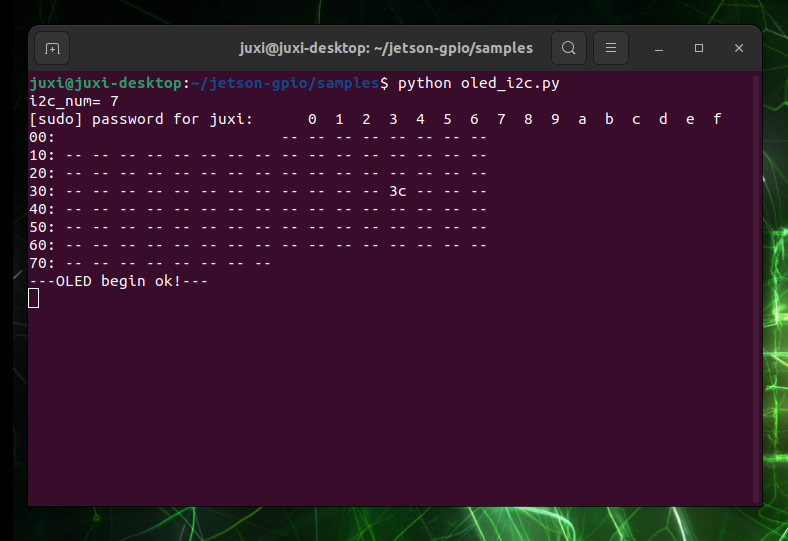
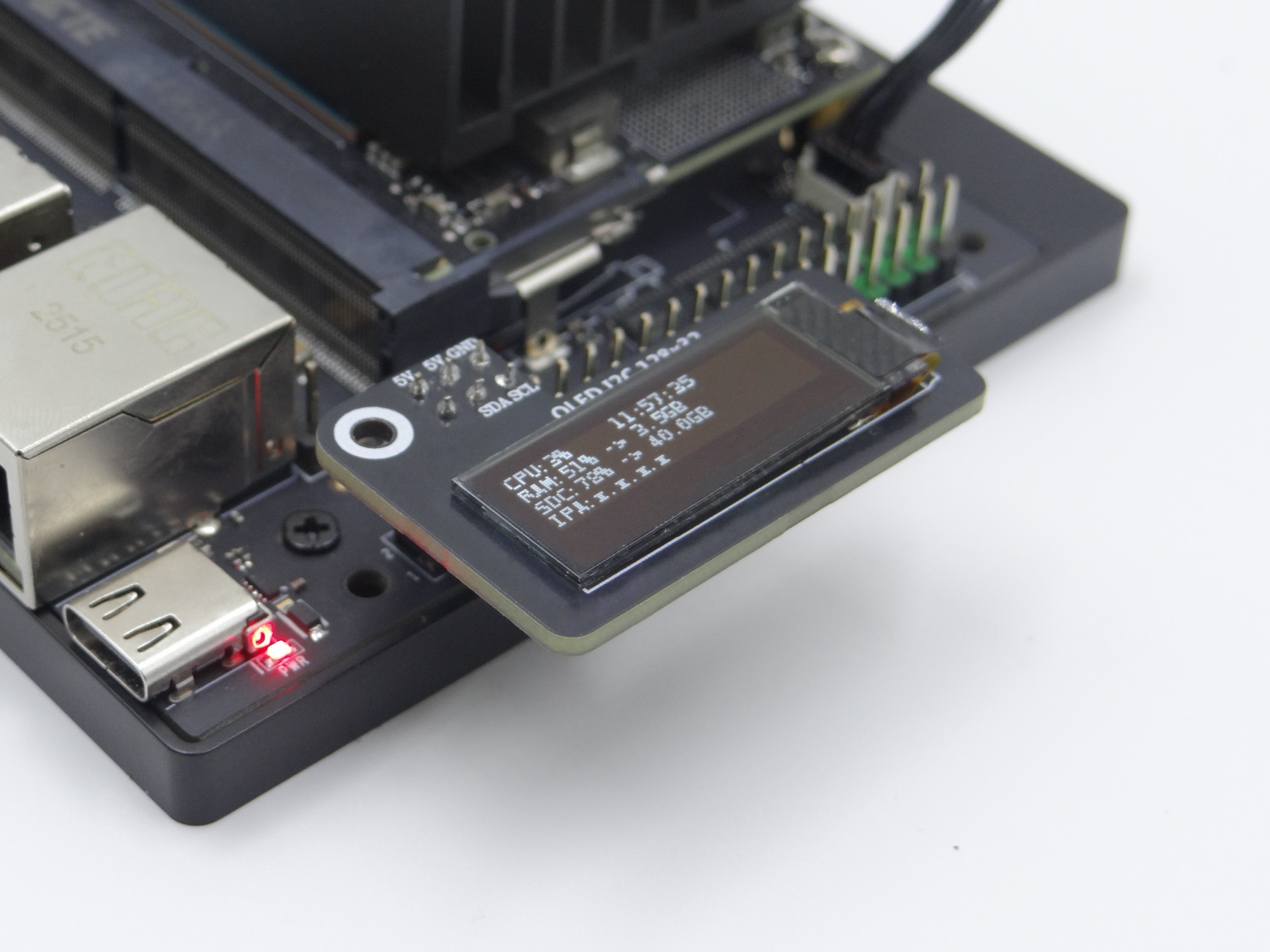
Al iniciar el programa, el OLED muestra información del sistema como uso de CPU, hora del sistema y uso de memoria:
Raspberry Pi, Orange Pi
1. Activar la opción I2C
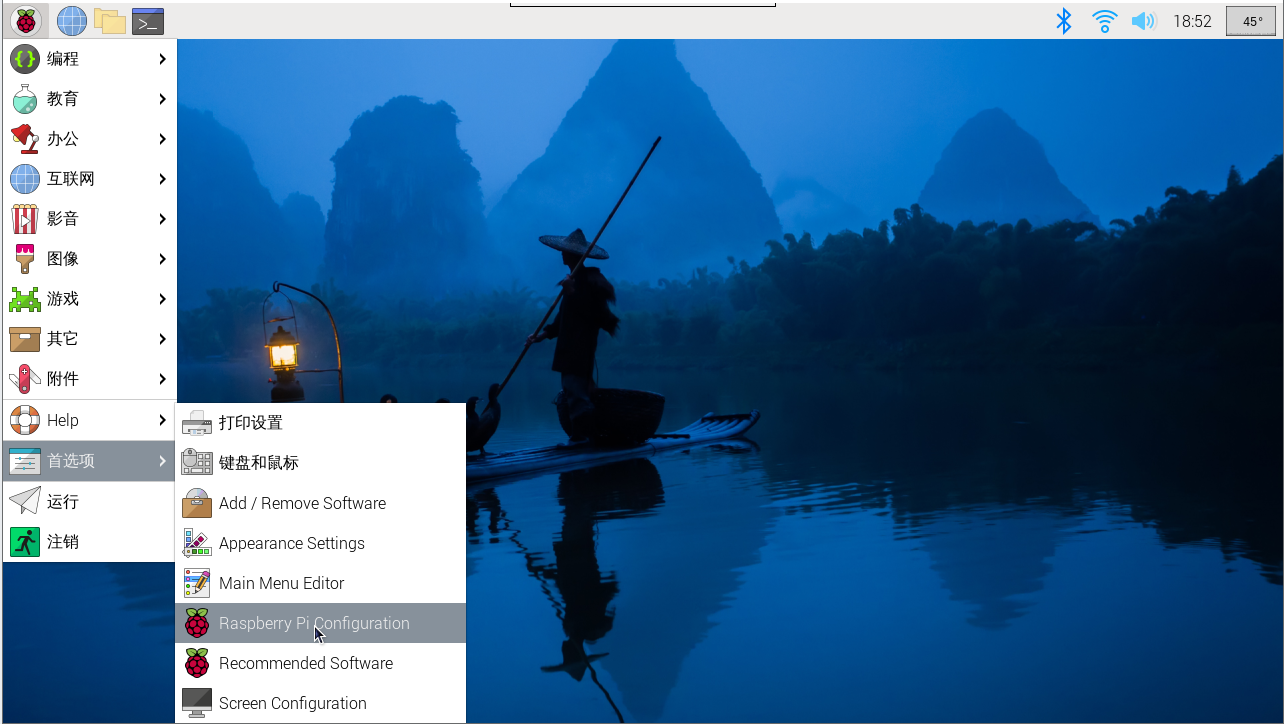
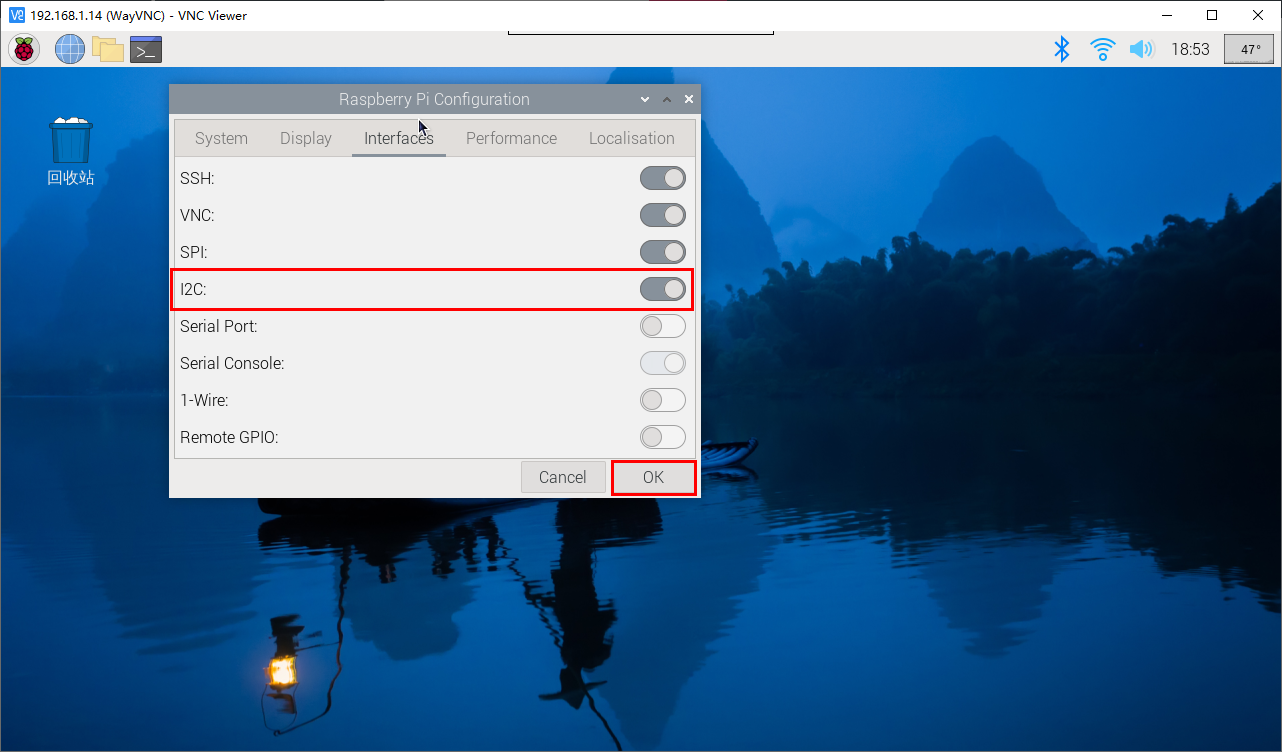
Entrar en la configuración del sistema Raspberry Pi, elegir: Preferencias → Raspberry Pi Configuration → Interfaces → encontrar la opción I2C y activarla; luego el sistema se reiniciará. (ver figura abajo)
En modo de comandos, sudo raspi-config también permite encontrar esa opción, activar I2C y reiniciar el sistema.
2. Instalar la biblioteca I2C
sudo apt install -y python3-dev
sudo apt install -y python3-smbus i2c-tools
sudo apt install -y python3-pil
sudo apt install -y python3-pip
sudo apt install -y python3-setuptools
sudo apt install -y python3-rpi.gpio
sudo apt install -y python3-venv
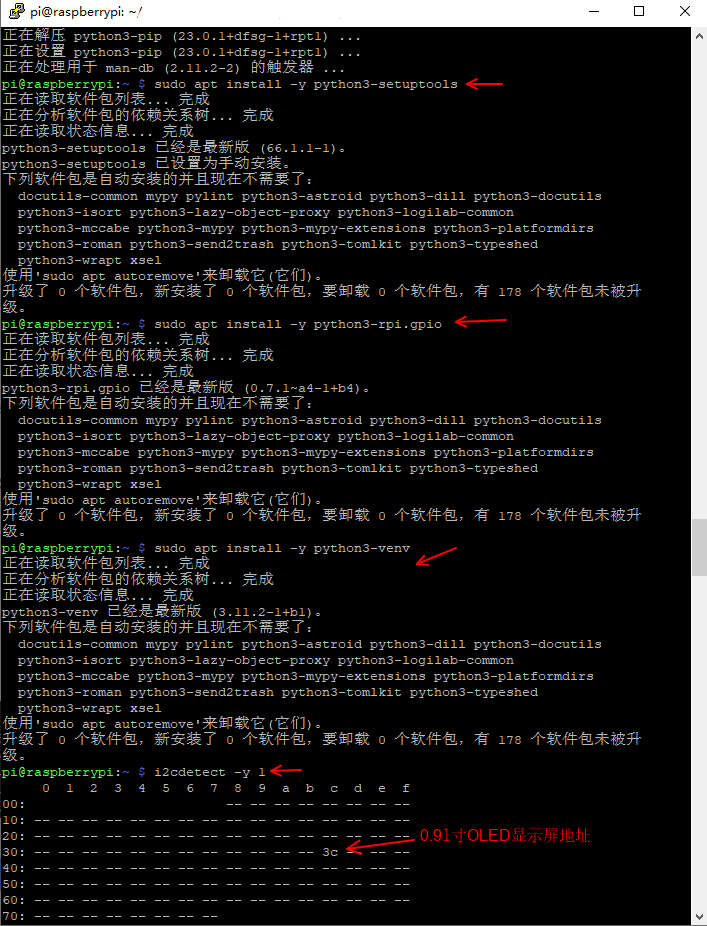
Aquí usamos Python3. Tras instalar la biblioteca I2C, usar i2cdetect para comprobar si el módulo de pantalla es reconocido
i2cdetect -y 1Se muestra que el dispositivo fue detectado en la dirección «0x3c» (ver abajo). La dirección por defecto de este tipo de dispositivo es hexadecimal.
3. Configurar el archivo de fuente
El código usa la fuente DejaVuSansMono.ttf:
sudo apt-get install -y fonts-dejavu-coreO modificar el código a una fuente ya existente en el sistema (por ejemplo, ImageFont.load_default())
4. Configurar permisos
Asegurarse de que los permisos de los archivos de dispositivos I2C sean correctos:
sudo chmod a+rw /dev/i2c-* # Temporary; for permanent effect, configure udev rules5. Ver la dirección IP y el puerto
Usar ifconfig para ver la dirección IP y el puerto reales
# (If net-tools is not installed) sudo apt install net-tools
ifconfig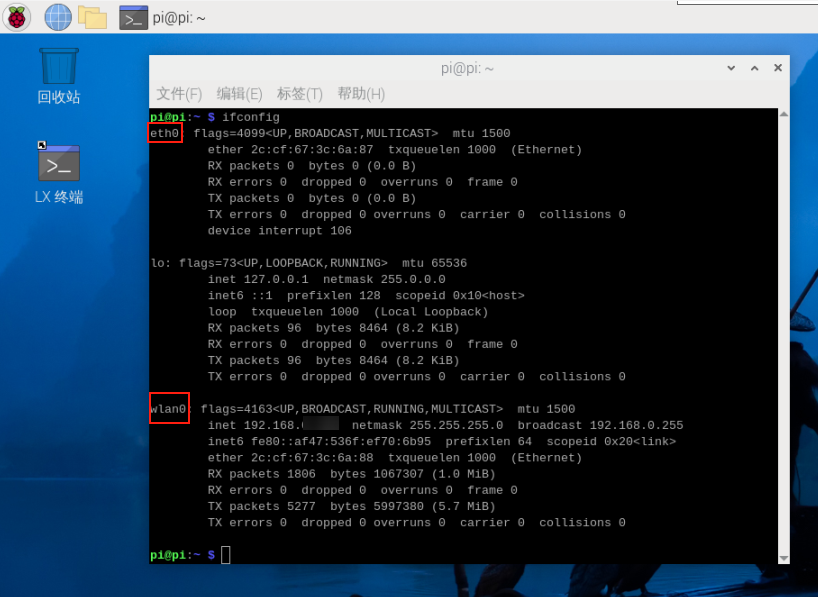
Modificar las dos zonas marcadas en el código según el puerto real
6. Crear el archivo Oled_i2c.py
Crear el archivo Oled_i2c.py en el directorio Home
# (If gedit is not installed) sudo apt install gedit
sudo gedit Oled_i2c.py
Copiar el siguiente código, pegarlo en el archivo, guardar y cerrar
#!/usr/bin/env python3
# coding=utf-8
import time
import os
import sys

i2c_num = 7
if len(sys.argv) > 1:
    if str(sys.argv[1]).isdigit():
        i2c_num = int(sys.argv[1])

print("i2c_num=", i2c_num)

passwd = "juxi"
cmd_i2c = "sudo i2cdetect -y -r " + str(i2c_num)
os.system('echo %s | sudo -S %s' % (passwd, cmd_i2c))


import Adafruit_SSD1306 as SSD

from PIL import Image
from PIL import ImageDraw
from PIL import ImageFont

import subprocess


class Juxi_OLED:
    def __init__(self, i2c_bus=1, debug=False):
        self.__debug = debug
        self.__i2c_bus = i2c_bus
        self.__top = -2
        self.__x = 0

        self.__total_last = 0
        self.__idle_last = 0
        self.__str_CPU = "CPU:0%"


    def __del__(self):
        if self.__debug:
            print("---OLED-DEL---")

    # Inicializar el OLED; devuelve True si tiene éxito y False si falla
    # Initialize OLED, return True on success, False on failure
    def begin(self):
        try:
            self.__oled = SSD.SSD1306_128_32(
                rst=None, i2c_bus=self.__i2c_bus, gpio=1)
            self.__oled.begin()
            self.__oled.clear()
            self.__oled.display()
            self.__width = self.__oled.width
            self.__height = self.__oled.height
            self.__image = Image.new('1', (self.__width, self.__height))
            self.__draw = ImageDraw.Draw(self.__image)
            self.__font = ImageFont.truetype("DejaVuSansMono.ttf",8)    # ImageFont.load_default()
            if self.__debug:
                print("---OLED begin ok!---")
            return True
        except:
            if self.__debug:
                print("---OLED no found!---")
            return False

    # Limpiar la pantalla. refresh=True actualiza de inmediato; refresh=False no actualiza.
    # Clear the display.  Refresh =True Refresh immediately, refresh=False refresh not
    def clear(self, refresh=False):
        self.__draw.rectangle(
            (0, 0, self.__width, self.__height), outline=0, fill=0)
        if refresh:
            self.refresh()

    # Añadir caracteres. start_x y start_y indican el punto de inicio. text son los caracteres que se añaden.
    # refresh=True actualiza de inmediato; refresh=False no actualiza.
    # Add characters.  Start_x Start_y indicates the starting point.  Text is the character to be added
    # Refresh =True Refresh immediately, refresh=False refresh not
    def add_text(self, start_x, start_y, text, refresh=False):
        if start_x > 128 or start_x < 0 or start_y < 0 or start_y > 32:
            if self.__debug:
                print("oled text: x, y input error!")
            return
        x = int(start_x + self.__x)
        y = int(start_y + self.__top)
        self.__draw.text((x, y), str(text), font=self.__font, fill=255)
        if refresh:
            self.refresh()

    # Escribir una línea de caracteres text. refresh=True actualiza de inmediato; refresh=False no actualiza.
    # line=[1, 4]
    # Write a line of character text.  Refresh =True Refresh immediately, refresh=False refresh not.
    def add_line(self, text, line=1, refresh=False):
        if line < 1 or line > 4:
            if self.__debug:
                print("oled line input error!")
            return
        y = int(8 * (line - 1))
        self.add_text(0, y, text, refresh)

    # Actualizar el OLED para mostrar el contenido
    # Refresh the OLED to display the content
    def refresh(self):
        self.__oled.image(self.__image)
        self.__oled.display()

    # Leer el uso de CPU
    # Read the CPU usage rate
    def getCPULoadRate(self, index):
        count = 10
        if index == 0:
            f1 = os.popen("cat /proc/stat", 'r')
            stat1 = f1.readline()
            data_1 = []
            for i in range(count):
                data_1.append(int(stat1.split(' ')[i+2]))
            self.__total_last = data_1[0]+data_1[1]+data_1[2]+data_1[3] + \
                data_1[4]+data_1[5]+data_1[6]+data_1[7]+data_1[8]+data_1[9]
            self.__idle_last = data_1[3]
        elif index == 4:
            f2 = os.popen("cat /proc/stat", 'r')
            stat2 = f2.readline()
            data_2 = []
            for i in range(count):
                data_2.append(int(stat2.split(' ')[i+2]))
            total_now = data_2[0]+data_2[1]+data_2[2]+data_2[3] + \
                data_2[4]+data_2[5]+data_2[6]+data_2[7]+data_2[8]+data_2[9]
            idle_now = data_2[3]
            total = int(total_now - self.__total_last)
            idle = int(idle_now - self.__idle_last)
            usage = int(total - idle)
            usageRate = int(float(usage / total) * 100)
            self.__str_CPU = "CPU:" + str(usageRate) + "%"
            self.__total_last = 0
            self.__idle_last = 0
        return self.__str_CPU

    # Leer la hora del sistema
    # Read system time
    def getSystemTime(self):
        cmd = "date +%H:%M:%S"
        date_time = subprocess.check_output(cmd, shell=True)
        str_Time = str(date_time).lstrip("b'")
        str_Time = str_Time.rstrip("\\n'")
        return str_Time

    # Leer el uso de memoria y la memoria total
    # Read the memory usage and total memory
    def getUsagedRAM(self):
        cmd = "free | awk 'NR==2{printf \"RAM:%2d%% -> %.1fGB \", 100*($2-$7)/$2, ($2/1048576.0)}'"
        FreeRam = subprocess.check_output(cmd, shell=True)
        str_FreeRam = str(FreeRam).lstrip("b'")
        str_FreeRam = str_FreeRam.rstrip("'")
        return str_FreeRam

    # Leer la memoria libre / la memoria total
    # Read free memory/total memory
    def getFreeRAM(self):
        cmd = "free -h | awk 'NR==2{printf \"RAM: %.1f/%.1fGB \", $7,$2}'"
        FreeRam = subprocess.check_output(cmd, shell=True)
        str_FreeRam = str(FreeRam).lstrip("b'")
        str_FreeRam = str_FreeRam.rstrip("'")
        return str_FreeRam

    # Leer el uso de espacio de la tarjeta TF / el espacio total de la tarjeta TF
    # Read the TF card space usage/TOTAL TF card space
    def getUsagedDisk(self):
        cmd = "df -h | awk '$NF==\"/\"{printf \"SDC:%s -> %.1fGB\", $5, $2}'"
        Disk = subprocess.check_output(cmd, shell=True)
        str_Disk = str(Disk).lstrip("b'")
        str_Disk = str_Disk.rstrip("'")
        return str_Disk

    # Leer el espacio libre de la tarjeta TF / el espacio total de la tarjeta TF
    # Read the free TF card space/total TF card space
    def getFreeDisk(self):
        cmd = "df -h | awk '$NF==\"/\"{printf \"Disk:%.1f/%.1fGB\", $4,$2}'"
        Disk = subprocess.check_output(cmd, shell=True)
        str_Disk = str(Disk).lstrip("b'")
        str_Disk = str_Disk.rstrip("'")
        return str_Disk

    # Obtener la IP local
    # Read the local IP address
    def getLocalIP(self):
        ip = os.popen(
            "/sbin/ifconfig enP8p1s0 | grep 'inet' | awk '{print $2}'").read()
        ip = ip[0: ip.find('\n')]
        if(ip == ''):
            ip = os.popen(
                "/sbin/ifconfig wlP1p1s0 | grep 'inet' | awk '{print $2}'").read()
            ip = ip[0: ip.find('\n')]
            if(ip == ''):
                ip = 'x.x.x.x'
        if len(ip) > 15:
            ip = 'x.x.x.x'
        return ip

    # Función principal del OLED; se llama en el bucle while y permite la conexión en caliente.
    # Oled mainly runs functions that are called in a while loop and can be hot-pluggable
    def main_program(self):
        state = False
        try:
            cpu_index = 0
            state = self.begin()
            while state:
                self.clear()
                str_CPU = self.getCPULoadRate(cpu_index)
                str_Time = self.getSystemTime()
                if cpu_index == 0:
                    str_FreeRAM = self.getUsagedRAM()
                    str_Disk = self.getUsagedDisk()
                    str_IP = "IPA:" + self.getLocalIP()
                self.add_text(0, 0, str_CPU)
                self.add_text(50, 0, str_Time)
                self.add_line(str_FreeRAM, 2)
                self.add_line(str_Disk, 3)
                self.add_line(str_IP, 4)
                self.refresh()
                cpu_index = cpu_index + 1
                if cpu_index >= 5:
                    cpu_index = 0
                time.sleep(.1)
        except:
            if self.__debug:
                print("!!!---OLED refresh error---!!!")
            pass


if __name__ == "__main__":
    try:

        oled = Juxi_OLED(i2c_num, debug=True)
        while True:
            oled.main_program()
            time.sleep(2)
    except KeyboardInterrupt:
        oled.clear(True)
        del oled
        print(" Program closed! ")
        pass
7. Crear un entorno virtual
# Install virtualenv tool (if not installed) sudo apt-get install -y python3-venv

# Create a virtual environment
python3 -m venv oled_env

# Activate:source oled_env/bin/activate  # After activation, (oled_env) appears at the command prompt
# Install dependencies in the virtual environment
# Use the Aliyun mirror
pip install Adafruit_SSD1306 -i https://mirrors.aliyun.com/pypi/simple/

# Also install pillow (dependency)
pip install pillow -i https://mirrors.aliyun.com/pypi/simple/

# Run the code (must be inside the virtual environment)

# Go to the corresponding simple folder
cd /home/pi/oled-screen/luma.examples/examples
python3 oled_i2c.py  # default bus 7
# Or specify a bus (e.g. bus 1)
python3 oled_i2c.py 1
# If a permission error occurs, check the sudo configuration or I2C device permissions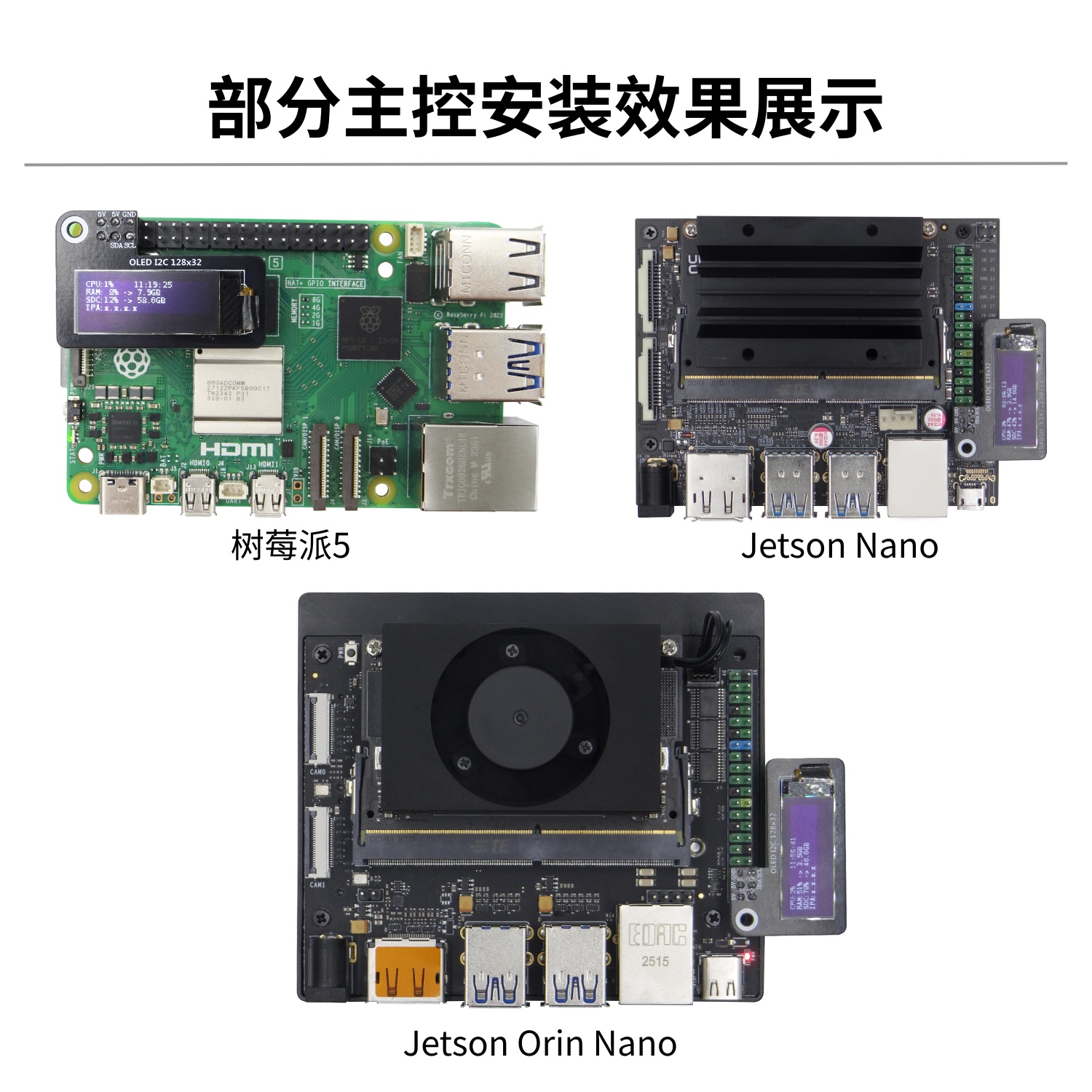
Ejemplo del repositorio oficial
JUXI proporciona código de driver open source para pantallas OLED: GitHub
Ejemplo de driver I2C
sudo apt install -y python3-pip
sudo pip3 install smbus Adafruit_SSD1306import Adafruit_SSD1306
from PIL import Image, ImageDraw, ImageFont
# Inicializar OLED (128x32)
disp = Adafruit_SSD1306.SSD1306_128_32(rst=None)
disp.begin()
disp.clear()
disp.display()
# Dibujar texto
image = Image.new('1', (disp.width, disp.height))
draw = ImageDraw.Draw(image)
draw.text((0, 0), 'Hello Juxi!', font=ImageFont.load_default(), fill=255)
disp.image(image)
disp.display()