

Ecrã OLED de 0,91"
Controlador principal da série Jetson
1. Diagrama de pinos GPIO
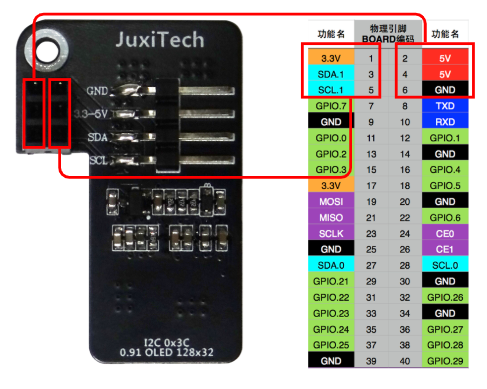
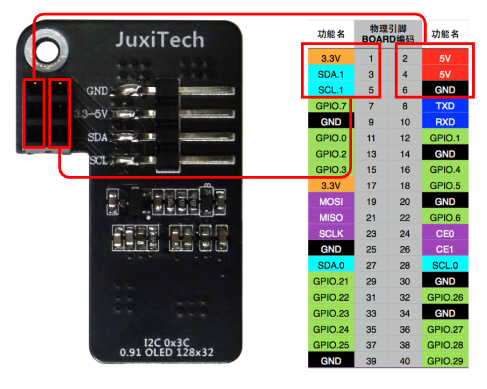
Use uma ecrã OLED de 0,91 polegadas para testar a função de comunicação I2C e conecte de acordo com a seguinte fiação:
Cuidado: não conecte incorretamente nem provoque curto-circuito nos pinos, pois erros podem causar danos ao hardware da placa principal!
2. Teste I2C
2.1. Instalar dependências
sudo apt install -y python3-pip
sudo pip3 install smbus
sudo pip3 install Adafruit_SSD1306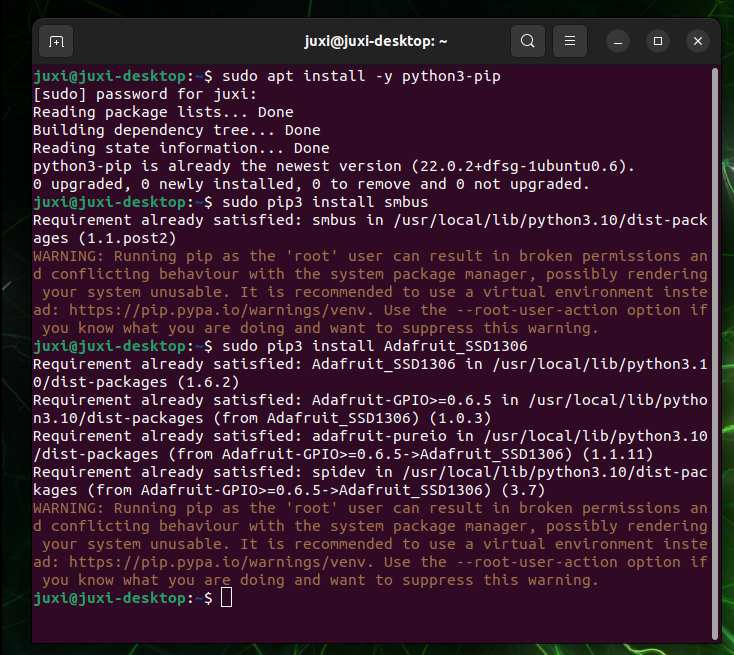
2.2, Dispositivo I2C
Durante o desenvolvimento normal, precisamos encontrar o barramento do dispositivo e o endereço do dispositivo onde o dispositivo I2C está montado.
(1) Consultar o barramento I2C
Inserir o seguinte comando no terminal pode listar todos os barramentos do dispositivo:
i2cdetect -l(2) Consultar o dispositivo I2C
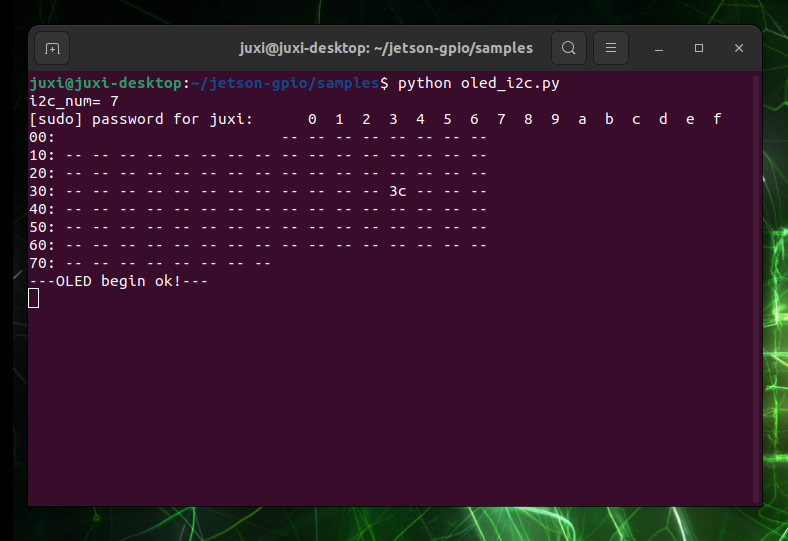
Inserir o seguinte comando no terminal pode listar os dispositivos I2C sob o barramento especificado: o endereço I2C correspondente ao oled é 0x3c
i2cdetect -y -r *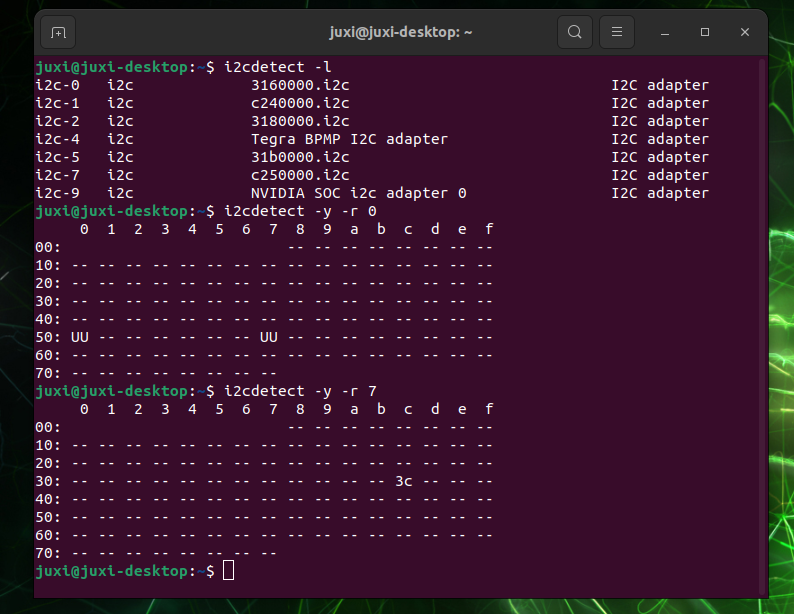
4. Verificar endereço IP e porta
Use ifconfig para ver o endereço IP e a porta
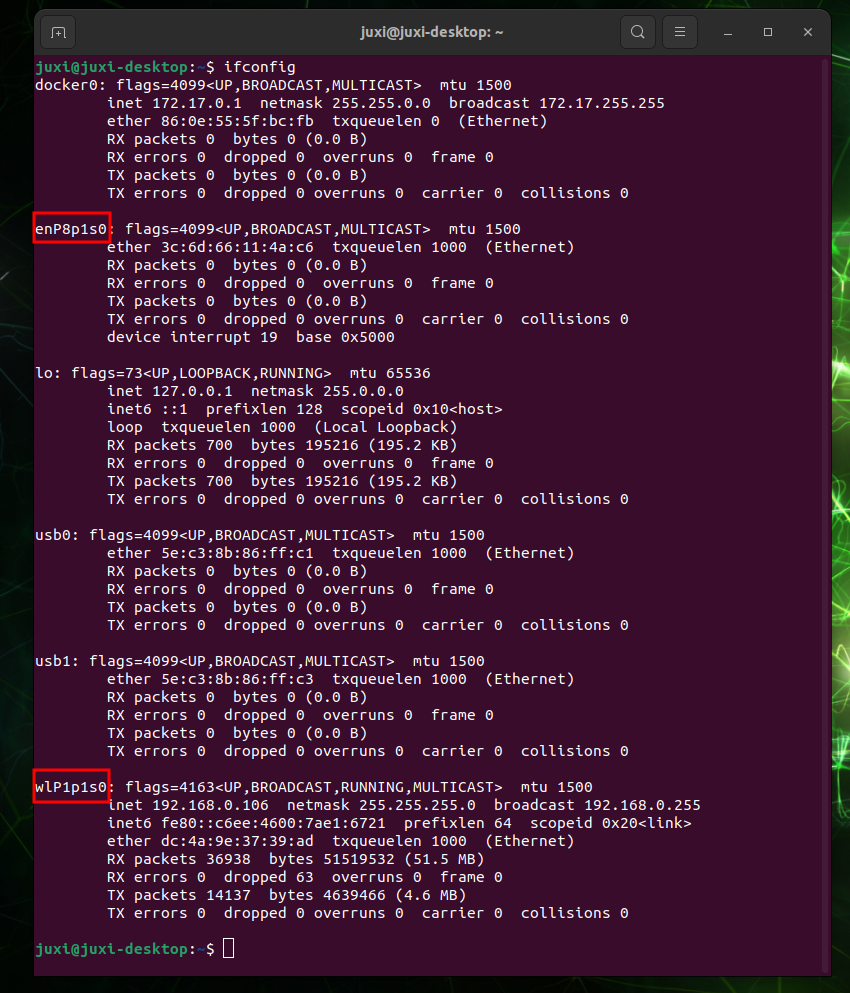
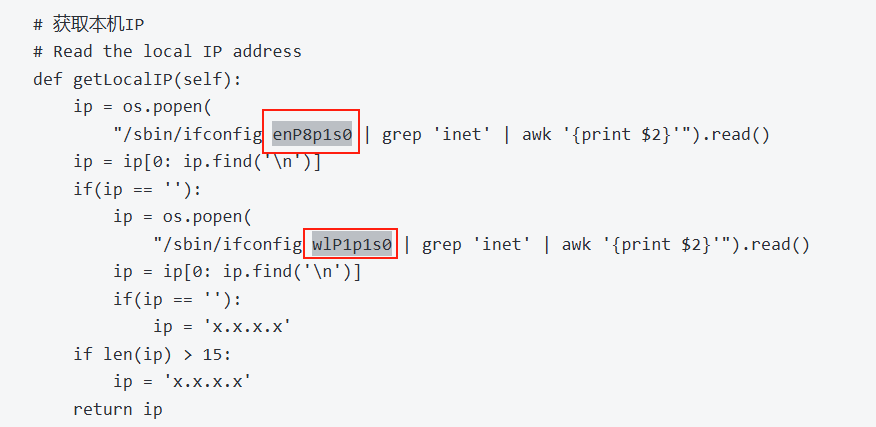
Altere o código de acordo com a porta real
3. Efeito do experimento
Crie o ficheiro Oled_i2c.py
sudo gedit Oled_i2c.pyCopie e cole o seguinte código
#!/usr/bin/env python3
# coding=utf-8
import time
import os
import sys

i2c_num = 7
if len(sys.argv) > 1:
    if str(sys.argv[1]).isdigit():
        i2c_num = int(sys.argv[1])

print("i2c_num=", i2c_num)

passwd = "juxi"
cmd_i2c = "sudo i2cdetect -y -r " + str(i2c_num)
os.system('echo %s | sudo -S %s' % (passwd, cmd_i2c))


import Adafruit_SSD1306 as SSD

from PIL import Image
from PIL import ImageDraw
from PIL import ImageFont

import subprocess


class Juxi_OLED:
    def __init__(self, i2c_bus=1, debug=False):
        self.__debug = debug
        self.__i2c_bus = i2c_bus
        self.__top = -2
        self.__x = 0

        self.__total_last = 0
        self.__idle_last = 0
        self.__str_CPU = "CPU:0%"


    def __del__(self):
        if self.__debug:
            print("---OLED-DEL---")

    # Initialize OLED, return True on success, False on failure
    def begin(self):
        try:
            self.__oled = SSD.SSD1306_128_32(
                rst=None, i2c_bus=self.__i2c_bus, gpio=1)
            self.__oled.begin()
            self.__oled.clear()
            self.__oled.display()
            self.__width = self.__oled.width
            self.__height = self.__oled.height
            self.__image = Image.new('1', (self.__width, self.__height))
            self.__draw = ImageDraw.Draw(self.__image)
            self.__font = ImageFont.truetype("DejaVuSansMono.ttf",8)    # ImageFont.load_default()
            if self.__debug:
                print("---OLED begin ok!---")
            return True
        except:
            # if self.__i2c_bus == 1:
            #     self.__i2c_bus = 8
            # elif self.__i2c_bus == 8:
            #     self.__i2c_bus = 1
            if self.__debug:
                print("---OLED no found!---")
            return False

    # Clear the display.  Refresh =True Refresh immediately, refresh=False refresh not
    def clear(self, refresh=False):
        self.__draw.rectangle(
            (0, 0, self.__width, self.__height), outline=0, fill=0)
        if refresh:
            self.refresh()

    # Add characters.  Start_x Start_y indicates the starting point.  Text is the character to be added
    # Refresh =True Refresh immediately, refresh=False refresh not
    def add_text(self, start_x, start_y, text, refresh=False):
        if start_x > 128 or start_x < 0 or start_y < 0 or start_y > 32:
            if self.__debug:
                print("oled text: x, y input error!")
            return
        x = int(start_x + self.__x)
        y = int(start_y + self.__top)
        self.__draw.text((x, y), str(text), font=self.__font, fill=255)
        if refresh:
            self.refresh()

    # line=[1, 4]
    # Write a line of character text.  Refresh =True Refresh immediately, refresh=False refresh not.
    def add_line(self, text, line=1, refresh=False):
        if line < 1 or line > 4:
            if self.__debug:
                print("oled line input error!")
            return
        y = int(8 * (line - 1))
        self.add_text(0, y, text, refresh)

    # Refresh the OLED to display the content
    def refresh(self):
        self.__oled.image(self.__image)
        self.__oled.display()

    # Read the CPU usage rate
    def getCPULoadRate(self, index):
        count = 10
        if index == 0:
            f1 = os.popen("cat /proc/stat", 'r')
            stat1 = f1.readline()
            data_1 = []
            for i in range(count):
                data_1.append(int(stat1.split(' ')[i+2]))
            self.__total_last = data_1[0]+data_1[1]+data_1[2]+data_1[3] + \
                data_1[4]+data_1[5]+data_1[6]+data_1[7]+data_1[8]+data_1[9]
            self.__idle_last = data_1[3]
        elif index == 4:
            f2 = os.popen("cat /proc/stat", 'r')
            stat2 = f2.readline()
            data_2 = []
            for i in range(count):
                data_2.append(int(stat2.split(' ')[i+2]))
            total_now = data_2[0]+data_2[1]+data_2[2]+data_2[3] + \
                data_2[4]+data_2[5]+data_2[6]+data_2[7]+data_2[8]+data_2[9]
            idle_now = data_2[3]
            total = int(total_now - self.__total_last)
            idle = int(idle_now - self.__idle_last)
            usage = int(total - idle)
            usageRate = int(float(usage / total) * 100)
            self.__str_CPU = "CPU:" + str(usageRate) + "%"
            self.__total_last = 0
            self.__idle_last = 0
            # if self.__debug:
            #     print(self.__str_CPU)
        return self.__str_CPU

    # Read system time
    def getSystemTime(self):
        cmd = "date +%H:%M:%S"
        date_time = subprocess.check_output(cmd, shell=True)
        str_Time = str(date_time).lstrip("b'")
        str_Time = str_Time.rstrip("\\n'")
        # print(date_time)
        return str_Time

    # Read the memory usage and total memory
    def getUsagedRAM(self):
        cmd = "free | awk 'NR==2{printf \"RAM:%2d%% -> %.1fGB \", 100*($2-$7)/$2, ($2/1048576.0)}'"
        FreeRam = subprocess.check_output(cmd, shell=True)
        str_FreeRam = str(FreeRam).lstrip("b'")
        str_FreeRam = str_FreeRam.rstrip("'")
        return str_FreeRam

    # Read free memory/total memory
    def getFreeRAM(self):
        cmd = "free -h | awk 'NR==2{printf \"RAM: %.1f/%.1fGB \", $7,$2}'"
        FreeRam = subprocess.check_output(cmd, shell=True)
        str_FreeRam = str(FreeRam).lstrip("b'")
        str_FreeRam = str_FreeRam.rstrip("'")
        return str_FreeRam

    # Read the TF card space usage/TOTAL TF card space
    def getUsagedDisk(self):
        cmd = "df -h | awk '$NF==\"/\"{printf \"SDC:%s -> %.1fGB\", $5, $2}'"
        Disk = subprocess.check_output(cmd, shell=True)
        str_Disk = str(Disk).lstrip("b'")
        str_Disk = str_Disk.rstrip("'")
        return str_Disk

    # Read the free TF card space/total TF card space
    def getFreeDisk(self):
        cmd = "df -h | awk '$NF==\"/\"{printf \"Disk:%.1f/%.1fGB\", $4,$2}'"
        Disk = subprocess.check_output(cmd, shell=True)
        str_Disk = str(Disk).lstrip("b'")
        str_Disk = str_Disk.rstrip("'")
        return str_Disk

    # Read the local IP address
    def getLocalIP(self):
        ip = os.popen(
            "/sbin/ifconfig enP8p1s0 | grep 'inet' | awk '{print $2}'").read()
        ip = ip[0: ip.find('\n')]
        if(ip == ''):
            ip = os.popen(
                "/sbin/ifconfig wlP1p1s0 | grep 'inet' | awk '{print $2}'").read()
            ip = ip[0: ip.find('\n')]
            if(ip == ''):
                ip = 'x.x.x.x'
        if len(ip) > 15:
            ip = 'x.x.x.x'
        return ip

    # Oled mainly runs functions that are called in a while loop and can be hot-pluggable
    def main_program(self):
        state = False
        try:
            cpu_index = 0
            state = self.begin()
            while state:
                self.clear()
                str_CPU = self.getCPULoadRate(cpu_index)
                str_Time = self.getSystemTime()
                if cpu_index == 0:
                    str_FreeRAM = self.getUsagedRAM()
                    str_Disk = self.getUsagedDisk()
                    str_IP = "IPA:" + self.getLocalIP()
                self.add_text(0, 0, str_CPU)
                self.add_text(50, 0, str_Time)
                self.add_line(str_FreeRAM, 2)
                self.add_line(str_Disk, 3)
                self.add_line(str_IP, 4)
                # Display image.
                self.refresh()
                cpu_index = cpu_index + 1
                if cpu_index >= 5:
                    cpu_index = 0
                time.sleep(.1)
        except:
            if self.__debug:
                print("!!!---OLED refresh error---!!!")
            pass


if __name__ == "__main__":
    try:

        oled = Juxi_OLED(i2c_num, debug=True)
        while True:
            oled.main_program()
            time.sleep(2)
    except KeyboardInterrupt:
        oled.clear(True)
        del oled
        print(" Program closed! ")
        pass
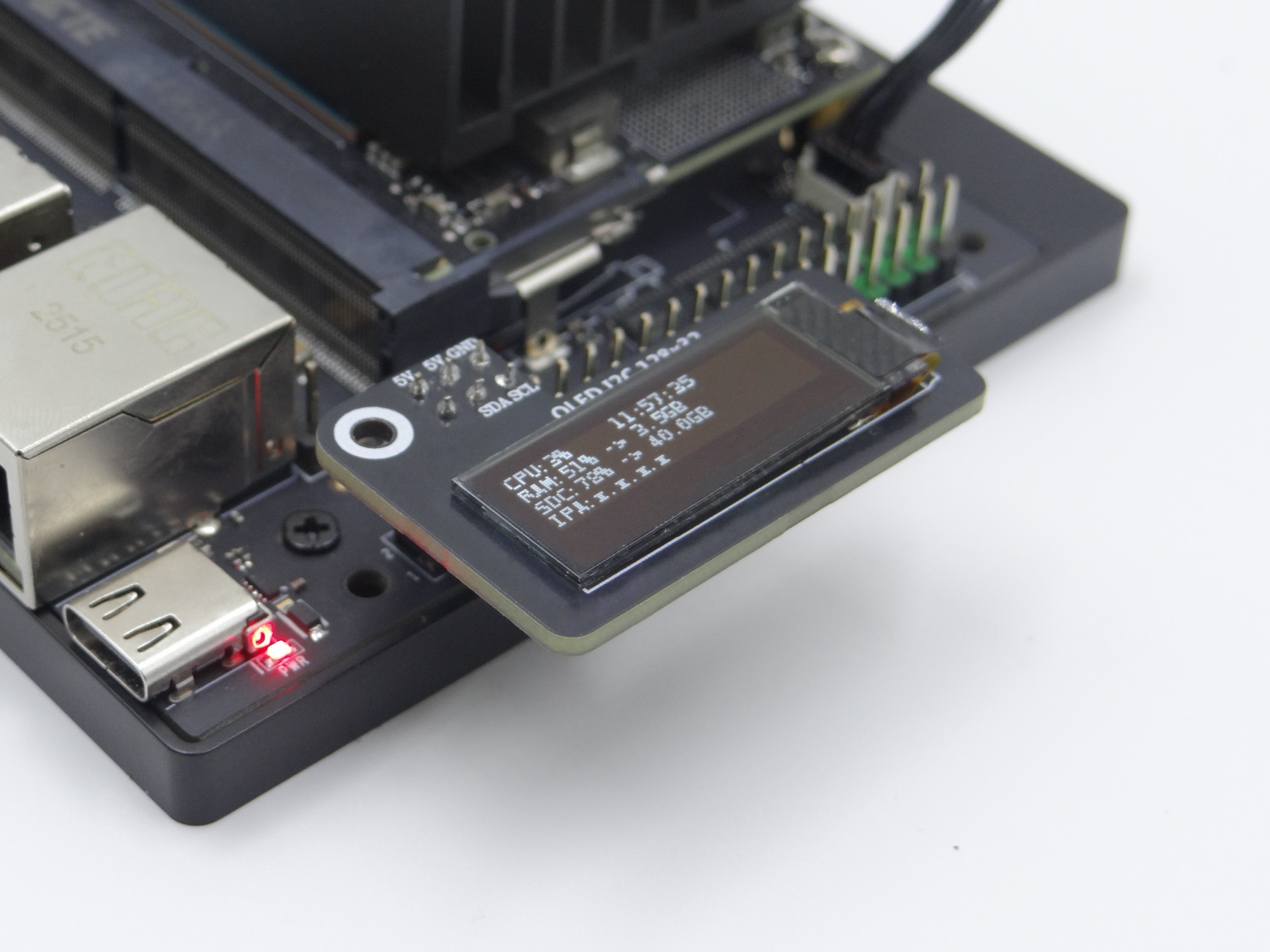
Após iniciar o programa, o ecrã OLED exibirá informações do sistema, como uso da CPU, hora do sistema e uso de memória:
Raspberry Pi, Orange Pi
1. Ativar a opção I2C
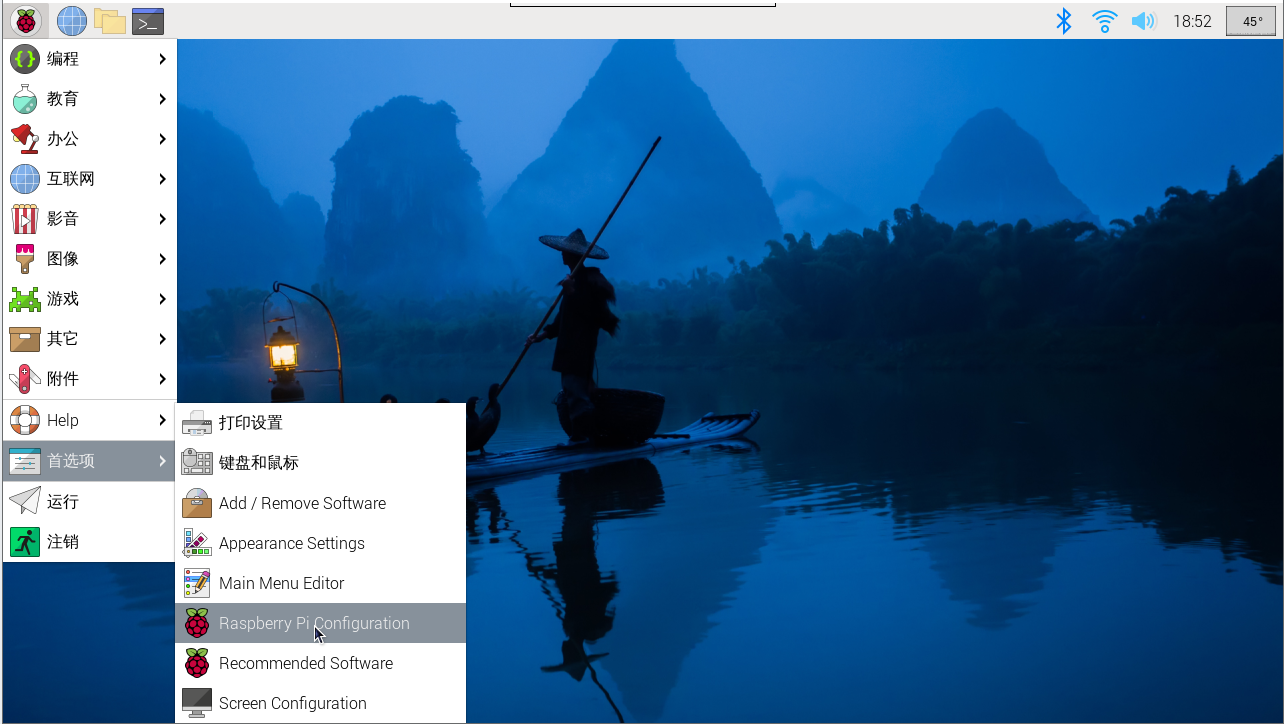
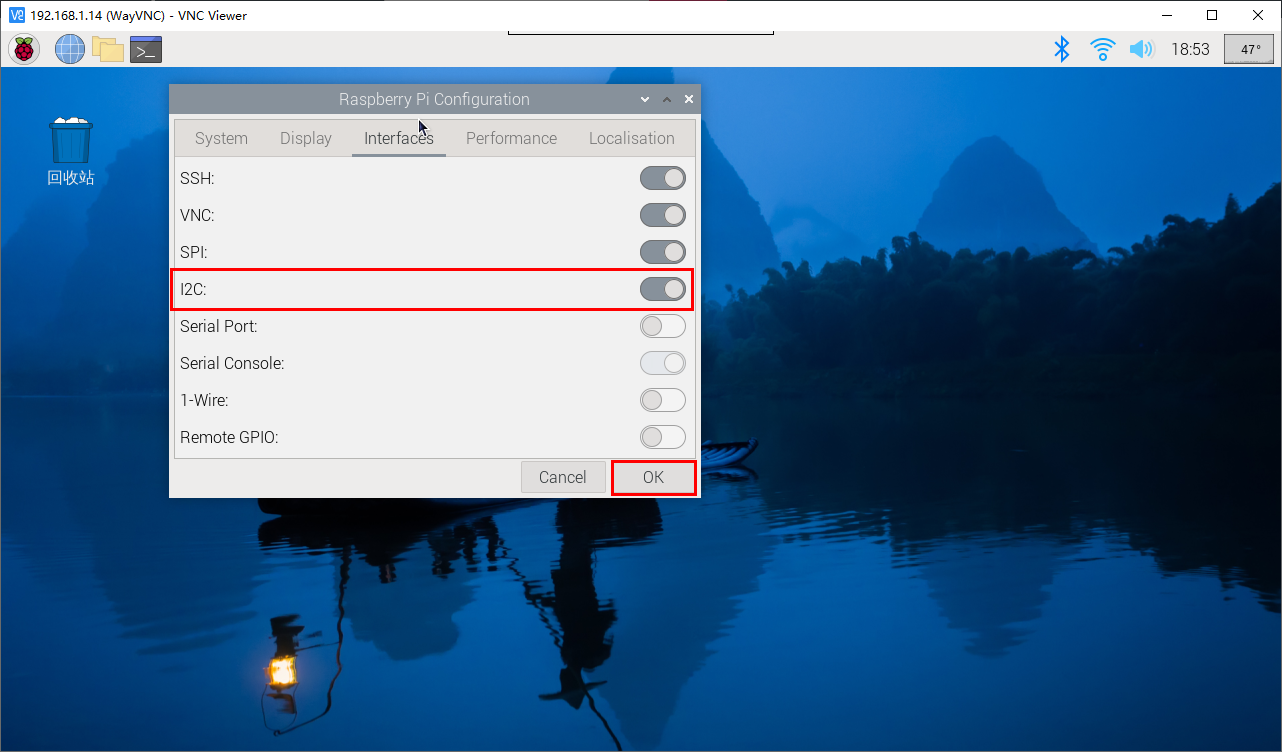
Entre nas configurações do sistema Raspberry Pi, selecione: Preferências → Configuração do Raspberry Pi → Interfaces → Encontre a opção I2C e ative-a; em seguida, o sistema reiniciará automaticamente. (Consulte a figura abaixo)
Se você estiver no modo de comando, pode inserir sudo raspi-config para ainda encontrar a opção de habilitar I2C e depois reiniciar o sistema.
2. Instalar os ficheiros da biblioteca I2C
sudo apt install -y python3-dev
sudo apt install -y python3-smbus i2c-tools
sudo apt install -y python3-pil
sudo apt install -y python3-pip
sudo apt install -y python3-setuptools
sudo apt install -y python3-rpi.gpio
sudo apt install -y python3-venv
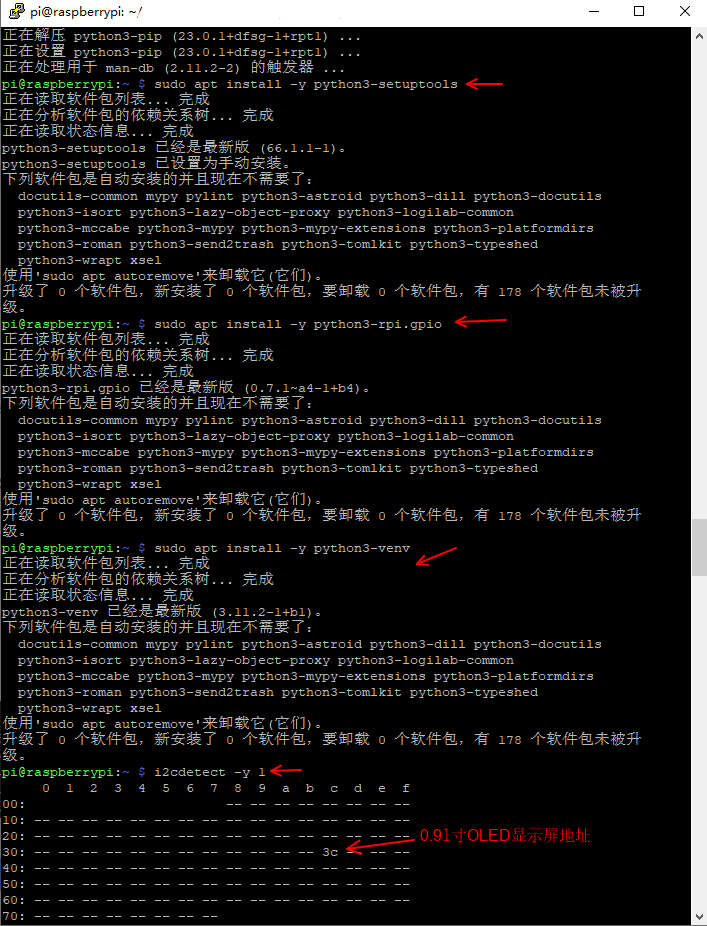
Estou a usar Python3. Após instalar a biblioteca I2C, use o comando i2cdetect para verificar se o módulo de exibição é reconhecido
i2cdetect -y 1Indica que o dispositivo foi detectado no endereço "0x3c" (como mostrado abaixo). O padrão para este tipo de dispositivo é um endereço hexadecimal.
3. Configuração do ficheiro de fonte
O código usa a fonte DejaVuSansMono.ttf:
sudo apt-get install -y fonts-dejavu-coreou modifique o código para usar uma fonte já disponível no sistema (como ImageFont.load_default())
4. Configuração de permissões
Garanta que as permissões do ficheiro de dispositivo I2C estejam corretas:
sudo chmod a+rw /dev/i2c-* # Temporary effect, permanent effect requires configuration of udev rules5. Verificar endereço IP e porta
Use ifconfig para ver o endereço IP e a porta reais
# (se o net-tools não estiver instalado) sudo apt install net-tools
ifconfig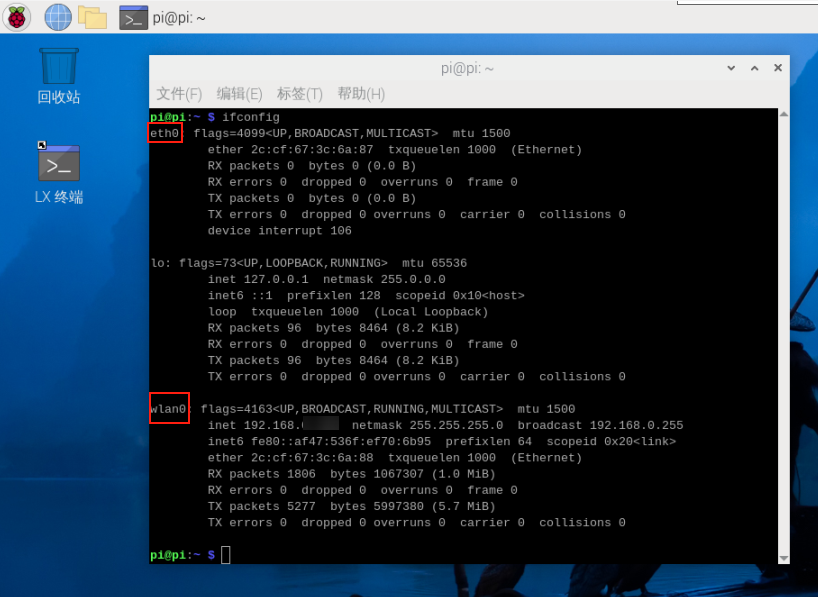
Altere o conteúdo das duas áreas destacadas a seguir no código de acordo com a porta real
6. Criar o ficheiro Oled_i2c.py
Crie o ficheiro Oled_i2c.py no diretório Home
# (se o gedit não estiver instalado) sudo apt install gedit
sudo gedit Oled_i2c.py
Copie o código a seguir, cole-o no ficheiro, guarde e feche
#!/usr/bin/env python3
# coding=utf-8
import time
import os
import sys

i2c_num = 7
if len(sys.argv) > 1:
    if str(sys.argv[1]).isdigit():
        i2c_num = int(sys.argv[1])

print("i2c_num=", i2c_num)

passwd = "juxi"
cmd_i2c = "sudo i2cdetect -y -r " + str(i2c_num)
os.system('echo %s | sudo -S %s' % (passwd, cmd_i2c))


import Adafruit_SSD1306 as SSD

from PIL import Image
from PIL import ImageDraw
from PIL import ImageFont

import subprocess


class Juxi_OLED:
    def __init__(self, i2c_bus=1, debug=False):
        self.__debug = debug
        self.__i2c_bus = i2c_bus
        self.__top = -2
        self.__x = 0

        self.__total_last = 0
        self.__idle_last = 0
        self.__str_CPU = "CPU:0%"


    def __del__(self):
        if self.__debug:
            print("---OLED-DEL---")

    # Inicializar o OLED; devolve True em caso de sucesso e False em caso de falha
    # Initialize OLED, return True on success, False on failure
    def begin(self):
        try:
            self.__oled = SSD.SSD1306_128_32(
                rst=None, i2c_bus=self.__i2c_bus, gpio=1)
            self.__oled.begin()
            self.__oled.clear()
            self.__oled.display()
            self.__width = self.__oled.width
            self.__height = self.__oled.height
            self.__image = Image.new('1', (self.__width, self.__height))
            self.__draw = ImageDraw.Draw(self.__image)
            self.__font = ImageFont.truetype("DejaVuSansMono.ttf",8)    # ImageFont.load_default()
            if self.__debug:
                print("---OLED begin ok!---")
            return True
        except:
            # if self.__i2c_bus == 1:
            #     self.__i2c_bus = 8
            # elif self.__i2c_bus == 8:
            #     self.__i2c_bus = 1
            if self.__debug:
                print("---OLED no found!---")
            return False

    # Limpar o ecrã. refresh=True atualiza imediatamente, refresh=False não atualiza.
    # Clear the display.  Refresh =True Refresh immediately, refresh=False refresh not
    def clear(self, refresh=False):
        self.__draw.rectangle(
            (0, 0, self.__width, self.__height), outline=0, fill=0)
        if refresh:
            self.refresh()

    # Adicionar caracteres. start_x e start_y indicam o ponto inicial. text são os caracteres a adicionar.
    # refresh=True atualiza imediatamente, refresh=False não atualiza.
    # Add characters.  Start_x Start_y indicates the starting point.  Text is the character to be added
    # Refresh =True Refresh immediately, refresh=False refresh not
    def add_text(self, start_x, start_y, text, refresh=False):
        if start_x > 128 or start_x < 0 or start_y < 0 or start_y > 32:
            if self.__debug:
                print("oled text: x, y input error!")
            return
        x = int(start_x + self.__x)
        y = int(start_y + self.__top)
        self.__draw.text((x, y), str(text), font=self.__font, fill=255)
        if refresh:
            self.refresh()

    # Escrever uma linha de caracteres text. refresh=True atualiza imediatamente, refresh=False não atualiza.
    # line=[1, 4]
    # Write a line of character text.  Refresh =True Refresh immediately, refresh=False refresh not.
    def add_line(self, text, line=1, refresh=False):
        if line < 1 or line > 4:
            if self.__debug:
                print("oled line input error!")
            return
        y = int(8 * (line - 1))
        self.add_text(0, y, text, refresh)

    # Atualizar o OLED para mostrar o conteúdo
    # Refresh the OLED to display the content
    def refresh(self):
        self.__oled.image(self.__image)
        self.__oled.display()

    # Ler a utilização da CPU
    # Read the CPU usage rate
    def getCPULoadRate(self, index):
        count = 10
        if index == 0:
            f1 = os.popen("cat /proc/stat", 'r')
            stat1 = f1.readline()
            data_1 = []
            for i in range(count):
                data_1.append(int(stat1.split(' ')[i+2]))
            self.__total_last = data_1[0]+data_1[1]+data_1[2]+data_1[3] + \
                data_1[4]+data_1[5]+data_1[6]+data_1[7]+data_1[8]+data_1[9]
            self.__idle_last = data_1[3]
        elif index == 4:
            f2 = os.popen("cat /proc/stat", 'r')
            stat2 = f2.readline()
            data_2 = []
            for i in range(count):
                data_2.append(int(stat2.split(' ')[i+2]))
            total_now = data_2[0]+data_2[1]+data_2[2]+data_2[3] + \
                data_2[4]+data_2[5]+data_2[6]+data_2[7]+data_2[8]+data_2[9]
            idle_now = data_2[3]
            total = int(total_now - self.__total_last)
            idle = int(idle_now - self.__idle_last)
            usage = int(total - idle)
            usageRate = int(float(usage / total) * 100)
            self.__str_CPU = "CPU:" + str(usageRate) + "%"
            self.__total_last = 0
            self.__idle_last = 0
            # if self.__debug:
            #     print(self.__str_CPU)
        return self.__str_CPU

    # Ler a hora do sistema
    # Read system time
    def getSystemTime(self):
        cmd = "date +%H:%M:%S"
        date_time = subprocess.check_output(cmd, shell=True)
        str_Time = str(date_time).lstrip("b'")
        str_Time = str_Time.rstrip("\\n'")
        # print(date_time)
        return str_Time

    # Ler a utilização de memória e a memória total
    # Read the memory usage and total memory
    def getUsagedRAM(self):
        cmd = "free | awk 'NR==2{printf \"RAM:%2d%% -> %.1fGB \", 100*($2-$7)/$2, ($2/1048576.0)}'"
        FreeRam = subprocess.check_output(cmd, shell=True)
        str_FreeRam = str(FreeRam).lstrip("b'")
        str_FreeRam = str_FreeRam.rstrip("'")
        return str_FreeRam

    # Ler a memória livre / memória total
    # Read free memory/total memory
    def getFreeRAM(self):
        cmd = "free -h | awk 'NR==2{printf \"RAM: %.1f/%.1fGB \", $7,$2}'"
        FreeRam = subprocess.check_output(cmd, shell=True)
        str_FreeRam = str(FreeRam).lstrip("b'")
        str_FreeRam = str_FreeRam.rstrip("'")
        return str_FreeRam

    # Ler a utilização do cartão TF / espaço total do cartão TF
    # Read the TF card space usage/TOTAL TF card space
    def getUsagedDisk(self):
        cmd = "df -h | awk '$NF==\"/\"{printf \"SDC:%s -> %.1fGB\", $5, $2}'"
        Disk = subprocess.check_output(cmd, shell=True)
        str_Disk = str(Disk).lstrip("b'")
        str_Disk = str_Disk.rstrip("'")
        return str_Disk

    # Ler o espaço livre do cartão TF / espaço total do cartão TF
    # Read the free TF card space/total TF card space
    def getFreeDisk(self):
        cmd = "df -h | awk '$NF==\"/\"{printf \"Disk:%.1f/%.1fGB\", $4,$2}'"
        Disk = subprocess.check_output(cmd, shell=True)
        str_Disk = str(Disk).lstrip("b'")
        str_Disk = str_Disk.rstrip("'")
        return str_Disk

    # Obter o IP local
    # Read the local IP address
    def getLocalIP(self):
        ip = os.popen(
            "/sbin/ifconfig enP8p1s0 | grep 'inet' | awk '{print $2}'").read()
        ip = ip[0: ip.find('\n')]
        if(ip == ''):
            ip = os.popen(
                "/sbin/ifconfig wlP1p1s0 | grep 'inet' | awk '{print $2}'").read()
            ip = ip[0: ip.find('\n')]
            if(ip == ''):
                ip = 'x.x.x.x'
        if len(ip) > 15:
            ip = 'x.x.x.x'
        return ip

    # Função principal do OLED, chamada dentro do ciclo while; permite ligação a quente (hot-plug).
    # Oled mainly runs functions that are called in a while loop and can be hot-pluggable
    def main_program(self):
        state = False
        try:
            cpu_index = 0
            state = self.begin()
            while state:
                self.clear()
                str_CPU = self.getCPULoadRate(cpu_index)
                str_Time = self.getSystemTime()
                if cpu_index == 0:
                    str_FreeRAM = self.getUsagedRAM()
                    str_Disk = self.getUsagedDisk()
                    str_IP = "IPA:" + self.getLocalIP()
                self.add_text(0, 0, str_CPU)
                self.add_text(50, 0, str_Time)
                self.add_line(str_FreeRAM, 2)
                self.add_line(str_Disk, 3)
                self.add_line(str_IP, 4)
                # Display image.
                self.refresh()
                cpu_index = cpu_index + 1
                if cpu_index >= 5:
                    cpu_index = 0
                time.sleep(.1)
        except:
            if self.__debug:
                print("!!!---OLED refresh error---!!!")
            pass


if __name__ == "__main__":
    try:

        oled = Juxi_OLED(i2c_num, debug=True)
        while True:
            oled.main_program()
            time.sleep(2)
    except KeyboardInterrupt:
        oled.clear(True)
        del oled
        print(" Program closed! ")
        pass
7. Criar um ambiente virtual
# Instalar a ferramenta de ambiente virtual (se não estiver instalada) sudo apt-get install -y python3-venv

# Criar o ambiente virtual
python3 -m venv oled_env

# Ativar o ambiente virtualsource oled_env/bin/activate  # depois de ativar, (oled_env) aparece antes da linha de comandos# Instalar as dependências no ambiente virtual
# Instalar com o mirror da Alibaba Cloud
pip install Adafruit_SSD1306 -i https://mirrors.aliyun.com/pypi/simple/

# Instalar também a pillow (biblioteca de dependências)
pip install pillow -i https://mirrors.aliyun.com/pypi/simple/

# Executar o código (é necessário estar no ambiente virtual)

# Entrar na pasta simple correspondente
cd /home/pi/oled-screen/luma.examples/examples
python3 oled_i2c.py  # Barramento predefinido 7
# Ou especificar o barramento (por exemplo, barramento 1)
python3 oled_i2c.py 1
#Se aparecer um erro de permissões, verificar a configuração do sudo ou as permissões do dispositivo I2C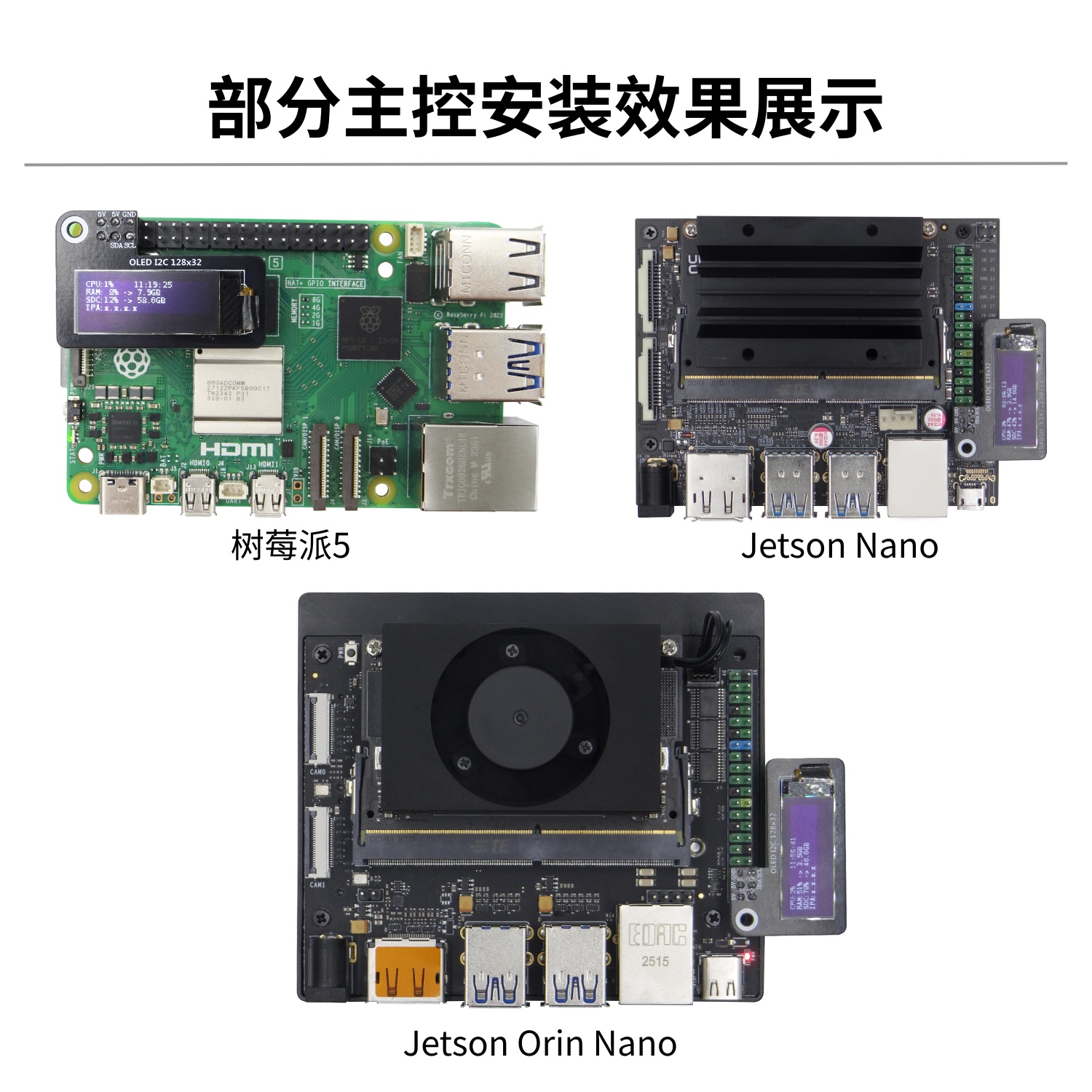
Exemplo do repositório oficial
A Juxi Technology fornece código de driver open source para o ecrã OLED: GitHub
Exemplo de driver I2C
sudo apt install -y python3-pip
sudo pip3 install smbus Adafruit_SSD1306import Adafruit_SSD1306
from PIL import Image, ImageDraw, ImageFont
# Inicializar o OLED (128x32)
disp = Adafruit_SSD1306.SSD1306_128_32(rst=None)
disp.begin()
disp.clear()
disp.display()
# Desenhar texto
image = Image.new('1', (disp.width, disp.height))
draw = ImageDraw.Draw(image)
draw.text((0, 0), 'Hello Juxi!', font=ImageFont.load_default(), fill=255)
disp.image(image)
disp.display()